OK3588-C-3588J: Switch Frequency to Normal Mode - Application Note_V1.0
Document classification: □ Top secret □ Secret □ Internal information ■ Open
Copyright
The copyright of this manual belongs to Baoding Forlinx Embedded Technology Co., Ltd. Without the written permission of our company, no organizations or individuals have the right to copy, distribute, or reproduce any part of this manual in any form, and violators will be held legally responsible.
Forlinx adheres to copyrights of all graphics and texts used in all publications in original or license-free forms.
The drivers and utilities used for the components are subject to the copyrights of the respective manufacturers. The license conditions of the respective manufacturer are to be adhered to. Related license expenses for the operating system and applications should be calculated/declared separately by the related party or its representatives.
Revision History
Date |
Version |
Revision History |
|---|---|---|
21/03/2024 |
V1.0 |
Initial Version |
Switch the industrial-grade core board frequency to normal mode.
Modification Steps
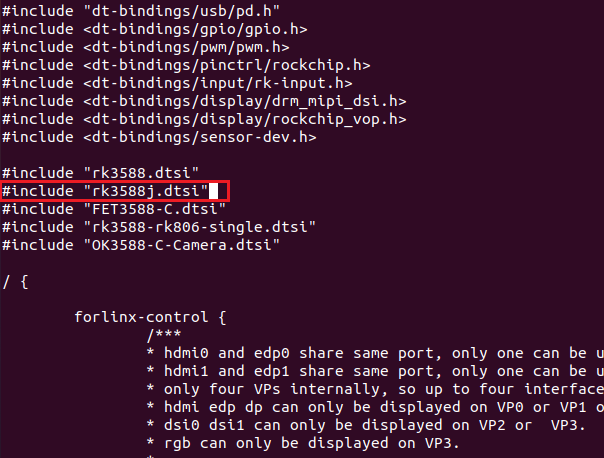
Navigate to the source code directory, and add the reference #include "rk3588j.dtsi" in the kernel device tree. The file path is as follows:
forlinx@ubuntu20:~/3588/OK3588_Linux_fs$ vi kernel/arch/arm64/boot/dts/rockchip/OK3588-C-common.dtsi
Modify the .dtsi file as shown below:
Perform a full compilation to generate the target image:
plain forlinx@ubuntu20:~/3588/OK3588_Linux_fs$ sudo ./build.sh
After the compilation, the system image will be generated in the rockdev folder, as shown in the figure below:

Test
Use the command below to check the frequency levels supported by the current CPU:
root@ok3588:/# cat /sys/devices/system/cpu/cpu0/cpufreq/scaling_available_frequencies
Before the switch, that is, under the overclocking mode, the tested frequencies are as follows:

