Logo

SOFTWARE

  • Linux6.1.99_User’s Manual_V1.0
    • Copyright
    • 1. FCU1501 Product Overview
      • 1.1 Product Description:
      • 1.2 Application Areas
      • 1.3 Software Parameter
        • 1.3.1 Basic Function
        • 1.3.2 Extended Features
      • 1.4 Software Parameter
      • 1.5 Enclosure Dimensions
        • 1.5.1 Enclosure Dimension Drawing
        • 1.5.2 Installation Method Schematic
    • 2. FCU1501 Function Description
      • 2.1 Interface Diagram
      • 2.2 Power Supply
      • 2.3 User Login
        • 2.3.1 SSH Login
        • 2.3.2 Debug Serial Port Login
        • 2.3.3 View System Logs
        • 2.3.4 Memory and Storage Space Distribution
      • 2.4 Querying Image Version Information
      • 2.5 Frequency Modulation Function
      • 2.6 Temperature Reading Function
      • 2.7 Watchdog Function
      • 2.8 RTC Function
      • 2.9 System Indicator Lights
      • 2.10 RESET Button
        • 2.10.1 RESET One‑Key Network Parameter Recovery
        • 2.10.2 Disabling the Network Reset Function of the RESET Button
      • 2.11 UART Usage and Example Program (Including Extended Version)
        • 2.11.1 Interface Description
        • 2.11.2 Correspondence Between Software and Hardware
        • 2.11.3 RS485 Test
      • 2.12 Ethernet Usage
        • 2.12.1 Correspondence Between Software and Hardware
        • 2.12.2 Network Card Test
        • 2.12.3 IPv4 Basic Command Test
        • 2.12.4 Nginx Web Service
        • 2.12.5 Reverse Proxy Function
        • 2.12.6 SFTP Service
      • 2.13 WiFi Usage Guide
        • 2.13.1 STA Test
        • 2.13.2 AP Test
      • 2.14 Bluetooth Usage Guide
        • 2.14.1 Bluetooth Configuration
        • 2.14.2 Passive Pairing
        • 2.14.3 Active Pairing
        • 2.14.4 Receiving Files
        • 2.14.5 Sending Files
      • 2.15 4G Usage Guide
        • 2.15.1 4G Communication Test
        • 2.15.2 4G Communication Daemon
      • 2.16 Database Usage
      • 2.17 DO/DI Usage (Including Extended Version)
        • 2.17.1 Interface Description
        • 2.17.2 Correspondence Between Software and Hardware
        • 2.17.3 DO Test
        • 2.17.4 DI Test
      • 2.18 CAN Usage (Including Extended Version)
        • 2.18.1 Interface Description
        • 2.18.2 Correspondence Between Software and Hardware
        • 2.18.3 CAN Test
      • 2.19 Buzzer Usage
      • 2.20 System Boot Auto-start Function
      • 2.21 User-defined Auto-start Function
        • 2.21.1 Method for 4G Dial-Up Auto-Startup on Boot
      • 2.22 Static IP Configuration
      • 2.23 Python Language Support
      • 2.24 QT Libraries
      • 2.25 MQTT
      • 2.26 TUN
      • 2.27 NTP Service
      • 2.28 IPtables
      • 2.29 Telnet
      • 2.30 Crond
      • 2.31 lrzsz
      • 2.32 Ntpdate
      • 2.33 Curl
      • 2.34 Tcpdump
    • 3. Flashing the System
      • 3.1 USB Drive System Flashing
        • 3.1.1 Creating a Bootable Flashing USB Drive
        • 3.1.2 Flash System via USB Drive
      • 3.2 OTG System Flashing
        • 3.2.1 OTG Driver Installation (OTG interface is located inside the device)
        • 3.2.2 Complete OTG Flashing
  • Linux6.1.99_V1.0_User’s Compilation Manual_V1.0
    • 1 . VMware Virtual Machine Software Installation
      • 1.1 Downloading and Purchasing VMware Software
      • 1.2 VMware Software Installation
    • 2. Loading an Existing Ubuntu Development Environment
    • 3. New Ubuntu Development Environment Setup
      • 3.1 Ubuntu System Setup
        • 3.1.1 Creating an Ubuntu Virtual Machine
        • 3.1.2 Basic Configuration of Ubuntu
        • 3.1.3 Virtual Machine Network Configuration
    • 4. Compilation of Related Code
      • 4.1 Preparation Before Compilation
        • 4.1.1 Environment Description
        • 4.1.2 Copying the Source Code
      • 4.2 Source Code Compilation
        • 4.2.1 Full Compilation Test
        • 4.2.2 Individual Compilation
        • 4.2.3 Cleaning up Generated Files
      • 4.3 Image Files Usage
      • 4.4 Application Compilation and Running
        • 4.4.1 Configure Cross-Compilation Toolchain
        • 4.4.2 Command-Line Applications Compilation and Operation
  • User’s Manual_FlBase22.04
    • Copyright
    • 1. FCU1501 Product Overview
      • 1.1 Product Description
      • 1.2 Application Areas
      • 1.3 Software Parameter
        • 1.3.1 Basic Function
        • 1.3.2 Extended Features
      • 1.4 Software Parameter
      • 1.5 Enclosure Dimensions
        • 1.5.1 Enclosure Dimension Drawing
        • 1.5.2 Installation Method Schematic
    • 2. FCU1501 Function Description
      • 2.1 Interface Diagram
      • 2.2 Power Supply
      • 2.3 User Login
        • 2.3.1 SSH Login
        • 2.3.2 Debug Serial Port Login
        • 2.3.3 View System Logs
        • 2.3.4 Memory and Storage Space Distribution
      • 2.4 Querying Image Version Information
      • 2.5 Frequency Modulation Function
      • 2.6 Temperature Reading Function
      • 2.7 Watchdog Function
      • 2.8 RTC Function
      • 2.9 System Indicator Lights
      • 2.10 Ubuntu Emergency Mode
      • 2.11 RESET Button Input
        • 2.11.1 RESET One‑Key Network Parameter Recovery
        • 2.11.2 Disabling the Network Reset Function of the RESET Button
      • 2.12 UART Usage and Example Program (Including Extended Version)
        • 2.12.1 Interface Description
        • 2.12.2 Correspondence Between Software and Hardware
        • 2.12.3 RS485 Test
      • 2.13 Ethernet Usage
        • 2.13.1 Correspondence Between Software and Hardware
        • 2.13.2 Network Card Test
        • 2.13.3 IPv4 Basic Command Test
        • 2.13.4 Nginx Web Service
        • 2.13.5 Reverse Proxy Function
        • 2.13.6 FTP Service
      • 2.14 Wi-Fi Usage Guide
        • 2.14.1 STA Test
        • 2.14.2 AP Test
      • 2.15 Bluetooth Usage Guide
        • 2.15.1 Bluetooth Configuration
        • 2.15.2 Passive Pairing
      • 2.15.3 Active Pairing
        • 2.15.4 Receiving Files
        • 2.15.5 Sending Files
      • 2.16 4G Usage Guide
        • 2.16.1 4G Communication Test
        • 2.16.2 4G Communication Daemon
      • 2.17 Database Usage
      • 2.18 DO/DI Usage (Including Extended Version)
        • 2.18.1 Interface Description
        • 2.18.2 Correspondence Between Software and Hardware
        • 2.18.3 DO Test
        • 2.18.4 DI Test
      • 2.19 CAN Usage (Including Extended Version)
        • 2.19.1 Interface Description
        • 2.19.2 Correspondence Between Software and Hardware
        • 2.19.3 CAN Test
      • 2.20 Buzzer Usage
        • 2.21 System Boot Auto-start Function
      • 2.22 User-defined Auto-start Function
      • 2.23 Replacing Software Repository
      • 2.24 Static IP Configuration
      • 2.25 eMMC Lifespan Detection Tool
      • 2.26 Python Language Support
      • 2.27 QT Libraries
      • 2.28 MQTT
      • 2.29 TUN
      • 2.30 NTP Service
      • 2.31 IPtables
      • 2.32 Telnet
      • 2.33 Docker
      • 2.34 Crond
      • 2.35 lrzsz
      • 2.36 Ntpdate
      • 2.37 Curl
      • 2.38 Tcpdump
    • 3. System Flashing
      • 3.1 USB Drive System Flashing
        • 3.1.1 Creating a Bootable Flashing USB Drive
        • 3.1.2 Flash System via USB Drive
      • 3.2 OTG System Flashing
        • 3.2.1 OTG Driver Installation (OTG interface is located inside the device)
        • 3.2.2 Complete OTG Flashing
  • User’s Compilation Manual_FlB22.04
    • Copyright
    • 1. VMware Software Installation
      • 1.1 Downloading and Purchasing VMware Software
      • 1.2 VMware Software Installation
    • 2. Loading an Existing Ubuntu Development Environment
    • 3. New Ubuntu Development Environment Setup
      • 3.1 Ubuntu System Setup
      • 3.1.1 Creating an Ubuntu Virtual Machine
        • 3.1.2 Basic Configuration of Ubuntu
        • 3.1.3 Virtual Machine Network Configuration
        • 3.1.3.2 Bridged Connection Mode
    • 4. Compilation of Related Code
      • 4.1 Preparation Before Compilation
        • 4.1.1 Environment Description
        • 4.1.2 Copying the Source Code
      • 4.2 Source Code Compilation
        • 4.2.1 Full Compilation Test
        • 4.2.2 Individual Compilation
        • 4.2.3 Cleaning up Generated Files
      • 4.3 Image Files Usage
    • 5. Ubuntu Application Development
      • 5.1 Ubuntu Application Development Environment Setup
Forlinx Embedded FCU1501 Documentation
  • FCU1501 Embedded Computer Manual

FCU1501 Embedded Computer Manual

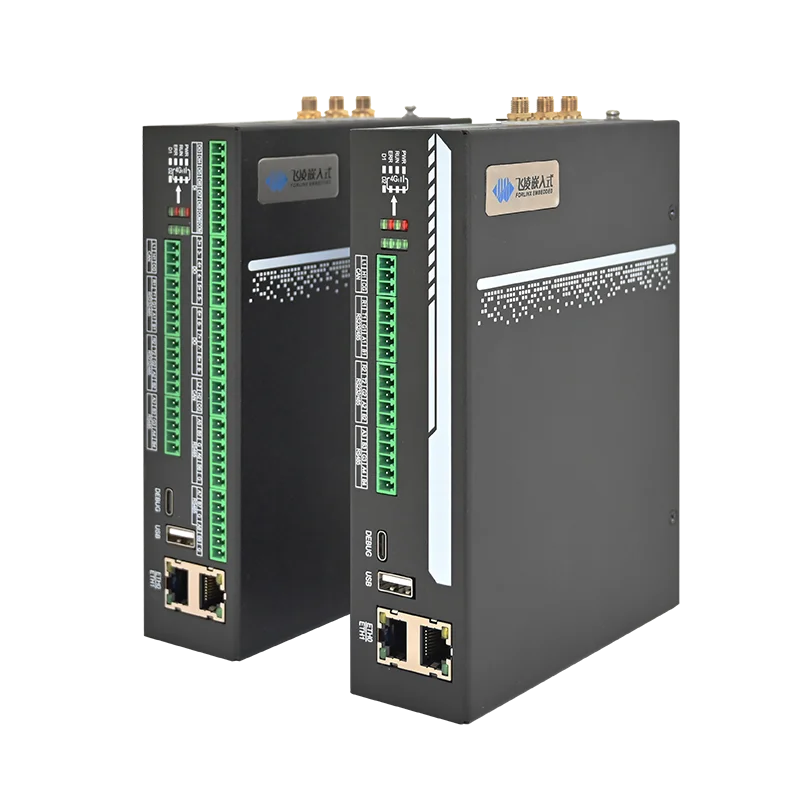
Welcome to the official technical documentation for the Forlinx FCU1501 Embedded Computer. Powered by the Rockchip RK3506J processor.
PC Details Home Request Quote
FCU1501 Embedded Computer

HARDWARE

SOFTWARE

SOFTWARE

  • Linux6.1.99_User’s Manual_V1.0
    • Copyright
    • 1. FCU1501 Product Overview
    • 2. FCU1501 Function Description
    • 3. Flashing the System
  • Linux6.1.99_V1.0_User’s Compilation Manual_V1.0
    • 1 . VMware Virtual Machine Software Installation
    • 2. Loading an Existing Ubuntu Development Environment
    • 3. New Ubuntu Development Environment Setup
    • 4. Compilation of Related Code
  • User’s Manual_FlBase22.04
    • Copyright
    • 1. FCU1501 Product Overview
    • 2. FCU1501 Function Description
    • 3. System Flashing
  • User’s Compilation Manual_FlB22.04
    • Copyright
    • 1. VMware Software Installation
    • 2. Loading an Existing Ubuntu Development Environment
    • 3. New Ubuntu Development Environment Setup
    • 4. Compilation of Related Code
    • 5. Ubuntu Application Development

Contact Us

If you have any questions, please contact us at:

  • Contact Sales: sales@forlinx.com

  • Technical Support: support@forlinx.com

  • Website: www.forlinx.net


Thank you for choosing Forlinx Embedded. We’re committed to supporting your development journey.


© Forlinx Embedded