T113 Linux5.4_OTA Upgrade_Recovery_Solution
Document classification: □ Top secret □ Secret □ Internal information ■ Open
Copyright
The copyright of this manual belongs to Baoding Forlinx Embedded Technology Co., Ltd. Without the written permission of our company, no organizations or individuals have the right to copy, distribute, or reproduce any part of this manual in any form, and violators will be held legally responsible.
Forlinx adheres to copyrights of all graphics and texts used in all publications in original or license-free forms.
The drivers and utilities used for the components are subject to the copyrights of the respective manufacturers. The license conditions of the respective manufacturer are to be adhered to. Related license expenses for the operating system and applications should be calculated/declared separately by the related party or its representatives.
Application Scope
OK113i-S_Linux5.4.61+Qt5.12.2_User’s Manual_R3
1. Application Scenarios
OTA upgrade involves downloading update files from a server via wireless networks to upgrade local systems or files. This allows customers to quickly update systems and applications for their users. The 113 system lacks an AB system, so a recovery system is used, which operates alongside the main system. During the upgrade, the recovery system handles the main system’s upgrade. If power is lost during the upgrade, it won’t affect the system in use. After restarting, the system can be accessed normally, and the upgrade continues.
2. Solution
To develop the recovery system, you must start by configuring the buildroot configuration file. Next, compile it to generate the filesystem, and then proceed to configure and compile the recovery system.
2.1 Buildroot Configuration
2.1.1 Deconfig File Configuration
Main System:
Use the default OK113I_linux_defconfig file, as it already includes the necessary features.
Recovery system:
The recovery system needs to be manually configured. It cannot directly copy the main system’s deconfig file, as a system with too large a filesystem will not boot. Later tests showed that the recovery system’s filesystem must not exceed 11M; otherwise, the kernel will fail to boot.
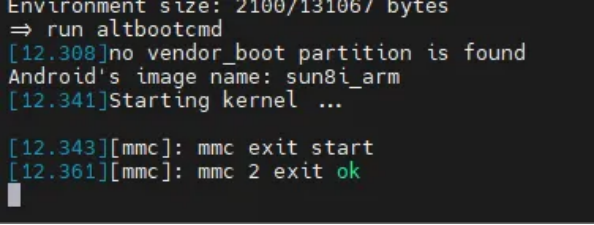
To implement this, simply modify the buildroot/buildroot-201902/configs/OK113I_linux_recovery_defconfig file by adding these settings. It’s based on the simplest defconfig file.
OK113I_linux_recovery_defconfig
BR2_arm=y
BR2_cortex_a7=y
BR2_SVN="svn"
BR2_TOOLCHAIN_EXTERNAL=y
BR2_TOOLCHAIN_EXTERNAL_LINARO_ARMSF=y
BR2_TARGET_GENERIC_HOSTNAME="ok113i"
BR2_TARGET_GENERIC_ISSUE="Welcome to Allwinner Longan Platform"
BR2_ROOTFS_DEVICE_CREATION_DYNAMIC_EUDEV=y
BR2_SYSTEM_BIN_SH_BASH=y
BR2_TARGET_GENERIC_GETTY_PORT="ttyS0"
BR2_TARGET_GENERIC_GETTY_BAUDRATE_115200=y
BR2_TARGET_TZ_INFO=y
BR2_ROOTFS_POST_BUILD_SCRIPT="$(TOPDIR)/../../platform/config/buildroot/post_build.sh"
BR2_PACKAGE_BUSYBOX_SHOW_OTHERS=y
BR2_PACKAGE_ZLIB=y
BR2_TARGET_ROOTFS_CPIO=y
BR2_TARGET_ROOTFS_CPIO_GZIP=y
BR2_PACKAGE_HOST_DOSFSTOOLS=y
BR2_PACKAGE_HOST_DTC=y
BR2_PACKAGE_HOST_E2FSPROGS=y
BR2_PACKAGE_HOST_GENEXT2FS=y
BR2_PACKAGE_HOST_GENIMAGE=y
BR2_PACKAGE_HOST_MTOOLS=y
BR2_ARCH_SUN55I=y
BR2_ARCH_SUN55IW6=y
BR2_PACKAGE_OTA_BURNBOOT=y
BR2_PACKAGE_MTD=y
BR2_PACKAGE_MTD_MKFSJFFS2=y
BR2_PACKAGE_UBOOT_TOOLS=y
BR2_PACKAGE_LIBCONFIG=y
BR2_PACKAGE_SWUPDATE=y
SWUPDATE_CONFIG_MTD=y
SWUPDATE_CONFIG_UBIVOL=y
BR2_PACKAGE_LIBCEDARX=n
BR2_PACKAGE_LIBCEDARC=n
BR2_ROOTFS_OVERLAY="/home/forlinx/work/recovery_rootfs_test"
BR2_PACKAGE_UBOOT_TOOLS=y
BR2_PACKAGE_OTA_BURNBOOT=y
BR2_PACKAGE_LIBCONFIG=y
BR2_PACKAGE_LIBCURL=y
BR2_PACKAGE_LIBRSYNC=y
BR2_PACKAGE_OPENSSL=y
BR2_ARM_EABI=y
BR2_PACKAGE_OPENSSH=y
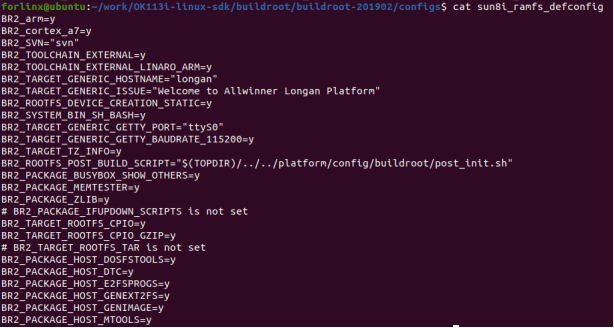
Modify the default hard floating point to soft floating point.
BR2_arm=y                         # Select ARM architecture
BR2_cortex_a7=y                    # CPU type: Cortex-A7
BR2_ARM_EABI=y                     # Use ARM EABI toolchain
BR2_TOOLCHAIN_EXTERNAL=y           # Use external toolchain
BR2_TOOLCHAIN_EXTERNAL_LINARO_ARMSF=y  # Use Linaro ARM toolchain (Soft float)
BR2_ARCH_SUN55I=y                  # Target platform architecture: Allwinner SUN55I
BR2_ARCH_SUN55IW6=y                # Specify specific kernel version/sub-platform
Since the 113 environment uses soft floating point, if not configured, the system will use hard floating point, leading to errors due to the lack of swupdate-related files in the cross-compilation toolchain. Therefore, it needs to be manually modified. However, the default 113 buildroot environment does not have the soft floating point cross-compilation tools, which need to be manually added using an external toolchain. The build.sh script in buildroot has already written this content, so you can directly copy it and modify it into the full compilation script for the recovery system.
Create buildroot/buildroot-201902/build_recovery.sh
#!/bin/bash

# Enable immediate exit on error to prevent script from continuing after failures
set -e

# Check if .buildconfig configuration file exists in parent directory and load it
if [ -f ../../.buildconfig ]; then
    source ../../.buildconfig
else
    # If configuration file not found, prompt user to run config command first, then exit script
    echo "Please run ./build.sh config first"
    return
fi

# LICHEE_BR_RAMFS_OUT is the output path for temporary ramfs filesystem, derived from previously configured LICHEE_PLAT_OUT_RECOVERY variable
LICHEE_BR_RAMFS_OUT=${LICHEE_PLAT_OUT_RECOVERY}/ramfs

# Function: Prepare cross-compilation toolchain
function prepare_br_toolchain()
{
    local toolchain_archive=""
    local toolchain_archive_tmp=""
    local toolchain_archivedir=""
    local tooldir=""
    local boardconfig="${LICHEE_BOARDCONFIG_PATH}"

    # Determine cross-compiler package name based on architecture (soft float arm-linux-gnueabi or aarch64)
    if [ "xarm" = "x${LICHEE_ARCH}" ]; then
        local LICHEE_COMPILER_TAR=gcc-linaro-5.3.1-2016.05-x86_64_arm-linux-gnueabi.tar.xz
    else
        local LICHEE_COMPILER_TAR=gcc-linaro-7.4.1-2019.02-x86_64_aarch64-linux-gnu.tar.xz
    fi

    echo "Preparing buildroot toolchain ${LICHEE_COMPILER_TAR}..."

    # Cross-compiler archive path
    toolchain_archive=${LICHEE_COMPILER_TAR}
    toolchain_archivedir=${LICHEE_BUILD_DIR}/toolchain/${toolchain_archive}

    # Exit with error if cross-compiler archive doesn't exist
    if [ ! -f ${toolchain_archivedir} ]; then
        mk_error "Toolchain preparation failed!"
        exit 1
    fi

    # Temporary extraction directory for cross-compiler
    toolchain_archive_tmp=${toolchain_archive%.*} # Remove .tar.xz suffix to get tar directory name
    tooldir=${LICHEE_OUT_DIR}/${toolchain_archive_tmp%.*} # Remove additional suffix for final directory name

    # Extract if toolchain directory doesn't exist
    if [ ! -d "${tooldir}" ]; then
        echo "Extracting ${LICHEE_COMPILER_TAR}..."
        mkdir -p ${tooldir} || exit 1
        tar --strip-components=1 -xf ${toolchain_archivedir} -C ${tooldir} || exit 1
    fi
}

# Function: Build buildroot system
build_buildroot()
{
    # Prepare toolchain
    prepare_br_toolchain

    # Determine CPU core count for make concurrency parameter
    cpu_cores=`cat /proc/cpuinfo | grep "processor" | wc -l`
    if [ ${cpu_cores} -le 8 ] ; then
        LICHEE_JLEVEL=${cpu_cores}
    else
        LICHEE_JLEVEL=`expr ${cpu_cores} / 2`
    fi

    # Use default configuration if .config file doesn't exist in buildroot output directory
    if [ ! -f ${LICHEE_BR_OUT_RECOVERY}/.config ] ; then
        printf "\nUsing default configuration...\n\n"
        echo ${LICHEE_BR_DEFCONF_RECOVERY}
        make -j${LICHEE_JLEVEL} O=${LICHEE_BR_OUT_RECOVERY} -C ${LICHEE_BR_DIR} ${LICHEE_BR_DEFCONF_RECOVERY}
    fi

    # Build buildroot
    make -j${LICHEE_JLEVEL} O=${LICHEE_BR_OUT_RECOVERY}
}

# Define external package directory, target image directory, cross-compilation directory, etc.
EXTERNAL_DIR=${LICHEE_BR_DIR}/external-packages
DESTDIR=${LICHEE_BR_DIR}/images
STAGING_DIR=${LICHEE_BR_OUT_RECOVERY}/staging
INCDIR=${STAGING_DIR}/usr/include
TARGET_DIR=${LICHEE_BR_OUT_RECOVERY}/target
TARGET_SYSROOT_OPT="--sysroot=${STAGING_DIR}"

# Set cross-compiler prefix
CROSS_COMPILE=arm-linux-gnueabi-

# Define various cross-compilation tool commands
TARGET_AR=${CROSS_COMPILE}ar
TARGET_AS=${CROSS_COMPILE}as
TARGET_CC="${CROSS_COMPILE}gcc ${TARGET_SYSROOT_OPT}"
TARGET_CPP="${CROSS_COMPILE}cpp ${TARGET_SYSROOT_OPT}"
TARGET_CXX="${CROSS_COMPILE}g++ ${TARGET_SYSROOT_OPT}"
TARGET_FC="${CROSS_COMPILE}gfortran ${TARGET_SYSROOT_OPT}"
TARGET_LD="${CROSS_COMPILE}ld ${TARGET_SYSROOT_OPT}"
TARGET_NM="${CROSS_COMPILE}nm"
TARGET_RANLIB="${CROSS_COMPILE}ranlib"
TARGET_OBJCOPY="${CROSS_COMPILE}objcopy"
TARGET_OBJDUMP="${CROSS_COMPILE}objdump"

# Cross-compilation CFLAGS with optimization and architecture-specific settings
TARGET_CFLAGS="-pipe -Os  -mtune=cortex-a7 -march=armv7-a -mabi=aapcs-linux -msoft-float -D_LARGEFILE_SOURCE -D_LARGEFILE64_SOURCE -D_FILE_OFFSET_BITS=64 -I${INCDIR}"

# Build option variables for passing to make commands
BUILD_OPTIONS="DESTDIR=${DESTDIR} CROSS_COMPILE=${CROSS_COMPILE} \
    STAGING_DIR=${STAGING_DIR} TARGET_DIR=${TARGET_DIR} CC=\"${TARGET_CC}\" \
    AR=${TARGET_AR} AS=${TARGET_AS} CPP=\"${TARGET_CPP}\" CXX=\"${TARGET_CXX}\" \
    FC=\"${TARGET_FC}\" LD=\"${TARGET_LD}\" NM=${TARGET_NM} RANLIB=${TARGET_RANLIB} \
    OBJCOPY=${TARGET_OBJCOPY} OBJDUMP=${TARGET_OBJDUMP} CFLAGS=\"${TARGET_CFLAGS}\""

# Function: Build all external packages in external-packages directory
build_external()
{
    for dir in ${EXTERNAL_DIR}/* ; do
        if [ -f ${dir}/Makefile ]; then
            # Build
            BUILD_COMMAND="make -C ${dir} ${BUILD_OPTIONS} all"
            eval $BUILD_COMMAND
            # Install
            BUILD_COMMAND="make -C ${dir} ${BUILD_OPTIONS} install"
            eval $BUILD_COMMAND
        fi
    done
}

# Function: Clean compilation output directory
clean()
{
   if [ "x" != "x${LICHEE_BR_OUT_RECOVERY}" ];then
       rm -rf ${LICHEE_BR_OUT_RECOVERY}
   fi

   if [ "x" != "x${LICHEE_BR_RAMFS_OUT}" ];then
     rm -rf ${LICHEE_BR_RAMFS_OUT}
   fi
}

# Execute corresponding function based on first argument
case "$1" in
    clean)
        clean
        ;;
    *)
        # Default action: build buildroot or install toolchain based on platform variable
        if [ "x${LICHEE_PLATFORM}" = "xlinux" ] ; then
            build_buildroot
            export PATH=${LICHEE_BR_OUT_RECOVERY}/host/opt/ext-toolchain/bin:$PATH
            build_external
        else
            build_toolchain
        fi
        ;;
esac
Environment variables also need to be modified: OK113i-linux-sdk/.buildconfig.
Add the following at the end:
export LICHEE_PLAT_OUT_RECOVERY=/home/forlinx/work/OK113i-linux-sdk/out/t113_i/ok113i/longan_recover
export LICHEE_BR_OUT_RECOVERY=/home/forlinx/work/OK113i-linux-sdk/out/t113_i/ok113i/longan_recover/buildroot
export LICHEE_BR_DEFCONF_RECOVERY=OK113I_linux_recovery_defconfig
This script will copy the soft floating point cross-compilation toolchain from the source to the recovery system’s buildroot for full compilation.
Filesystem Overlay Folder
BR2_TARGET_GENERIC_HOSTNAME="ok113i"            # Default hostname
BR2_TARGET_GENERIC_ISSUE="Welcome to Allwinner Longan Platform"  # Login prompt message
BR2_ROOTFS_DEVICE_CREATION_DYNAMIC_EUDEV=y     # Use udev to dynamically create device nodes
BR2_SYSTEM_BIN_SH_BASH=y                        # Use bash as the default shell
BR2_TARGET_GENERIC_GETTY_PORT="ttyS0"          # Console login port
BR2_TARGET_GENERIC_GETTY_BAUDRATE_115200=y     # Console baud rate
BR2_TARGET_TZ_INFO=y                            # Timezone information
BR2_ROOTFS_POST_BUILD_SCRIPT="$(TOPDIR)/../../platform/config/buildroot/post_build.sh" # Post-build script
BR2_ROOTFS_OVERLAY="/home/forlinx/work/recovery_rootfs_test" # rootfs overlay directory
By default, buildroot generates a filesystem. Adding BR2_ROOTFS_OVERLAY will overlay files from the specified path onto the buildroot-generated filesystem. Since the recovery system automatically formats itself upon restart, essential files can be placed in this path. Manually create the folder /home/forlinx/work/recovery_rootfs_test. Failure to do so will result in an error (configure as per your requirements).
Add SSH Service
BR2_PACKAGE_BUSYBOX_SHOW_OTHERS=y   # BusyBox shows other tools
BR2_PACKAGE_ZLIB=y                   # Compression library
BR2_PACKAGE_LIBCONFIG=y              # Configuration file parsing library
BR2_PACKAGE_LIBCURL=y                # Network transfer library (HTTP/FTP)
BR2_PACKAGE_LIBRSYNC=y               # Rsync data synchronization library
BR2_PACKAGE_OPENSSL=y                # SSL/TLS support
BR2_PACKAGE_OPENSSH=y                # SSH service support
SSH allows remote OTA upgrades. Dependencies for SSH upgrading include BR2_PACKAGE_OPENSSH, BR2_PACKAGE_OPENSSL, and BR2_PACKAGE_ZLIB, all of which must be selected.
Additionally, network configuration files must be added.
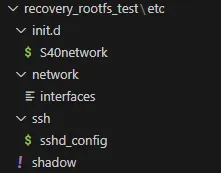
Place these network configuration files in the previously mentioned rootfs overlay folder. You can directly copy these files from the main system. If the customer uses a custom board without RTC, password expiration may occur. In such cases, modify the configuration file according to this link: https://forlinx-book.yuque.com/pxh4d1/gfqde1/blvtok3upvabt02c#UFTjs
Modify Filesystem Format
BR2_TARGET_ROOTFS_CPIO=y             # Generate rootfs in cpio format
BR2_TARGET_ROOTFS_CPIO_GZIP=y        # Gzip compress the cpio rootfs
By default, buildroot generates rootfs.ext2 and rootfs.ext4 files. However, the kernel requires the .cpio.gz format. After making this adjustment, the generated filesystem will be in cpio.gz format.
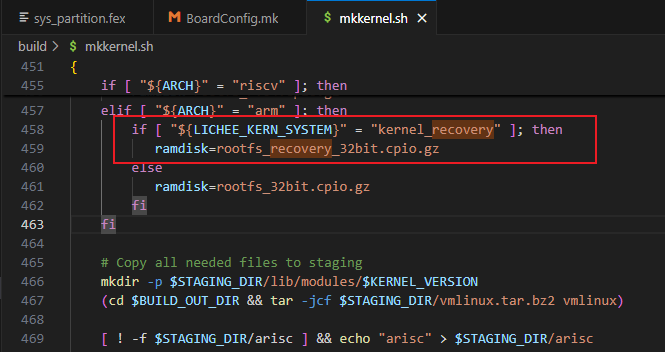

Note: The filesystem cannot exceed 11M. The current size is 9.3M.
2.1.2 Buildroot Configuration and Compilation
The make command is used based on the Makefile located in the specified path.
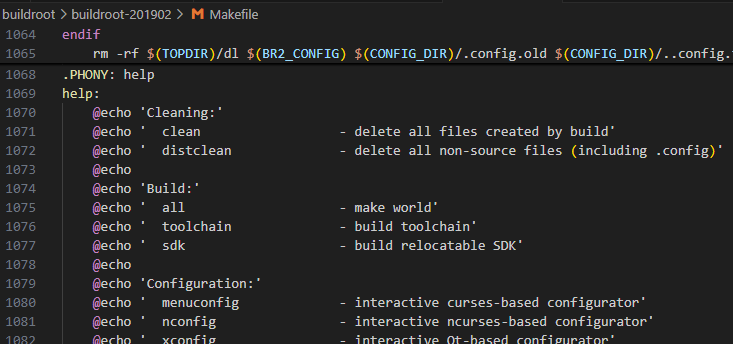
Path: OK113i-linux-sdk/buildroot/buildroot-201902
Main System:
# Initialize Buildroot configuration using the specified defconfig
make O=/home/forlinx/work/OK113i-linux-sdk/out/t113_i/ok113i/longan/buildroot \
     BR2_DEFCONFIG=/home/forlinx/work/OK113i-linux-sdk/buildroot/buildroot-201902/configs/OK113I_linux_defconfig \
     ARCH=arm \
     defconfig

# Enter the configuration menu
make O=/home/forlinx/work/OK113i-linux-sdk/out/t113_i/ok113i/longan/buildroot \
     ARCH=arm \
     menuconfig

# Perform a full compilation
./build.sh
Recovery System:
mkdir -p /home/forlinx/work/OK113i-linux-sdk/out/t113_i/ok113i/longan_recover/buildroot

# Initialize buildroot configuration using the specified defconfig
make O=/home/forlinx/work/OK113i-linux-sdk/out/t113_i/ok113i/longan_recover/buildroot \
     BR2_DEFCONFIG=/home/forlinx/work/OK113i-linux-sdk/buildroot/buildroot-201902/configs/OK113I_linux_recovery_defconfig \
     ARCH=arm \
     defconfig
# Enter menu configuration
make O=/home/forlinx/work/OK113i-linux-sdk/out/t113_i/ok113i/longan_recover/buildroot \
     ARCH=arm \
     menuconfig
# Full compilation
./build_recovery.sh

# Manually copy the generated root filesystem to the kernel source directory for subsequent compilation
cp /home/forlinx/work/OK113i-linux-sdk/out/t113_i/ok113i/longan_recover/buildroot/images/rootfs.cpio.gz \
   /home/forlinx/work/OK113i-linux-sdk/kernel/linux-5.4/rootfs_recovery_32bit.cpio.gz

# If you want to save the currently modified config file
# make O=/home/forlinx/work/OK113i-linux-sdk/out/t113_i/ok113i/longan_recover/buildroot \
#      ARCH=arm \
#      savedefconfig
# cp /home/forlinx/work/OK113i-linux-sdk/out/t113_i/ok113i/longan_recover/buildroot/defconfig \
#    /home/forlinx/work/OK113i-linux-sdk/buildroot/buildroot-201902/configs/OK113I_linux_recovery_defconfig
After compilation, manually copy the generated filesystem to the corresponding directory.
To save modifications to the source files, it’s recommended to manually edit the defconfig file instead of using the savedeconfig command, as it seems to have issues.
Output Path
After full compilation, the files are generated in the out directory.
Main System:

/home/forlinx/work/OK113i-linux-sdk/out/t113_i/ok113i/longan/buildroot
Recovery System:

/home/forlinx/work/OK113i-linux-sdk/out/t113_i/ok113i/longan_recover/buildroot
The root filesystem is located in the images folder. It’s advisable to keep multiple versions of the main system’s filesystem for future testing.
2.2 Kernel Configuration
The basic logic here is to configure the deconfig files for both systems using the filesystem generated by buildroot and then compile. The necessary scripts and configuration files are provided and can be used directly.
After manually copying the root filesystem to the kernel directory, you can proceed with compiling the kernel. (As mentioned earlier)
For the main system, simply run ./build.sh. For the recovery system, environment variables need to be declared before calling the corresponding functions. The required scripts and the recovery system’s deconfig file are already provided for use.
2.2.1 Deconfig File Configuration
The deconfig files for both systems are available in the source code and can be used directly.
/home/forlinx/work/OK113i-linux-sdk/device/config/chips/t113_i/configs/ok113i/longan/BoardConfig.mk
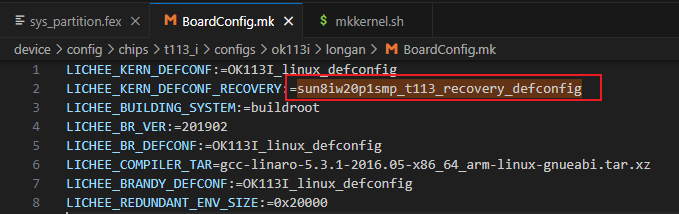
This file specifies the configuration file used by the recovery system kernel, as found in the compilation script.
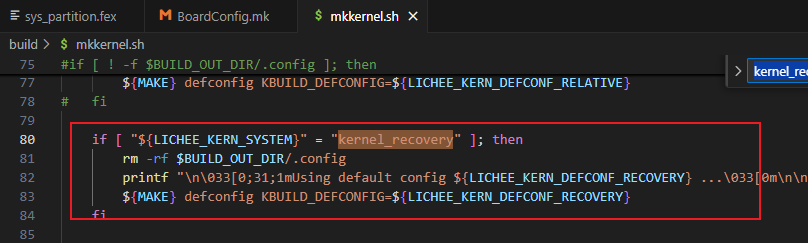
Main System:
/home/forlinx/work/OK113i-linux-sdk/kernel/linux-5.4/arch/arm/configs/OK113I_linux_defconfig
Recovery System:
/home/forlinx/work/OK113i-linux-sdk/kernel/linux-5.4/arch/arm/configs/sun8iw20p1smp_t113_recovery_defconfig
2.2.2 Kernel Configuration, Compilation
Main System:
(Under OK113i-linux-sdk)
./build.sh menuconfig
./build.sh saveconfig
./build.sh
Recovery system:
(Under OK113i-linux-sdk/kernel/linux-5.4)
# Generate .config
make -C /home/forlinx/work/OK113i-linux-sdk/kernel/linux-5.4 \
  O=/home/forlinx/work/OK113i-linux-sdk/out/kernel/build_recovery \
  ARCH=arm \
  defconfig \
  KBUILD_DEFCONFIG=sun8iw20p1smp_t113_recovery_defconfig

# Enter the menu configuration interface to modify the configuration
make -C /home/forlinx/work/OK113i-linux-sdk/kernel/linux-5.4 \
  O=/home/forlinx/work/OK113i-linux-sdk/out/kernel/build_recovery \
  ARCH=arm \
  menuconfig

# Perform compilation (return to the OK113i-linux-sdk directory)
source build/envsetup.sh
build recovery
To save modifications to the source files, it is recommended to manually edit the defconfig file, as the savedeconfig command seems to have issues.
In fact, the build process for recovery ultimately uses ./build.sh recovery.
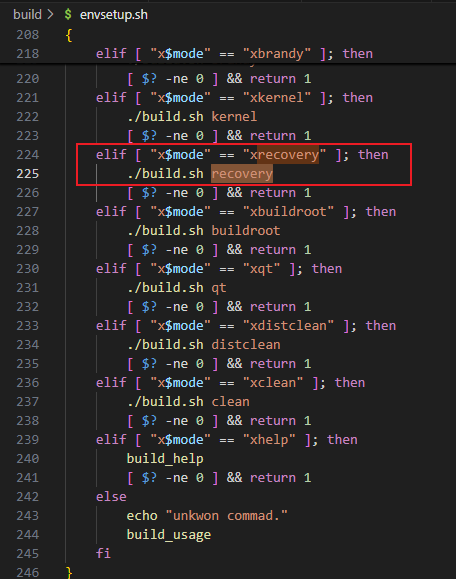
The compilation script only declares some environment variables. Ultimately, mkkernel processes both sets of environment variables, but the output path remains the same.
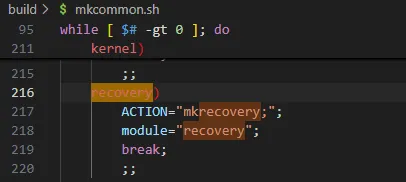
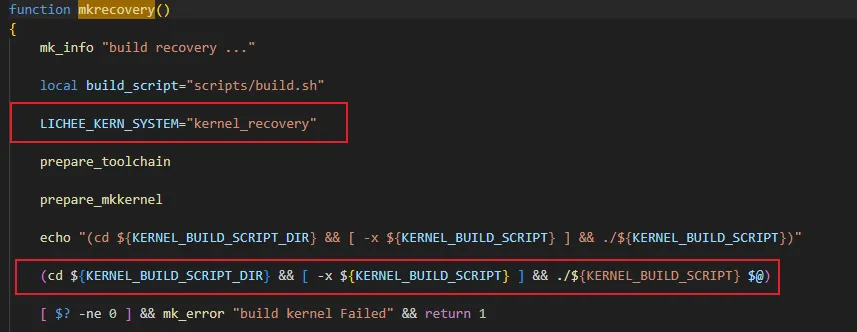
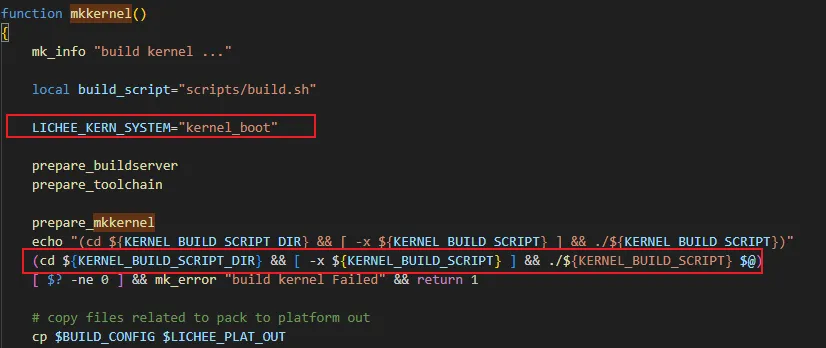
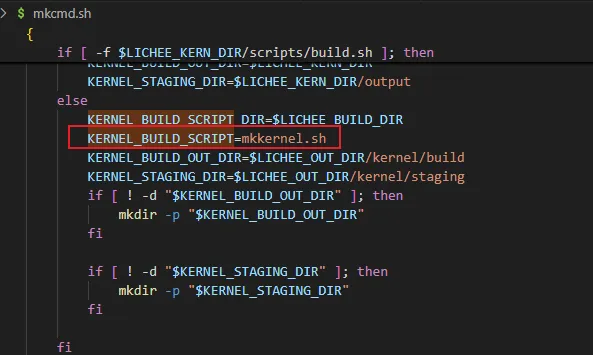
The system will ultimately generate the boot.img and recovery.img files in the path /home/forlinx/work/OK113i-linux-sdk/out/t113_i/ok113i/longan.
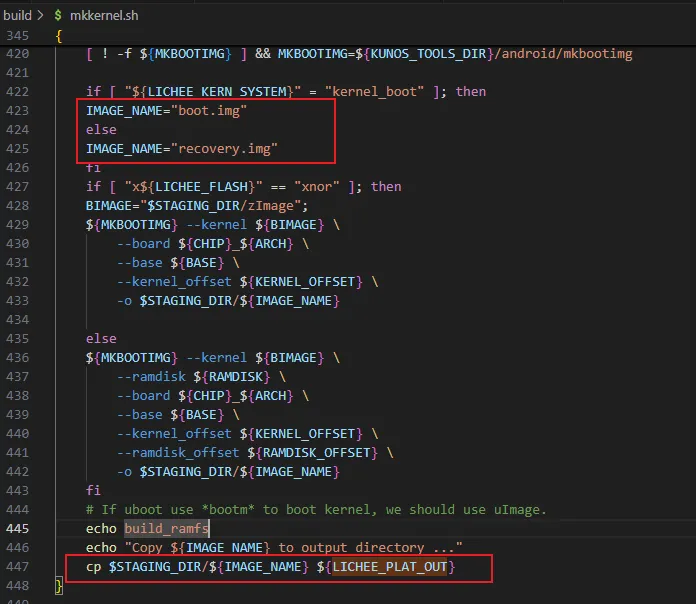
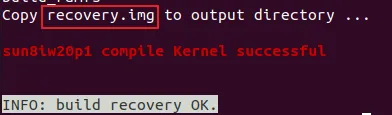
2.3 Uboot Configuration
Modify the environment variables, bash device/config/chips/t113_i/configs/ok113i/longan/env.cfg
#kernel command arguments
earlycon=uart8250,mmio32,0x02500000
initcall_debug=0
console=ttyAS0,115200
nand_root=ubi0_5
mmc_root=/dev/mmcblk0p6
mtd_name=sys
rootfstype=ubifs,rw
init=/init
loglevel=8
cma=16M
mac=
wifi_mac=
bt_mac=
specialstr=
keybox_list=widevine,ec_key,ec_cert1,ec_cert2,ec_cert3,rsa_key,rsa_cert1,rsa_cert2,rsa_cert3
dsp0_partition=dsp0
#set kernel cmdline if boot.img or recovery.img has no cmdline we will use this
setargs_nand=setenv bootargs ubi.mtd=${mtd_name} earlycon=${earlycon} clk_ignore_unused initcall_debug=${initcall_debug} console=${console} loglevel=${loglevel} root=${nand_root} rootfstype=${rootfstype} init=${init} partitions=${partitions} cma=${cma} snum=${snum} mac_addr=${eth0_mac} wifi_mac=${wifi_mac} bt_mac=${bt_mac} specialstr=${specialstr} gpt=1
setargs_nand_ubi=setenv bootargs ubi.mtd=${mtd_name} earlycon=${earlycon} clk_ignore_unused initcall_debug=${initcall_debug} console=${console} loglevel=${loglevel} root=${nand_root} rootfstype=${rootfstype} init=${init} partitions=${partitions} cma=${cma} snum=${snum} mac_addr=${eth0_mac} wifi_mac=${wifi_mac} bt_mac=${bt_mac} specialstr=${specialstr} gpt=1
setargs_mmc=setenv  bootargs earlycon=${earlycon} clk_ignore_unused initcall_debug=${initcall_debug} console=${console} loglevel=${loglevel} root=${mmc_root}  init=${init} partitions=${partitions} cma=${cma} snum=${snum} mac_addr=${eth0_mac} wifi_mac=${wifi_mac} bt_mac=${bt_mac} specialstr=${specialstr} gpt=1
#nand command syntax: sunxi_flash read address partition_name read_bytes
#0x4007f800 = 0x40080000(kernel entry) - 0x800(boot.img header 2k)
boot_partition=boot
#boot_partition=recovery
boot_dsp0=sunxi_flash read 43000000 ${dsp0_partition};bootr 43000000 0 0
boot_normal=sunxi_flash read 43000000 ${boot_partition};bootm 43000000
boot_recovery=sunxi_flash read 43000000 recovery;bootm 43000000
boot_fastboot=fastboot

#uboot system env config
bootdelay=1
#default bootcmd, will change at runtime according to key press
#default nand boot
bootcmd=run setargs_mmc boot_normal
disp_type=6
board=1

altbootcmd=run setargs_mmc boot_recovery
upgrade_rootfs=0
upgrade_available=1
bootlimit=5
bootcount=0
Modify the Boot Partition:
Since a new partition will be added before the rootfs during packaging, the main system’s filesystem will shift.
mmc_root=/dev/mmcblk0p6
The partition originally set to 5 must be changed to 6; otherwise, the filesystem will not be found.
Filesystem Switch Between Systems:
boot_partition=boot
#boot_partition=recovery
boot_dsp0=sunxi_flash read 43000000 ${dsp0_partition};bootr 43000000 0 0
boot_normal=sunxi_flash read 43000000 ${boot_partition};bootm 43000000
...
bootcmd=run setargs_mmc boot_normal
You also need to modify the configuration.
brandy/brandy-2.0/u-boot-2018/board/sunxi/board_helper.c:624:
// env_set("bootcmd", boot_commond);
brandy/brandy-2.0/u-boot-2018/drivers/bootcount/bootcount_env.c:30:
// env_set("bootcmd", "run setargs_nand boot_normal");
This modification will be made during the uboot startup, where environment variables are updated, overriding previous settings.
After the change, you can use the fw_printenv and fw_setenv tools in the terminal to modify environment variables, allowing you to control whether the system boots into the main system or recovery system. The system can also be switched remotely via SSH.
fw_printenv
fw_setenv boot_partition boot
fw_setenv boot_partition recovery
Uboot Watchdog and Counter:
During an OTA upgrade, there may be situations where the recovery system successfully updates, or updates fail halfway. If the update files are corrupted, it can cause the system to freeze at the kernel or filesystem stage, making the terminal inaccessible. If remote access is used, the device may become bricked.
To prevent this, a uboot watchdog and counter should be introduced. The watchdog is activated during the uboot phase and is fed in the filesystem, or it can be disabled. If the upgrade causes issues with the kernel or filesystem and the watchdog is not fed in time, it will trigger a reset. The uboot counter tracks the number of resets, and when a set number of resets is reached, a command will be executed in the environment variables to restart the system into recovery mode.
Add Uboot Watchdog:
This is added after the uboot menu. The watchdog timeout is set to 16 seconds, which does not affect the use of the uboot menu.
diff --git a/arch/arm/lib/bootm.c b/arch/arm/lib/bootm.c
index 01136a2..032d1cc 100644
--- a/arch/arm/lib/bootm.c
+++ b/arch/arm/lib/bootm.c
@@ -31,7 +31,7 @@
 #include <asm/armv7.h>
 #endif
 #include <asm/setup.h>
-
+#include <asm/io.h>
 DECLARE_GLOBAL_DATA_PTR;

 static struct tag *params;
@@ -84,8 +84,53 @@ __weak void board_quiesce_devices(void)
  *
  * @fake: non-zero to do everything except actually boot
  */
+
+#define WDT_BASE_ADDR 0x02050000  // Watchdog timer base address
+#define WDOG_CFG_REG (WDT_BASE_ADDR + 0xB4)  // Configure register
+#define WDOG_CTRL_REG (WDT_BASE_ADDR + 0xB0) // Control register
+#define WDOG_MODE_REG (WDT_BASE_ADDR + 0xB8) // Mode register
+#define WDOG_KEY 0xA57
+#define KEY_FIELD_MAGIC     (0x16AA0000)
+
 static void announce_and_cleanup(int fake)
 {
+
+    unsigned int reg_value = 0;
+
+    // Step 1: Configure WDOG_CTRL_REG (with key)
+    reg_value = readl(WDOG_CTRL_REG);
+    // Clear bits 12:1 and preserve key bits, write WDOG_KEY to bits 12:1, while retaining KEY_FIELD_MAGIC
+    reg_value &= ~(0xFFF << 1);                  // Clear bits 12:1
+    reg_value |= (WDOG_KEY << 1) | KEY_FIELD_MAGIC;  // Add key and hardware-required prefix
+    writel(reg_value, WDOG_CTRL_REG);
+
+    // Set bit 0 (start bit), keeping the key unchanged
+    reg_value = readl(WDOG_CTRL_REG);  // Re-read to ensure key has taken effect
+    reg_value |= (1 << 0);             // Only modify bit 0
+    writel(reg_value, WDOG_CTRL_REG);
+
+    // Verify control register configuration
+    reg_value = readl(WDOG_CTRL_REG);
+
+    // Step 2: Configure initial count value for WDOG_MODE_REG (16 seconds, with key)
+    reg_value = readl(WDOG_MODE_REG);
+    reg_value &= ~0xF0;                  // Clear bits 7:4 (count value bits)
+    reg_value |= (0xB << 4);             // Count value corresponding to 16 seconds (bits 7:4 = 0xB) 1011
+    reg_value |= KEY_FIELD_MAGIC;        // Add hardware key prefix
+    writel(reg_value, WDOG_MODE_REG);
+
+    // Verify count value configuration
+    reg_value = readl(WDOG_MODE_REG);
+
+    // Step 3: Enable watchdog (with key)
+    reg_value = readl(WDOG_MODE_REG);
+    reg_value |= (1 << 0);               // Set bit 0 (enable bit)
+    reg_value |= KEY_FIELD_MAGIC;        // Ensure key prefix exists
+    writel(reg_value, WDOG_MODE_REG);
+
+    // Verify watchdog enable status
+    reg_value = readl(WDOG_MODE_REG);
+
     pr_emerg("Starting kernel ...%s\n\n", fake ?
         "(fake run for tracing)" : "");
     bootstage_mark_name(BOOTSTAGE_ID_BOOTM_HANDOFF, "start_kernel");
Directly control the registers, as outlined in the 113 data manual. Simply follow the instructions in the manual.
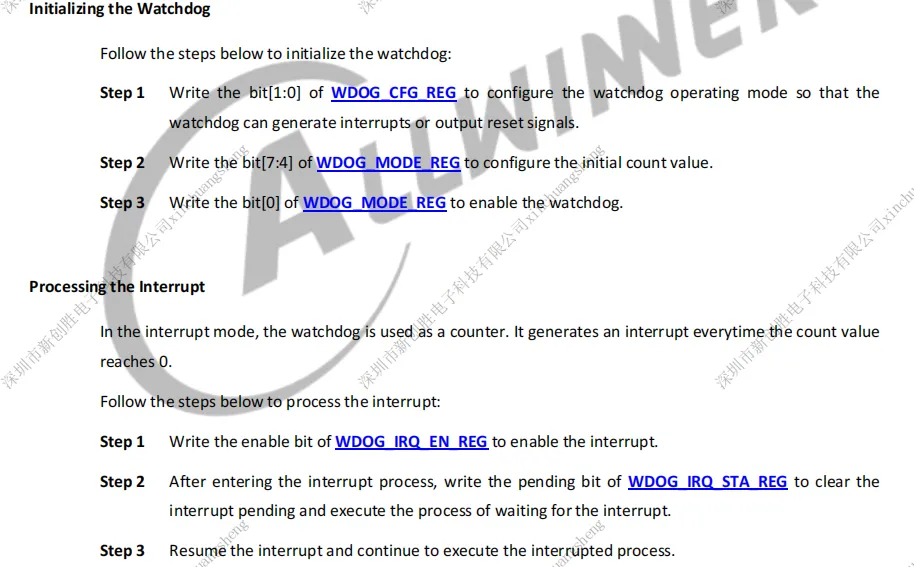
Note that when controlling the registers, a key must be added before the parameters to be written.
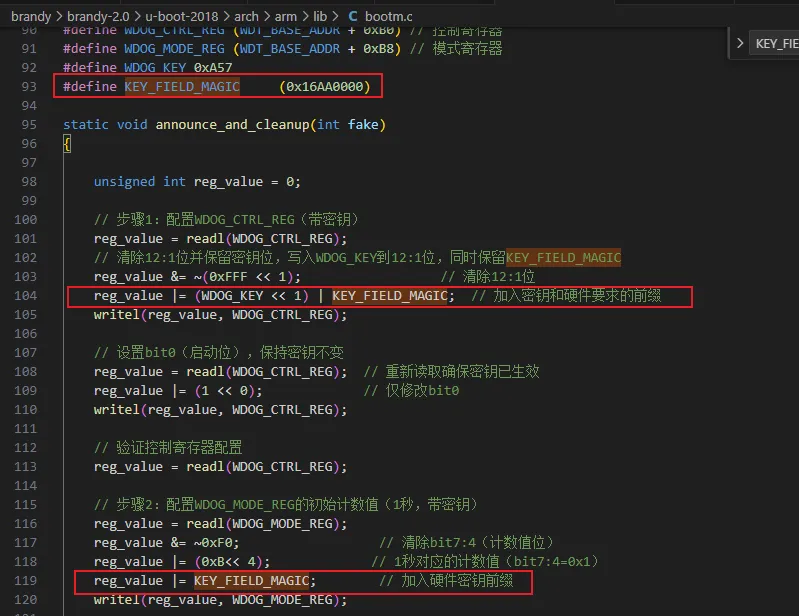
The data manual specifies that without the key, modification cannot be done. Additionally, only certain timeout values for the watchdog are available.
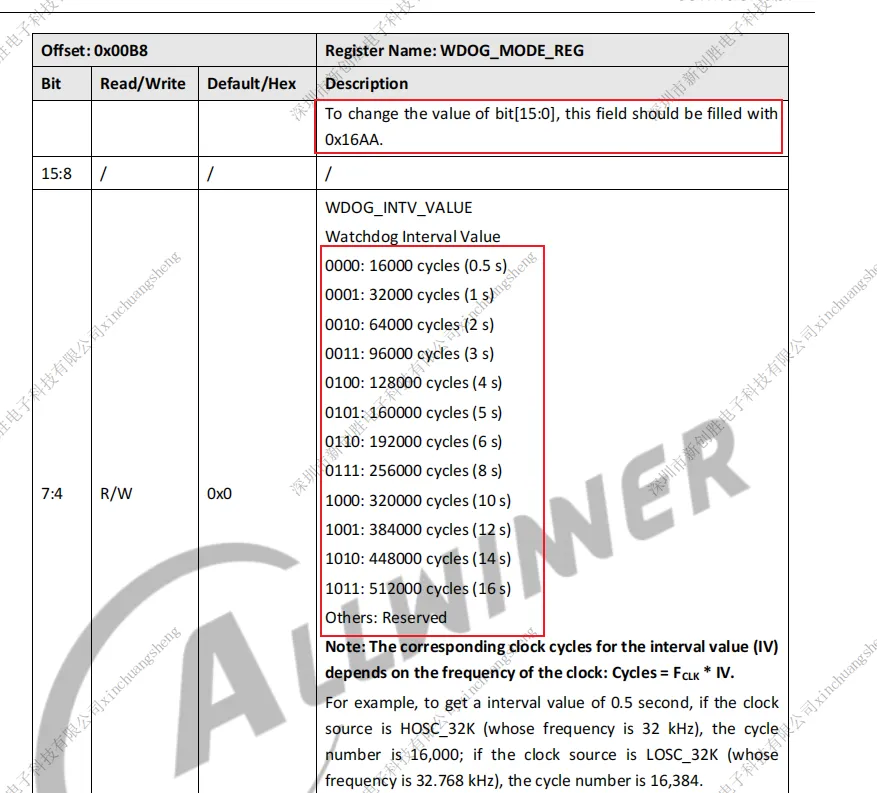
After making these changes, the watchdog will be triggered.
If the watchdog driver is loaded during the kernel phase, modifications during the uboot phase will be invalid, causing the watchdog to be disabled, and the counter will be reset.
Therefore, the watchdog driver can be placed in the filesystem and configured to load automatically using a startup script. This will help determine whether the kernel or filesystem has started properly.
In the kernel phase, first compile the watchdog driver as a module.
diff --git a/arch/arm/configs/OK113I_linux_defconfig b/arch/arm/configs/OK113I_linux_defconfig
index f6501bef5..7cdcf49bd 100755
--- a/arch/arm/configs/OK113I_linux_defconfig
+++ b/arch/arm/configs/OK113I_linux_defconfig
@@ -165,7 +165,7 @@ CONFIG_CPU_THERMAL=y
 CONFIG_THERMAL_EMULATION=y
 CONFIG_SUNXI_THERMAL=y
 CONFIG_WATCHDOG=y
-CONFIG_SUNXI_WATCHDOG=y
+CONFIG_SUNXI_WATCHDOG=m
 CONFIG_MFD_SUN6I_PRCM=y
 CONFIG_REGULATOR=y
 CONFIG_REGULATOR_FIXED_VOLTAGE=y
Delete all relevant files in the out directory, then perform a full compilation. If the kernel or filesystem hangs, the watchdog will be triggered.
rm ./out/kernel/build/drivers/watchdog/*
rm -f \
./out/kernel/build/drivers/watchdog/* \
./out/t113_i/ok113i/longan/lib/modules/5.4.61+/sunxi_wdt.ko \
./out/t113_i/ok113i/longan/buildroot/target/lib/modules/5.4.61+/sunxi_wdt.ko
Do a full compile so that if the kernel or file system gets stuck, the watchdog is triggered.
Uboot Counter
The original documentation (please ask from your sales representative) describes this process—simply follow the instructions. Modify the uboot deconfig file by adding the necessary changes.
brandy/brandy-2.0/u-boot-2018/configs/OK113I_linux_defconfig
CONFIG_BOOTCOUNT_LIMIT=y
CONFIG_BOOTCOUNT_ENV=y
Modify the uboot environment variables by adding the following:
boot_recovery=sunxi_flash read 43000000 recovery;bootm 43000000
...
altbootcmd=run setargs_mmc boot_recovery
upgrade_rootfs=0
upgrade_available=1
bootlimit=5
bootcount=0
Every restart increments the bootcount.
Once bootcount reaches bootlimit, the altbootcmd command will automatically execute, which boots the recovery system.
Thus, the system will recover as follows: If the update fails and the kernel or filesystem hangs, the watchdog will trigger a reset.
If the reset count exceeds the specified limit, the system will automatically boot into the recovery system.
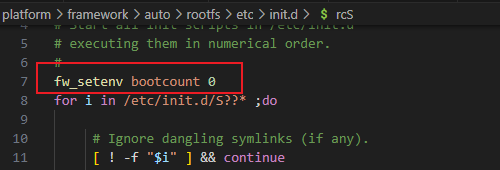
Note: Ensure to reset the bootcount in the filesystem of both the main system and recovery system.
Recovery System:
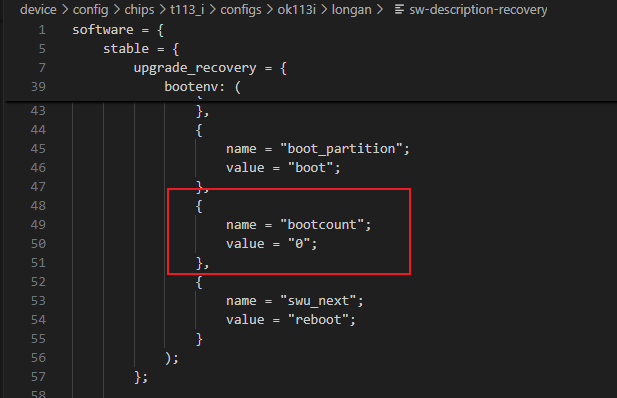
Add bash "fw_setenv bootcount 0" to the boot script within the main system.
2.4 Creating the Upgrade Package
Once the necessary files are ready, you can create the upgrade package. Before creating it, ensure that the configuration has been set up as mentioned earlier and the following commands have been executed.
forlinx@ubuntu:~/work/OK113i-linux-sdk/buildroot/buildroot-201902$ ./build.sh
forlinx@ubuntu:~/work/OK113i-linux-sdk/buildroot/buildroot-201902$ ./build_recovery.sh
forlinx@ubuntu:~/work/OK113i-linux-sdk/buildroot/buildroot-201902$
  cp /home/forlinx/work/OK113i-linux-sdk/out/t113_i/ok113i/longan_recover/buildroot/images/rootfs.cpio.gz \
  /home/forlinx/work/OK113i-linux-sdk/kernel/linux-5.4/rootfs_recovery_32bit.cpio.gz
forlinx@ubuntu:~/work/OK113i-linux-sdk/buildroot/buildroot-201902$ cd ../../
forlinx@ubuntu:~/work/OK113i-linux-sdk$ ./build.sh
forlinx@ubuntu:~/work/OK113i-linux-sdk$ source build/envsetup.sh
forlinx@ubuntu:~/work/OK113i-linux-sdk$ build recovery
OTA Package Configuration File
The OTA package configuration file sw-subimgs-recovery.cfg is provided in the source code and can be selected according to your needs (currently, only the filesystem is included).
swota_file_list=(
${LICHEE_BOARD_CONFIG_DIR}/longan/sw-description-recovery:sw-description
#${LICHEE_PLAT_OUT}/recovery.img:recovery
#${LICHEE_PLAT_OUT}/uboot.img:uboot
#${LICHEE_PLAT_OUT}/boot0.img:boot0
${LICHEE_PLAT_OUT}/rootfs.ext4:rootfs
#${LICHEE_PLAT_OUT}/boot.img:kernel
#${LICHEE_PLAT_OUT}/usr.img:usr
)

Configure the OTA Strategy Description File
The configuration file should be named sw-subimg.cfg or sw-subimgsxxx.cfg, where xxx can be customized. The 113-recovery OTA strategy description file is sw-description-recovery, which is provided as a reference in the source code. Modify it according to your needs.
You can refer to the upgrade command.
software = {
    version = "0.1.0";
    description = "Firmware update for t507 demo2.0 Project";

    stable = {
        /* upgrade recovery,uboot,boot0 ==> change swu_mode,boot_partition ==> reboot */
        upgrade_recovery = {
            /* upgrade recovery */
            images: (
                /*{
                    filename = "rootfsbak";
                    device = "/dev/mmcblk0p5";
                    #device = "/dev/by-name/rootfs";
                    installed-directly = true;
                },*/
                {
                    filename = "rootfs";
                    #device = "/dev/by-name/rootfs";
                    device = "/dev/mmcblk0p6";
                    installed-directly = true;
                }/*,
                {
                    filename = "recovery";
                    device = "/dev/mmcblk0p6";
                    #device = "/dev/by-name/recovery";
                    installed-directly = true;
                },
                {
                    filename = "uboot";
                    type = "awuboot";
                },
                {
                    filename = "boot0";
                    type = "awboot0";
                }*/
            );

            /* change swu_mode to upgrade_kernel, boot_partition to recovery & reboot */
            bootenv: (
                {
                    name = "swu_mode";
                    value = "";
                },
                {
                    name = "boot_partition";
                    value = "boot";
                },
                {
                    name = "bootcount";
                    value = "0";
                },
                {
                    name = "swu_next";
                    value = "reboot";
                }
            );
        };

        /* upgrade kernel,rootfs ==> change sw_mode */
        upgrade_system = {
            /* upgrade kernel,rootfs */
            images: (
                {
                    filename = "kernel";
                    #device = "/dev/by-name/boot";
                    device = "/dev/mmcblk0p4";
                    installed-directly = true;
                },
                {
                    filename = "rootfs";
                    #device = "/dev/by-name/rootfs";
                    device = "/dev/mmcblk0p5";
                    installed-directly = true;
                }
            );

            /* change sw_mode to upgrade_usr, change boot_partition to boot */
            bootenv: (
                {
                    name = "swu_mode";
                    value = "";
                },
                {
                    name = "boot_partition";
                    value = "boot";
                },
                {
                    name = "swu_next";
                    value = "reboot";
                }
            );
        };

        /* upgrade usr ==> clean ==> reboot */
        upgrade_usr = {
            /* upgrade usr */

            /* clean swu_param,swu_software,swu_mode & reboot */
            bootenv: (
                {
                    name = "swu_param";
                    value = "";
                },
                {
                    name = "swu_software";
                    value = "";
                },
                {
                    name = "swu_mode";
                    value = "";
                },
                {
                    name = "swu_next";
                    value = "reboot";
                }
            );
        };
    };

    /* when not call with -e xxx,xxx just clean */
    bootenv: (
        {
            name = "swu_param";
            value = "";
        },
        {
            name = "swu_software";
            value = "";
        },
        {
            name = "swu_mode";
            value = "";
        },
        {
            name = "swu_version";
            value = "";
        }
    );
}
For instance, /dev/mmcblk06 is the partition where the rootfs resides. You can check this with the cat /proc/cmdline command.

Syntax can be referenced in the official swupdate documentation at: http://sbabic.github.io/swupdate.
The general logic is that when creating the upgrade package, SWUpdate uses the list to find the corresponding files and add them to the package. The file mappings are generated using the names on the right. During the recovery system upgrade, it looks for these aliases and ultimately maps them to device = “/dev/mmcblk0p6”. Finally, modify the environment variables according to the commands in bootenv and execute the corresponding command.
Creating Upgrade
Configure sw-description-recovery and sw-subimgs-recovery.cfg as needed. The above files only update the filesystem.
Execute the following command in the root directory:
source build/envsetup.sh
swupdate_pack_swu -recovery
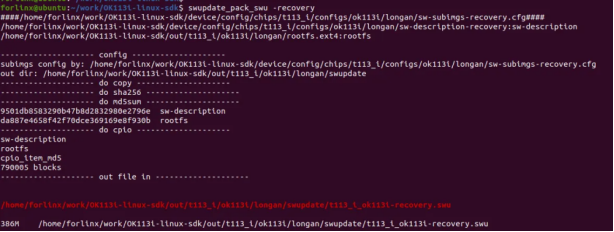
t113_i_evb1_auto.swu is the generated OTA package. The swupdate_pack_swu command will automatically find the configuration file sw-subimg.cfg. If the configuration file is sw-subimg-ab.cfg, use the swupdate_pack_swu -ab command.
Manually copy the generated files to the packaging directory.
cp /home/forlinx/work/OK113i-linux-sdk/out/t113_i/ok113i/longan/swupdate/t113_i_ok113i-recovery.swu \
/home/forlinx/work/OK113i-linux-sdk/device/config/chips/t113_i/usr-resource/usr-resource/
If the target path doesn’t exist, create it manually.
Here, the upgrade package is directly placed into the image. In practical applications, you can place the upgrade package in the corresponding partition using your preferred method, such as mount /dev/mmcblk0p7 /mnt, or manually mount it if needed.
2.5 Package
First, create a partition to store the upgrade package. Simply follow the patch file instructions.
diff --git a/build/pack b/build/pack
index 6f51dddd..ee2d6f3a 100755
--- a/build/pack
+++ b/build/pack
@@ -214,7 +214,10 @@ ${LICHEE_CHIP_CONFIG_DIR}/configs/${PACK_BOARD}/${PACK_PLATFORM}/bootlogo.bmp:${
 ${LICHEE_CHIP_CONFIG_DIR}/boot-resource/boot-resource/bat/bempty.bmp:${LICHEE_PACK_OUT_DIR}/bempty.bmp
 ${LICHEE_CHIP_CONFIG_DIR}/boot-resource/boot-resource/bat/battery_charge.bmp:${LICHEE_PACK_OUT_DIR}/battery_charge.bmp
 )
-
+usr_resource_list=(
+${LICHEE_CHIP_CONFIG_DIR}/usr-resource/usr-resource:${LICHEE_PACK_OUT_DIR}
+${LICHEE_CHIP_CONFIG_DIR}/usr-resource/usr-resource.ini:${LICHEE_PACK_OUT_DIR}
+)
 boot_file_list=(
 ${LICHEE_CHIP_CONFIG_DIR}/${BIN_PATH}/boot0_nand_${PACK_CHIP}.bin:${LICHEE_PACK_OUT_DIR}/boot0_nand.fex
 ${LICHEE_CHIP_CONFIG_DIR}/${BIN_PATH}/boot0_sdcard_${PACK_CHIP}.bin:${LICHEE_PACK_OUT_DIR}/boot0_sdcard.fex
@@ -495,6 +498,11 @@ function do_prepare()
        cp -rf $(echo $file | sed -e 's/:/ /g') 2>/dev/null
    done

+        printf "copying usr resource\n"
+        for file in ${usr_resource_list[@]} ; do
+                cp -rf $(echo $file | sed -e 's/:/ /g') 2>/dev/null
+        done
+
    if [ ! -f ${LICHEE_PACK_OUT_DIR}/bootlogo.bmp ]; then
        cp ${LICHEE_PACK_OUT_DIR}/boot-resource/bootlogo.bmp ${LICHEE_PACK_OUT_DIR}/bootlogo.bmp
    fi
@@ -592,6 +600,7 @@ function do_prepare()
    fi

    sed -i 's/\\boot-resource/\/boot-resource/g' ${LICHEE_PACK_OUT_DIR}/boot-resource.ini
+   sed -i 's/\\usr-resource/\/usr-resource/g' ${LICHEE_PACK_OUT_DIR}/usr-resource.ini
    sed -i 's/\\\\/\//g' ${LICHEE_PACK_OUT_DIR}/image.cfg
    sed -i 's/^imagename/;imagename/g' ${LICHEE_PACK_OUT_DIR}/image.cfg

@@ -921,6 +930,7 @@ function do_common()
        fi
    fi
    fsbuild      boot-resource.ini  split_xxxx.fex > /dev/null
+   fsbuild      usr-resource.ini split_xxxx.fex > /dev/null

    if [ -f boot_package.cfg ]; then
            echo "pack boot package"
diff --git a/device/config/chips/t113_i/configs/ok113i/longan/sys_partition.fex b/device/config/chips/t113_i/configs/ok113i/longan/sys_partition.fex
index 12c9b698..271a3e67 100755
--- a/device/config/chips/t113_i/configs/ok113i/longan/sys_partition.fex
+++ b/device/config/chips/t113_i/configs/ok113i/longan/sys_partition.fex
@@ -64,6 +64,12 @@ size = 16384
     downloadfile = "rootfs.fex"
     user_type    = 0x8000

+[partition]
+    name         = usr
+    size         = 2097152
+    downloadfile = "usr-resource.fex"
+    user_type    = 0x8000
+
 [partition]
     name         = dsp0
     size         = 2048
diff --git a/device/config/chips/t113_i/usr-resource/usr-resource.ini b/device/config/chips/t113_i/usr-resource/usr-resource.ini
new file mode 100755
index 00000000..0055c805
--- /dev/null
+++ b/device/config/chips/t113_i/usr-resource/usr-resource.ini
@@ -0,0 +1,32 @@
+
+[system]
+ver=100
+date=2009-7-03
+ID=937ae0d0-50e3-43c2-9b84-bfef0cd21a41
+
+[fsinfo]
+disccnt=1
+disc0=c

+[c]
+disc=c
+
+fsname=.\usr-resource.fex
+
+format=fat16
+
+size=1048576
+
+attr=0
+
+;root location and counter define
+rootcnt=1
+root0=.\usr-resource
+
Add the partition for storing the upgrade package (usr) and the recovery system partition in the partition table.
device/config/chips/t113_i/configs/ok113i/longan/sys_partition.fex
......
[partition]
    name         = recovery
    size         = 102400
    downloadfile = "recovery.fex"
    user_type    = 0x8000

[partition]
    name         = rootfs
    size         = 2097152
    downloadfile = "rootfs.fex"
    user_type    = 0x8000

[partition]
    name         = usr
    size         = 2097152
    downloadfile = "usr-resource.fex"
    user_type    = 0x8000
......
Since a new partition is added before rootfs, the main system’s filesystem will shift. The partition originally set to 5 should be changed to 6.
If you’re unsure of the size to allocate, you can initially set a smaller size. During packaging, it will prompt you for the required size.
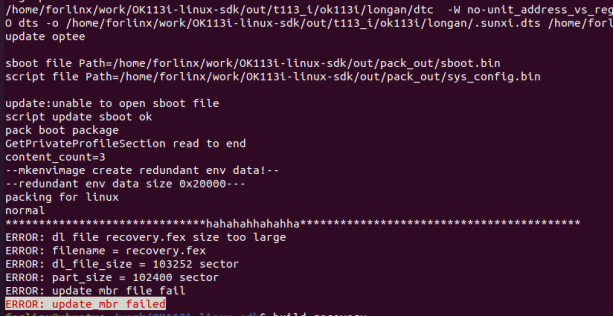
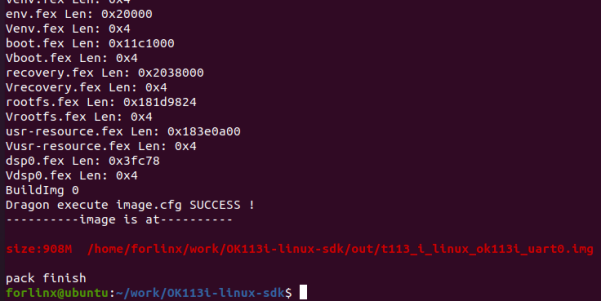
After modification, it is directly packaged, and the image can be flashed for OTA upgrade.
**./build.sh pack**
2.6 OTA Upgrade
After flashing, the system will boot into the main system by default. Upon reboot, it will enter the recovery system.
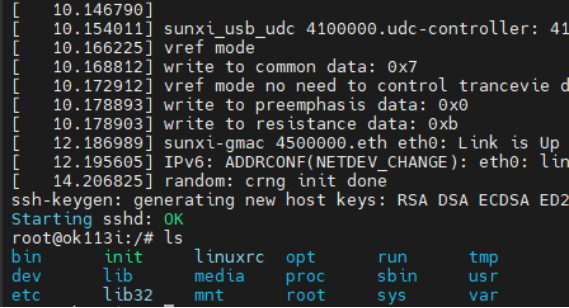
Mount the usr partition to view the stored upgrade package.
mount /dev/mmcblk0p7 /mnt**

Execute the upgrade script if there is no problem.
**/etc/swupdate_cmd.sh -i /mnt/t113_i_ok113i-recovery.swu -e stable,upgrade_recovery**
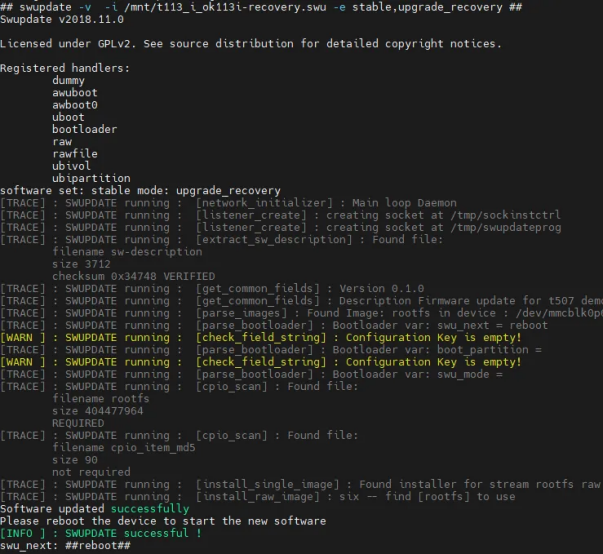
Automatically restart after upgrade, and the file system of the main system can be used normally.

3. Reproduction
Place the compressed package from the attachment into the virtual machine’s shared folder.
# Put the compressed package file in the corresponding path
forlinx@ubuntu:~/work$ cp /mnt/hgfs/share/OTA_recovery.tar /home/forlinx/work/
forlinx@ubuntu:~/work$ cd /home/forlinx/work/
forlinx@ubuntu:~/work$ tar -xvf OTA_recovery.tar
forlinx@ubuntu:~/work$ cp OTA_recovery/librsync-2.0.2.tar.gz OK113i-linux-sdk/buildroot/buildroot-201902/dl/
forlinx@ubuntu:~/work$ cd OK113i-linux-sdk/brandy/brandy-2.0/u-boot-2018/
forlinx@ubuntu:~/work/OK113i-linux-sdk/brandy/brandy-2.0/u-boot-2018$ patch -p1 < /home/forlinx/work/OTA_recovery/uboot.patch
forlinx@ubuntu:~/work/OK113i-linux-sdk/brandy/brandy-2.0/u-boot-2018$ cd /home/forlinx/work/OK113i-linux-sdk/
forlinx@ubuntu:~/work/OK113i-linux-sdk$ patch -p1 < /home/forlinx/work/OTA_recovery/sdk.patch
forlinx@ubuntu:~/work/OK113i-linux-sdk$ cd kernel/linux-5.4/
forlinx@ubuntu:~/work/OK113i-linux-sdk/kernel/linux-5.4$ patch -p1 < /home/forlinx/work/OTA_recovery/kernel.patch
forlinx@ubuntu:~/work$ cp -a /home/forlinx/work/OTA_recovery/recovery_rootfs_test /home/forlinx/work/
forlinx@ubuntu:~/work$ cd /home/forlinx/work/OK113i-linux-sdk
forlinx@ubuntu:~/work/OK113i-linux-sdk$ mkdir -p /home/forlinx/work/OK113i-linux-sdk/out/t113_i/ok113i/longan_recover/buildroot

# Compilation Package
forlinx@ubuntu:~/work/OK113i-linux-sdk$ cd buildroot/buildroot-201902/
forlinx@ubuntu:~/work/OK113i-linux-sdk/buildroot/buildroot-201902$ ./build.sh
forlinx@ubuntu:~/work/OK113i-linux-sdk/buildroot/buildroot-201902$ ./build_recovery.sh
forlinx@ubuntu:~/work/OK113i-linux-sdk/buildroot/buildroot-201902$
cp /home/forlinx/work/OK113i-linux-sdk/out/t113_i/ok113i/longan_recover/buildroot/images/rootfs.cpio.gz \
/home/forlinx/work/OK113i-linux-sdk/kernel/linux-5.4/rootfs_recovery_32bit.cpio.gz
forlinx@ubuntu:~/work/OK113i-linux-sdk/buildroot/buildroot-201902$ cd ../../
forlinx@ubuntu:~/work/OK113i-linux-sdk$ ./build.sh
forlinx@ubuntu:~/work/OK113i-linux-sdk$ source build/envsetup.sh
forlinx@ubuntu:~/work/OK113i-linux-sdk$ build recovery
forlinx@ubuntu:~/work/OK113i-linux-sdk$ swupdate_pack_swu -recovery
forlinx@ubuntu:~/work/OK113i-linux-sdk$
cp /home/forlinx/work/OK113i-linux-sdk/out/t113_i/ok113i/longan/swupdate/t113_i_ok113i-recovery.swu \
/home/forlinx/work/OK113i-linux-sdk/device/config/chips/t113_i/usr-resource/usr-resource/
forlinx@ubuntu:~/work/OK113i-linux-sdk$ ./build.sh pack

# After writing, it defaults to boot into the main system
root@ok113i:/# fw_setenv boot_partition recovery
root@ok113i:/# reboot

# Enter recovery system for OTA update
root@ok113i:/# mount /dev/mmcblk0p7 /mnt
root@ok113i:/# /etc/swupdate_cmd.sh -i /mnt/t113_i_ok113i-recovery.swu -e stable,upgrade_recovery
5. Attachments
sdk.patch: Go to the SDK root directory and run:
patch -p1 < patch_path/sdk.patch
kernel.patch: Go to the SDK root directory /kernel/linux5.4/ and run:
patch -p1 < patch_path/kernel.patch
uboot.patch: Go to the SDK root directory /brandy/brandy-2.0/u-boot-2018/ and run:
patch -p1 < patch_path/uboot.patch