OK3568 5.10.160 Uboot eDP Repeated Training
Document classification: □ Top secret □ Secret □ Internal information ■ Open
Copyright
The copyright of this manual belongs to Baoding Folinx Embedded Technology Co., Ltd. Without the written permission of our company, no organizations or individuals have the right to copy, distribute, or reproduce any part of this manual in any form, and violators will be held legally responsible.
Forlinx adheres to copyrights of all graphics and texts used in all publications in original or license-free forms.
The drivers and utilities used for the components are subject to the copyrights of the respective manufacturers. The license conditions of the respective manufacturer are to be adhered to. Related license expenses for the operating system and applications should be calculated/declared separately by the related party or its representatives.
Overview
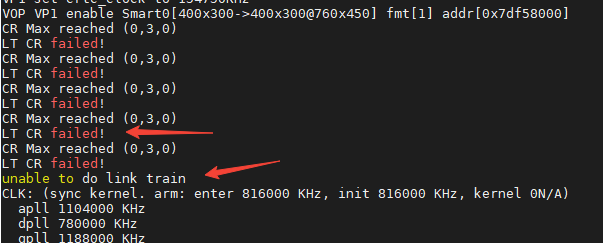
During the use of eDP screens, some feedback indicates that certain eDP screens may intermittently fail to display. By checking the log information, the root cause is identified as Training failure. The issue can be resolved by modifying the configuration during the uboot phase to implement repeated Training operations.
1. Introduction
Similar to HDMI display, eDP typically does not require users to manually adjust display parameters. eDP reads edid information via the AUX bus to obtain the display resolution. Before the actual display signal transmission, eDP performs a verification of the hardware pathway, which is referred to as Training. If Training fails, the SoC’s video output controller will not output video signals, resulting in the corresponding display not being lit up.
When certain screen hardware parameters are at critical thresholds, intermittent issues may occur—sometimes displaying normally and other times failing to display.
Since these screens are still capable of successful Training, implementing repeated Training operations via software until success can temporarily resolve this intermittent issue. However, the underlying cause remains the signal quality being at a critical level; therefore, it is recommended to replace the screen with another model. Moreover, if the hardware screen’s signal quality further degrades to the point where Training cannot succeed, the issue may reoccur. As such, this method is provided for reference only.
The relevant log information for the issue is as follows:
2. Solution
Apply the following patch:
From 37b2d7f012cacf8d491b1a28b84ef066e4acefa5 Mon Sep 17 00:00:00 2001

Subject: [PATCH] ReTraining eDP Link

---
 drivers/video/drm/analogix_dp.c | 10 ++++++++--
 1 file changed, 8 insertions(+), 2 deletions(-)

diff --git a/drivers/video/drm/analogix_dp.c b/drivers/video/drm/analogix_dp.c
index 70cd620f..6b9dc0be 100644
--- a/drivers/video/drm/analogix_dp.c
+++ b/drivers/video/drm/analogix_dp.c
@@ -463,7 +463,7 @@ static int analogix_dp_init_training(struct analogix_dp_device *dp,

 static int analogix_dp_sw_link_training(struct analogix_dp_device *dp)
 {
-	int retval = 0, training_finished = 0;
+	int retval = 0, training_finished = 0, num = 0;

 	dp->link_train.lt_state = START;

@@ -476,7 +476,13 @@ static int analogix_dp_sw_link_training(struct analogix_dp_device *dp)
 				dev_err(dp->dev, "LT link start failed!\n");
 			break;
 		case CLOCK_RECOVERY:
-			retval = analogix_dp_process_clock_recovery(dp);
+			for (num = 0;num < 5;num ++){  //Repeat for 5 times. Num can be modified appropriately according to the hardware conditions.
+				retval = analogix_dp_process_clock_recovery(dp);
+				dev_err(dp->dev, "LT link failed num=%d!\n",num);
+				if (!retval)
+					break;
+			}
+
 			if (retval)
 				dev_err(dp->dev, "LT CR failed!\n");
 			break;
--
2.34.1
3. Verification
After applying the modification, the log output is as follows:
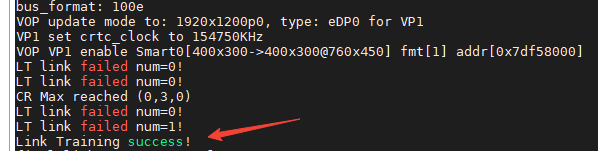
[Corresponding display now functions normally.]