OK3568 CAN Issues Summary
Issues Identified by RK Officials Regarding the RKCAN Controller
Practical Issues Affecting Usage with RKCAN
Issue 1: Extended Frame Randomly Changes to Standard Frame
Cause:
Design flaw in the CPU CAN controller.
Solution:
The original driver uses retransmission of standard remote frames to ensure proper sending of extended frame IDs. The default forlinx driver currently adopts this approach.
Issue 2: Kernel BUG_ON Print
Cause:
The BUG_ON is mainly triggered when the CAN bus enters a bus-off state and the CAN controller automatically resets. Manually executing ifconfig down/up during this automatic recovery process causes errors.
Solution:
To manually recover from situations where the CAN bus cannot send or receive as expected, disable the automatic recovery feature of the CAN controller. Execute the command: ip link set can0 type can restart-ms 0.
This sets the restart-ms parameter to 0.
Issue 3: Complete Failure to Receive CAN Frames When Communicating with Other Devices
Cause:
Typically caused by frequency offset of the connected device.
Testing Method:
Use a CAN analyzer to test whether RKCAN and the lower-level device communicate normally, check if all three devices work together, and monitor communication between RKCAN and other devices directly for errors. In software, try using the command:
Issue 4: Intermittent State of Neither Sending Nor Receiving During Communication with Other Devices
Cause:
Design flaw in the CPU CAN controller.
Testing Method (No direct solution; only CAN reset works):
When ID arbitration fails, the CAN controller should switch from the transmission state to the reception state, but in practice, it fails to do so. This leads to the described issue. When this occurs, resetting the CAN node by performing a down/up operation can restore normal functionality.
Usage Recommendations
Depending on the application scenario, if losing even a single frame is unacceptable, the following recommendations apply:
Ensure that the bus is idle when RKCAN is transmitting. Avoid scenarios where ID arbitration occurs while RKCAN is sending;
If ID arbitration cannot be avoided, ensure that RKCAN’s bus ID always wins arbitration. (Note: There should not be two RKCAN nodes on the same bus.);
If neither of the above conditions can be met, consider using an extended CAN solution. (For recommendations, please contact FORLINX technical support.);
If the application can tolerate occasional frame loss.
Application Layer Usage Recommendations
Ideally, only one RK CAN device node is on a single bus;
For the communication between the CAN equipment of other manufacturers and the rk can equipment, the standard ID data frame shall be used as far as possible. If the extended ID data frame must be used, ensure that the remote frame is ignored by the peer equipment and is not used in the application;
In scenarios with high bus traffic where the RK3568 device frequently encounters bus arbitration during transmission, prioritize the RK3568 device ID to the highest level to minimize arbitration failures;
The application protocol layer should verify successful CAN frame transmission. If transmission fails, implement a retransmission mechanism at the protocol layer. If the RK3568 application layer detects prolonged transmission failure, consider restarting the CAN interface (down/up) and retransmitting.
CAN Driver Selection Comparison
Scenarios |
Original Driver |
New Driver |
|---|---|---|
One RK3568 CAN device on bus, communicating with other devices in a one-to-many polling mode |
✅ Can be used |
✅ Can be used |
Multiple RK3568 CAN devices on bus, using one-to-one polling mode |
✅ Can be used |
✅ Can be used |
One RK3568 CAN device on bus, all devices can actively send data |
✅ Can be used |
✅ Can be used |
Multiple RK3568 CAN devices on bus, all devices can actively send data |
❌ Not recommended |
✅ Recommended |
forlinx driver:
rockchip driver:
How to Distinguish Between Old and New CPUs
Rockchip RK3568J PCN for Wafer Factory Change-RKPCNMI20020-20230916.docx
CAN Debugging Methods and Strategies
If there is a problem with CAN communication, use a CAN box to test the transmission and reception separately to verify whether a specific device is not communicating. Prioritise identifying whether the issue lies with the software, the hardware link or a specific device;
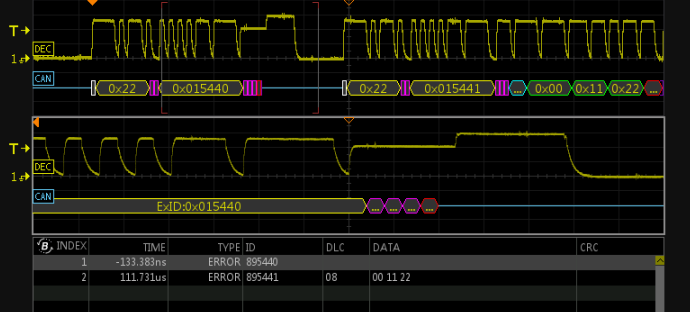
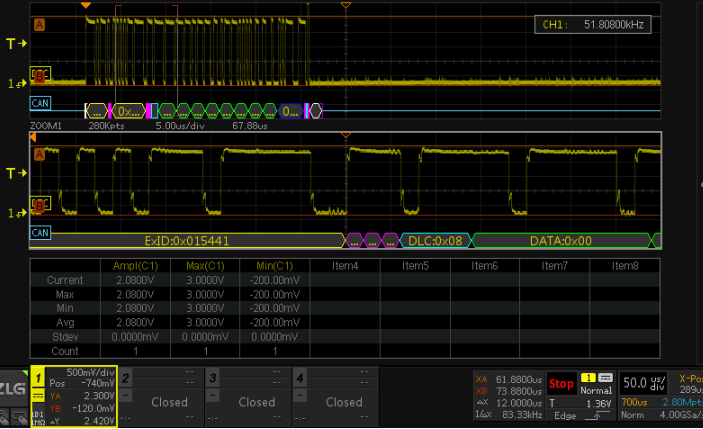
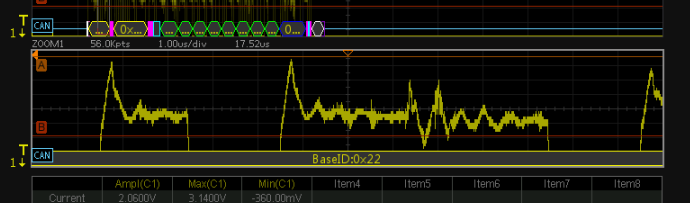
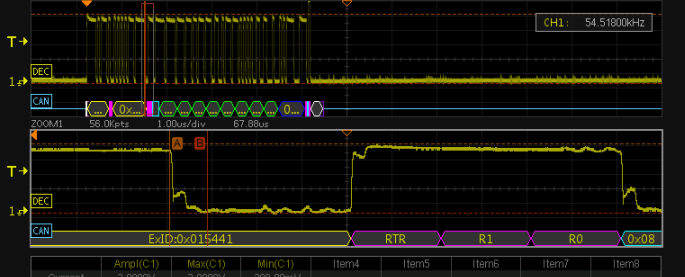
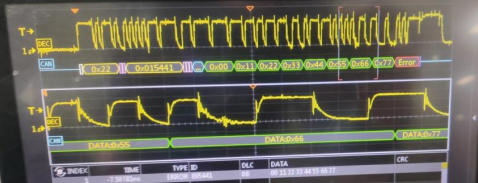
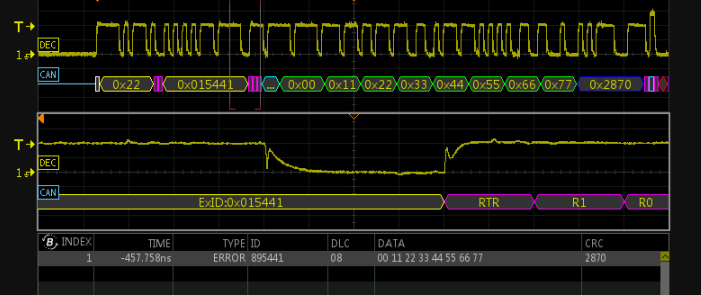
Actually grasp the CAN bus waveform, use the oscilloscope, two channels, two probes, one connected to H and the other connected to L (for the oscilloscope with CAN bus analysis function, directly connect the probe to H and the grounding clamp to L), and then test the CAN frame with the CAN box to check the actual situation of the waveform, whether there is a steep slope, slow descent, step and spike, and modify the waveform by hardware means. An example of a poor bus waveform:
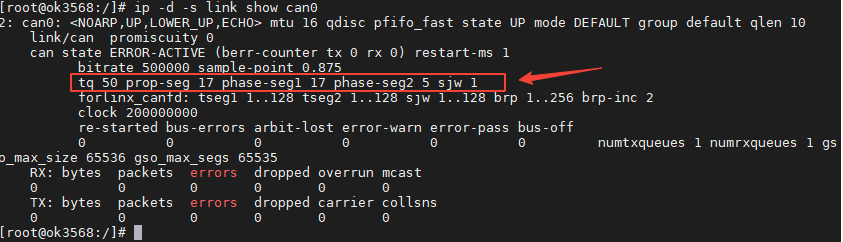
Use the command ip -d -s link show can0 to view the configuration of the software-defined CAN controller
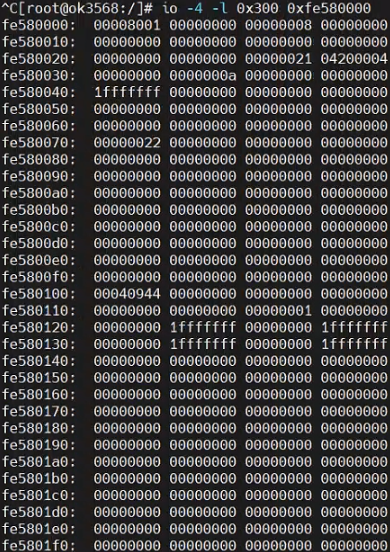
Use the io-4 -l 0x300 0xfe580000 command to view the CAN controller register status. Read out the register value and compare it with the register description on page 2185 of the Rockchip RK3568 TRM Part2 V1.1-20210301.pdf manual. Whether the current register status is normal.
The socket can easily generate a “no buffer space” error.
This is because the upper-layer software configuration is enabled; when the CANsend software sends a data packet,
it first passes it to the network queue, and the CAN driver retrieves the CAN frame from the network queue for transmission.
The “no buffer” error occurs because the queue is full.
The queue generally becomes full because CAN frames cannot be transmitted.
In this case, there are only two possible causes:
The speed of inserting CAN frames into the queue is greater than speed of CAN controller sending;
The actual physical link is not connected, and there is no ACK response from the CAN device, causing the controller to keep trying to resend;
The speed of inserting CAN frames into the queue is greater than speed of CAN controller sending;
The actual physical link is not connected, and there is no ACK response from the CAN device, causing the controller to keep trying to resend.
You can use the ifconfig command to check the queue length.

If the first scenario is identified, you can increase the transmission queue length using ifconfig can0 txqueuelen 1000.
If testing reveals communication issues with only a specific device, which may manifest as either complete frame loss or intermittent packet drops, it could indicate that the counterpart device has CAN clock frequency drift. As the receiving end, you can attempt to increase the Synchronization Jump Width (SJW) value in the CAN driver to broaden the threshold for frame analysis at the receiving side.
ip link set can0 type can sjw 10
The adjustable range for the SJW attribute can be viewed using the command: ip -d -s link show can0.
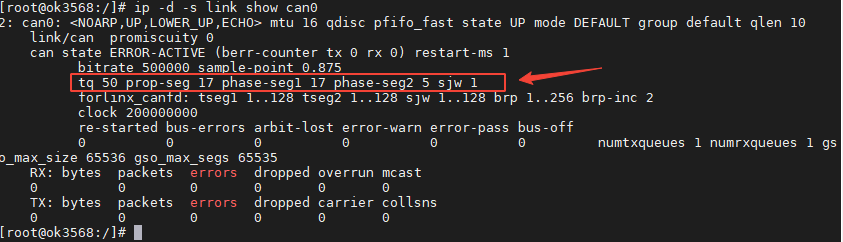
The maximum value of SJW is the smaller one of seg1 and seg2. This is related to the calculation of the sampling point. Generally, the default sampling point in the triple sampling map is: sample-point is 0.875. The calculation method of the sampling point is: sample-point = (prop-seg + phase-seg1 + 1) / (prop-seg + phase-seg1 + phase-seg2 + 1).
Tips
The issues mentioned above are present in the 3568 and 3588 CPUs, as they utilise the same underlying RKCAN design.
For the 3562, RKCAN still does not support CANFD, but the issues identified in the 3568 and 3588 have been resolved.
For the 3576, RKCAN supports CANFD and all known issues have been resolved.
Updated 27 July 2024: The description of the CAN section has been removed from the 3588RK original manufacturer’s data sheet.
Updated 21 August 2024: The 3562 CAN bus still experiences an issue where it may occasionally enter a state in which it neither receives nor transmits data (bus arbitration anomaly).
Updated 25 November 2024: Reference test data for the SPI-to-CANFD conversion solution:
ok3568 mcp2518 spi to can_single can_canfd interface performance testing report.pdf