User’s Hardware Manual_V1.6
Document classification: □ Top secret □ Secret □ Internal information ■ Open
Copyright
The copyright of this manual belongs to Baoding Folinx Embedded Technology Co., Ltd. Without the written permission of our company, no organizations or individuals have the right to copy, distribute, or reproduce any part of this manual in any form, and violators will be held legally responsible.
Forlinx adheres to copyrights of all graphics and texts used in all publications in original or license-free forms.
The drivers and utilities used for the components are subject to the copyrights of the respective manufacturers. The license conditions of the respective manufacturer are to be adhered to. Related license expenses for the operating system and applications should be calculated/declared separately by the related party or its representatives.
Overview
This manual aims to help you quickly get familiar with the product, understand interface functions and configurations. It covers the interface functions and introductions of the development board, product power consumption, and methods for troubleshooting issues during use. Some commands are annotated in the description for user convenience, with a focus on practicality. For information on pin function multiplexing and hardware troubleshooting methods, please refer to the “FET3576-C Pin Multiplexing Reference Table” and the “FET3576-C Design Guide” provided by Forlinx.
There are four chapters:
Chapter 1. provides an overall overview of the CPU, briefly introducing its performance and application industries;
Chapter 2. offers a general introduction to the SoM, including descriptions and functions of connector pins;
Chapter 3. introduces the development board in multiple chapters, covering hardware principles and simple design ideas;
Chapter 4. describes the product’s power consumption and other considerations.
Application Scope
This hardware manual applies to the OK3576-C& OK3576-C21 Forlinx Development Board.
Revision History
Date |
Version |
SoM Version |
Carrier Board Version |
Revision History |
|---|---|---|---|---|
06/05/2026 |
V1.6 |
FET3576-C V1.3/FET3576-C2 V1.0 |
V1.4 |
Adding FET3576-C2 SoM description. |
01/12/2025 |
V1.5 |
V1.3 |
V1.4 |
Adding SoM power management upgrade solution: Expanding the voltage input range from 12V to a wide voltage 5V-13V, |
21/11/2025 |
V1.4 |
V1.3 |
V1.4 |
Adding Section 2.8.2 “SoM Vibration Resistance Design Guide” |
07/05/2025 |
V1.3 |
V1.3 |
V1.4 |
1. Carrier board design updating: (Refer to the latest schematic for details; |
09/10/2024 |
V1.2 |
V1.1 |
V1.1 |
Updating Linux system power consumption parameter. |
24/07/2024 |
V1.1 |
V1.1 |
V1.1 and above |
1. Correcting the description of the SoM pin functions; |
07/05/2024 |
V1.0 |
V1.0 |
V1.0 |
OK3576-C User’s Hardware Manual Initial Version. |
1. RK3576 Description
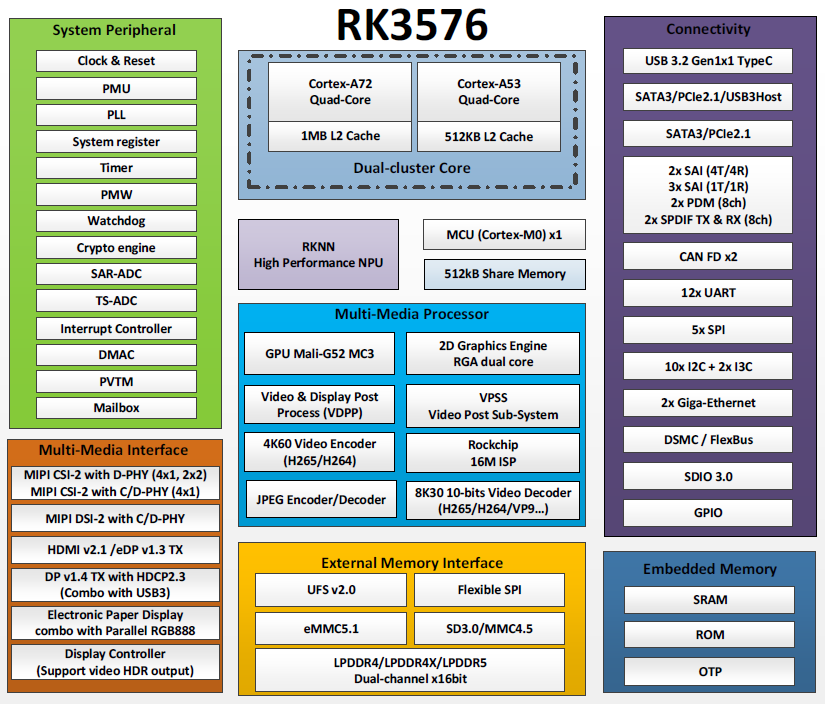
It is a high - performance, low - power application processor chip that integrates four Cortex - A72 cores, four Cortex - A53 cores, and an independent NEON coprocessor. It is suitable for ARM PC, edge computing, personal mobile Internet devices, and other multimedia products.
RK3576 incorporates a variety of powerful embedded hardware engines, providing excellent performance for high - end applications. It supports H.265, VP9, AVS2, and AV1 decoders at 4K@120fps and the H.264 decoder at 4K@60fps. It also supports H.264 and H.265 encoders at 4K@60fps, a high - quality JPEG encoder/decoder, and dedicated image pre - processors and post - processors.
It has a built - in 3D GPU that is fully compatible with OpenGL ES1.1/2.0/3.2, OpenCL 2.0, and Vulkan 1.1. A special 2D hardware engine with an MMU maximizes display performance and delivers a smooth operational experience.
It introduces a new - generation, fully hardware - based ISP (Image Signal Processor) with a maximum of 16M pixels, implementing a variety of algorithm accelerators such as HDR, 3A, CAC, 3DNR, 2DNR, sharpening, dehazing, enhancement, fisheye correction, and gamma correction.
The embedded NPU supports mixed operations of INT4/INT8/INT16/FP16/BF16/TF32. Moreover, thanks to its strong compatibility, it can easily convert network models based on a series of frameworks like TensorFlow, MXNet, PyTorch, and Caffe.
RK3576 features a high - performance external memory interface (LPDDR4/LPDDR4X/LPDDR5), capable of meeting demanding memory bandwidth requirements (supporting systems with high memory bandwidth demands). It also provides a complete set of peripheral interfaces to flexibly support various applications.
Target Applications:
Information Release Terminals
Smart Cockpit
Smart Screen
AR/VR
Edge Computing
High-end IPC
Smart NVR
Premium Pad
ARM PC
……
RK3576 Block Diagram
2. FET3576-C&FET3576-C2 SoM Description
2.1 FET3576-C/ FET3576-C2 SoM Appearance
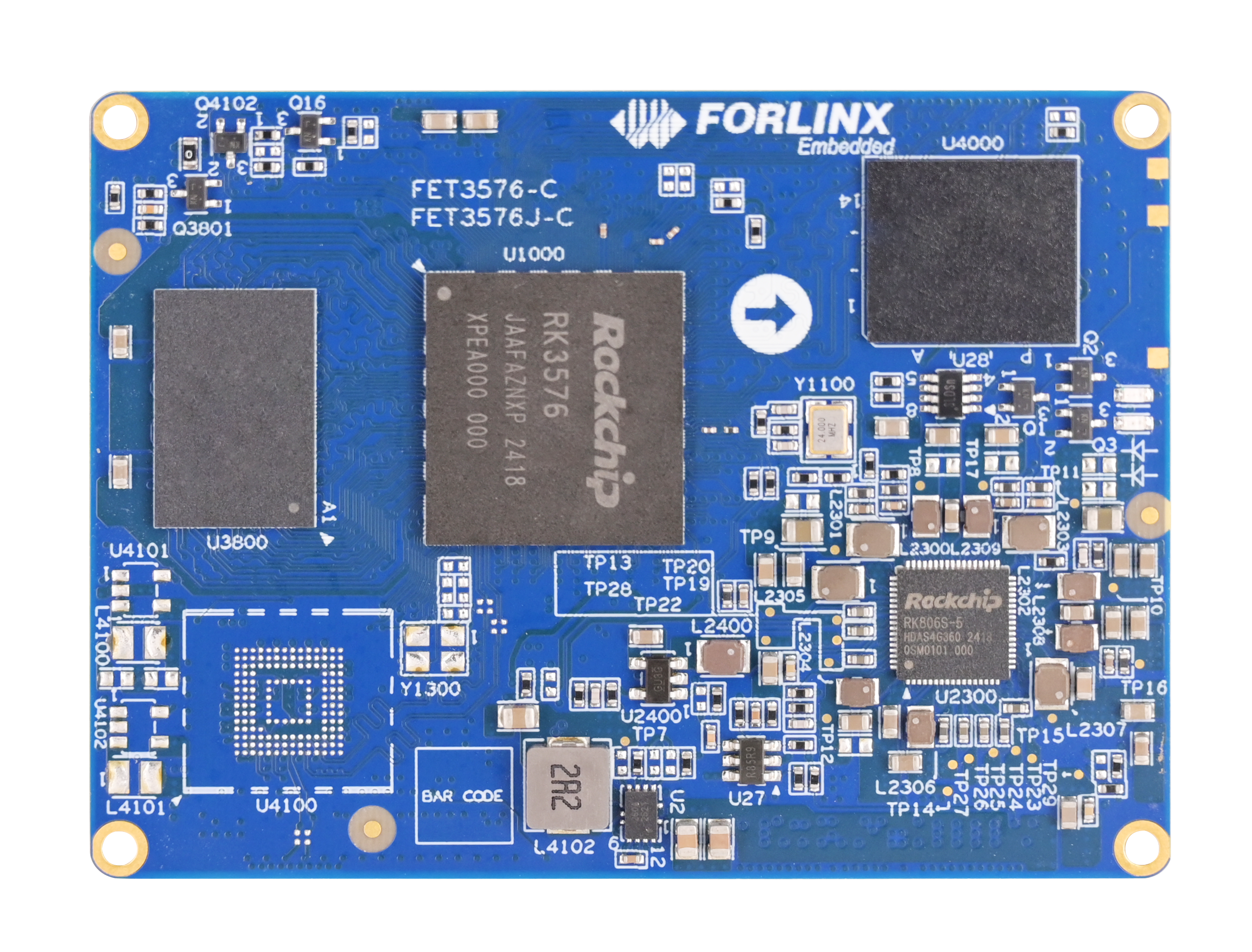
FET3576-C Front
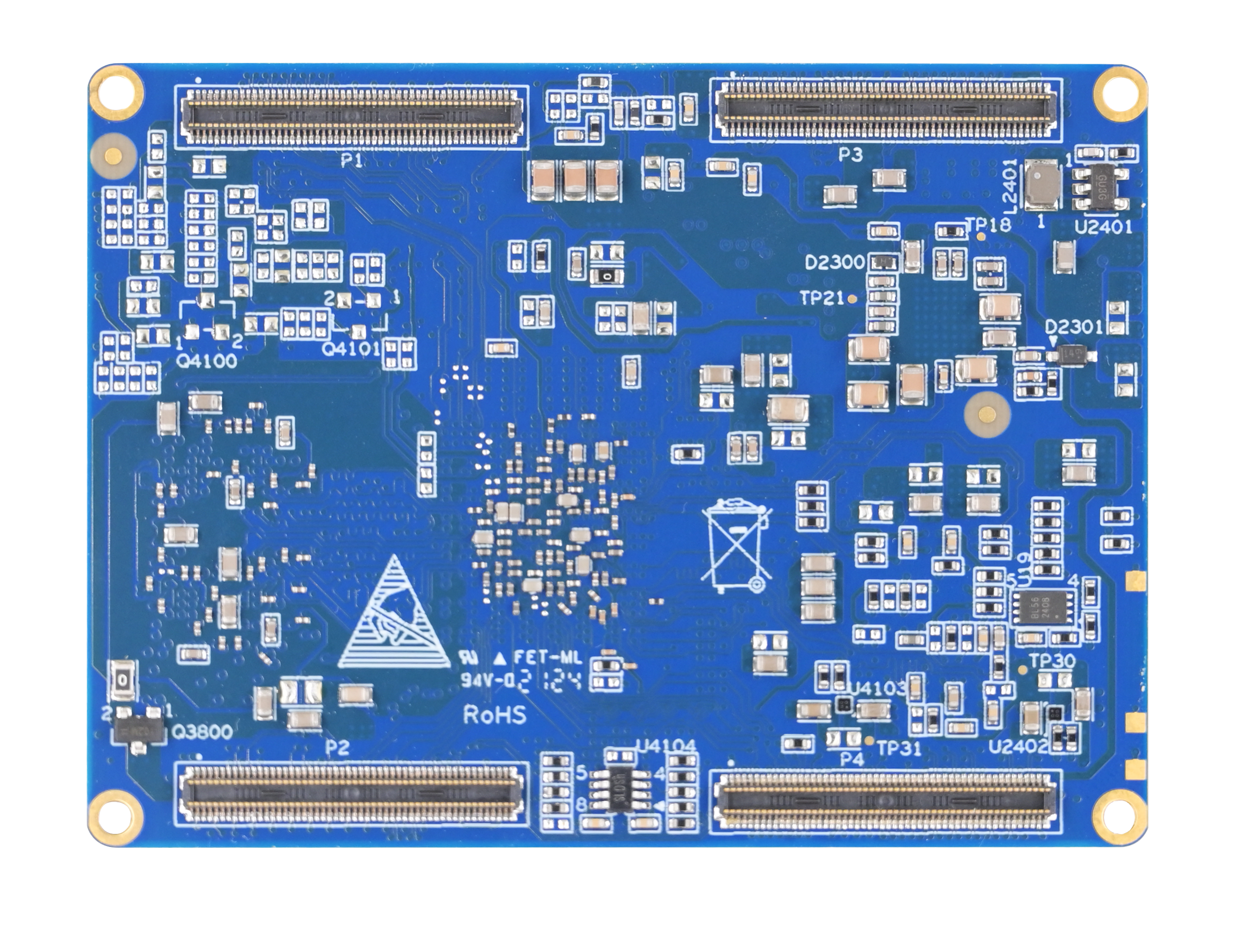
FET3576-C Back
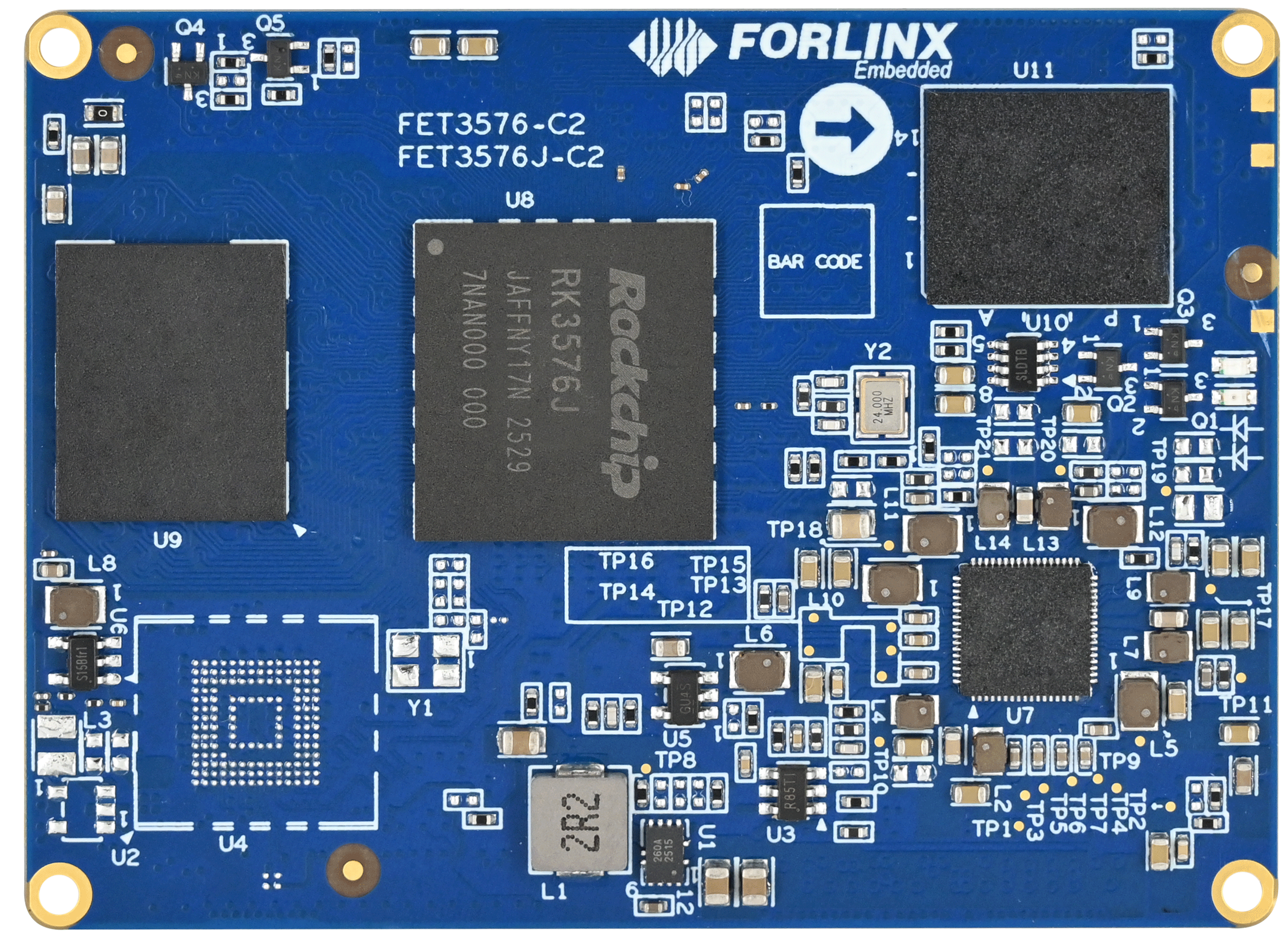
FET3576-C2 Front
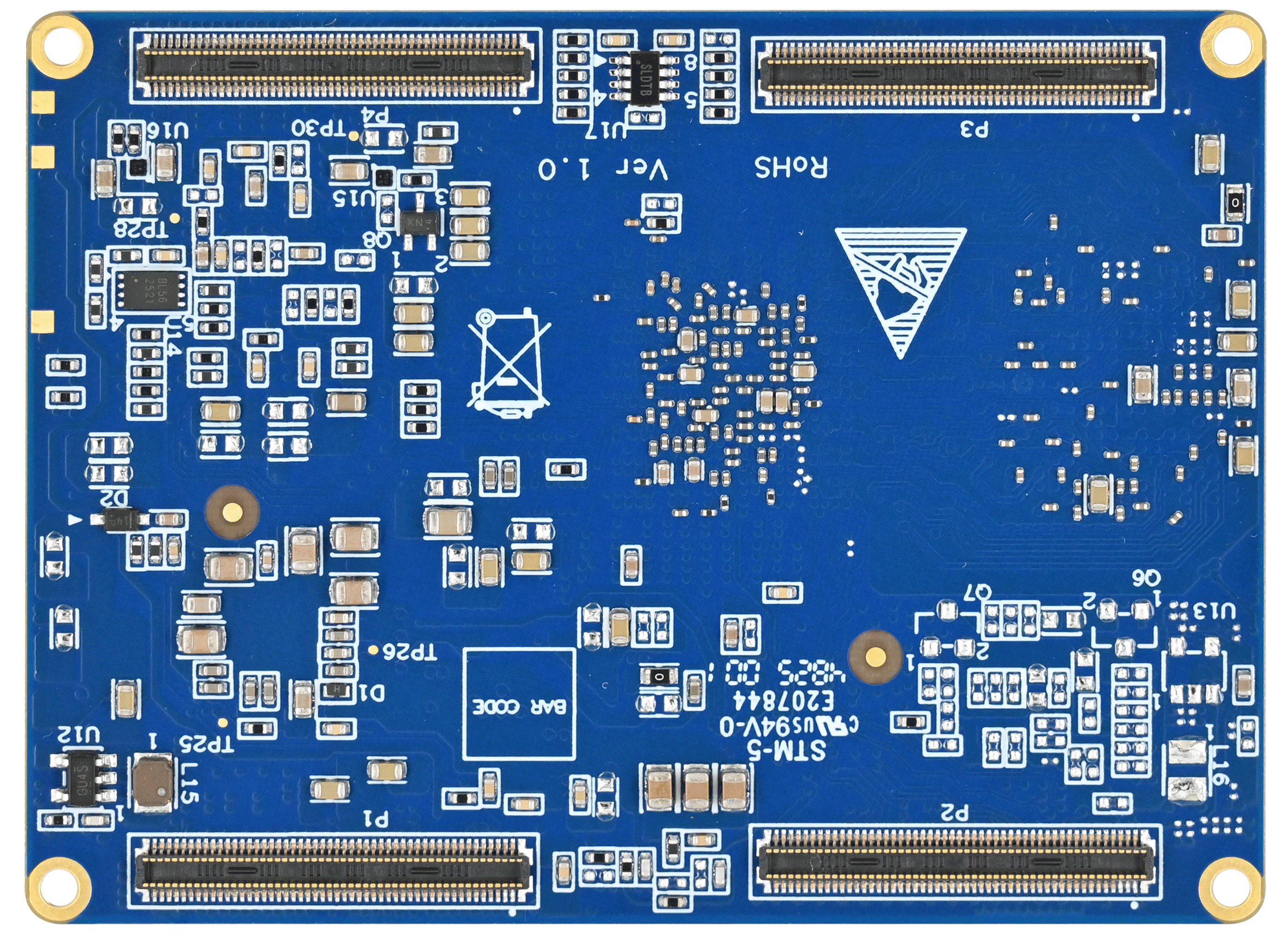
FET3576-C2 Back
2.2 FET3576-C/FET3576-C2 SoM Block Diagram
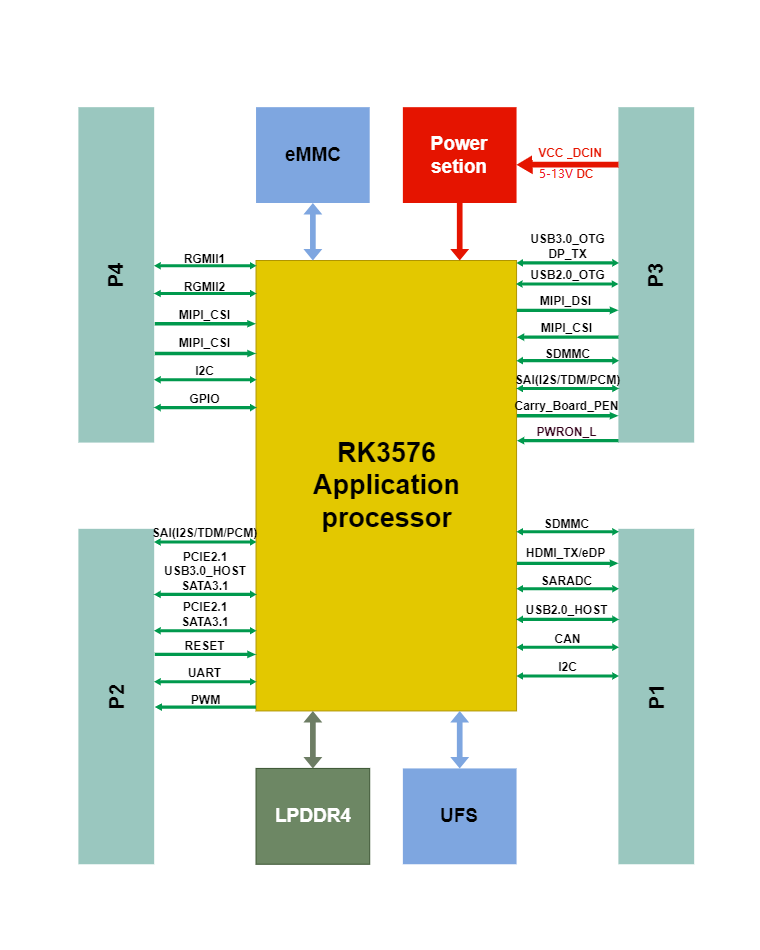
SoM
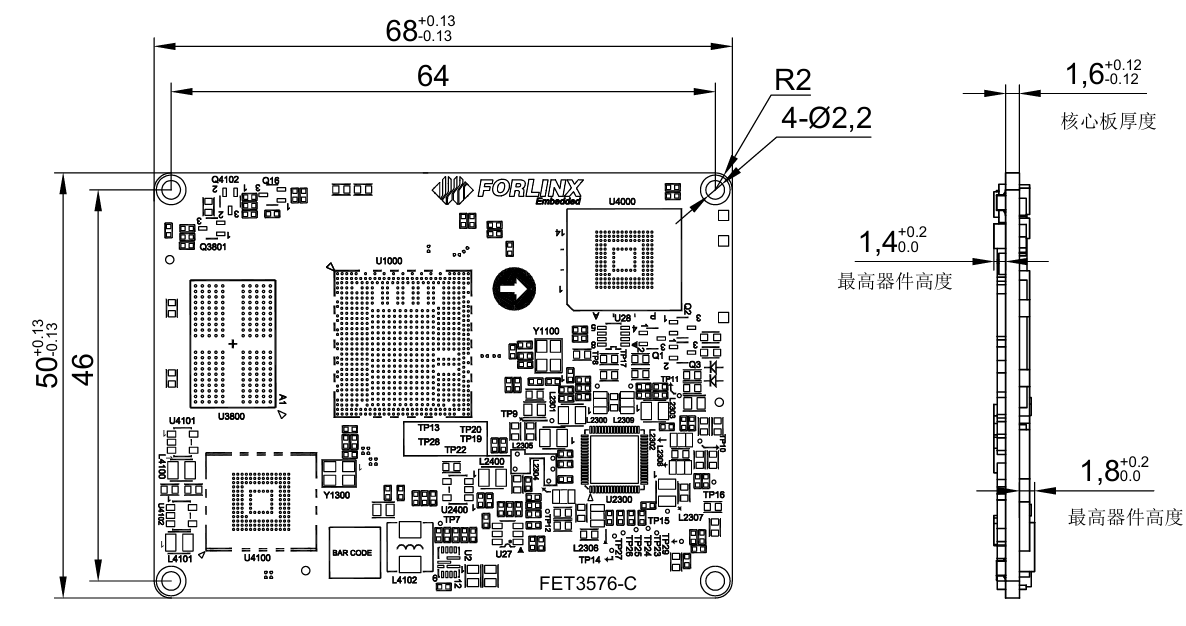
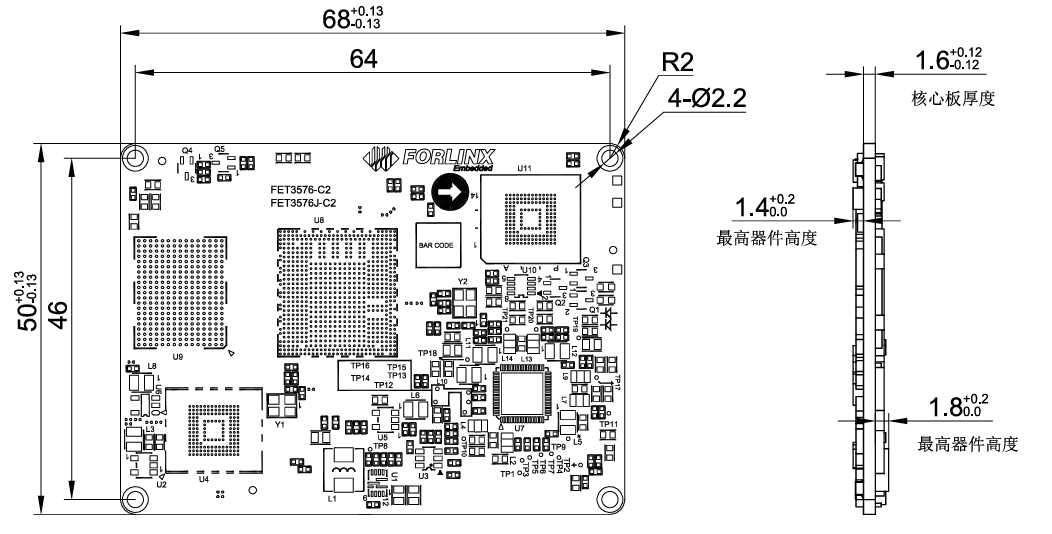
2.3 FET3576-C/FET3576-C2 SoM Dimensions Diagram
FET3576-C SoM Dimension Diagram:
FET3576-C2 SoM Dimension Diagram:
Bottom Layer Dimensions
Unit: mm
Dimensions: 68mm × 50mm, dimensional tolerance ±0.15mm. For more dimensional details, please refer to the DXF file.
Plate making process: 1.6mm thickness, 10-layer immersion gold PCB.
Connectors: Four 0.4 mm-pitch, 100-pin board-to-board connectors (Refer to the appendix for connector dimension diagrams.)
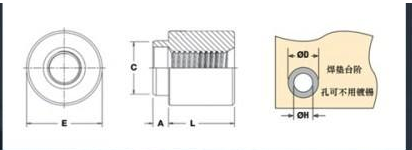
Four 2.2 mm diameter mounting holes are reserved at the four corners of the SoM; when the product is used in a vibration environment, fixing screws can be installed to improve the reliability of product connection.
Please refer to the development board design and use M2, L=1.5mm patch nuts on the carrier board, please refer to the diagram below for the specifications of the surface-mount nuts.

2.4 Performance Parameter
2.4.1 System Frequency
Name |
Specification |
Description |
|||
|---|---|---|---|---|---|
Minimum |
Typical |
Maximum |
Unit |
||
System Clock Arm® Cortex®-A72 |
- |
- |
2200 |
MHz |
Temperature |
System Clock Arm® Cortex®-A53 |
- |
- |
2000 |
MHz |
Temperature |
System Clock Arm® Cortex®-M0 |
- |
- |
- |
- |
- |
Name |
Specification |
Description |
|||
|---|---|---|---|---|---|
Minimum |
Typical |
Maximum |
Unit |
||
System Clock Arm® Cortex®-A72 |
- |
- |
2100 |
MHz |
Industrial Level |
System Clock Arm® Cortex®-A53 |
- |
- |
1900 |
MHz |
Industrial Level |
System Clock Arm® Cortex®-M0 |
- |
- |
- |
- |
- |
2.4.2 Power Parameter
Parameter |
Pin No. |
Specification |
Description |
|||
|---|---|---|---|---|---|---|
Minimum |
Typical |
Maximum |
Unit |
|||
Main Power Voltage |
12V |
5 |
12 |
13 |
V |
- |
2.4.3 Working Environment
Parameter |
Specification |
Description |
||||
|---|---|---|---|---|---|---|
Minimum |
Typical |
Maximum |
Unit |
|||
Operating Temperature |
Working Environment |
0 |
25 |
+80 |
℃ |
Commercial level |
Storage Environment |
-40 |
25 |
+125 |
℃ |
||
Working Environment |
-40 |
25 |
+85 |
℃ |
Industrial Level |
|
Storage Environment |
-40 |
25 |
+125 |
℃ |
||
Humidity |
Working Environment |
10 |
- |
90 |
%RH |
No Condensation |
Storage Environment |
5 |
- |
95 |
%RH |
2.4.4 SoM Interface Speed
Parameter |
Specification |
Description |
|||
|---|---|---|---|---|---|
Minimum |
Typical |
Maximum |
Unit |
||
Serial Port Communication Speed |
- |
115200 |
4M |
bps |
- |
SPI Clock |
- |
- |
50 |
MHz |
- |
I2C Communication Speed |
- |
100 |
400 |
Kbps |
- |
USB3.0 Interface Speed |
- |
- |
5 |
Gbps |
- |
USB2.0 Interface Speed |
- |
- |
480 |
Mbps |
- |
CAN Communication Speed |
- |
- |
1 |
Mbps |
- |
PCIe2.1 |
- |
- |
5 |
Gbps |
- |
2.4.5 ESD Features
Parameter |
Specification |
Unit |
Application Scope |
|
|---|---|---|---|---|
Minimum |
Maximum |
|||
ESD HBM(ESDA/JEDEC JS-001-2017) |
-2000 |
2000 |
V |
All signals routed out from the SoM. |
ESD CDM(ESDA/JEDEC JS-002-2018) |
-250 |
250 |
V |
All signals routed out from the SoM. |
Note:
The above data is provided by Rockchip;
As all the signals exported from SoM are electrostatic sensitive signals, the interfaces should be well protected from static electricity in the carrier board design and the SoM transportation, assembling, and use.
2.5 SoM Interfaces
FET3576-C/FET3576-C2 The interface resources of SoM are supported in the following table:
Function |
Quantity |
Parameter |
|---|---|---|
MIPI CSI |
5 |
• Supports 5 x CSI-2 interfaces; |
DVP |
1 |
Standard DVP interface (8/10/12/16-bit, up to 150 Mhz); |
HDMI/eDP TX |
1 *1 |
•Supports 1 USB / DP combo interface |
DP TX |
1 *1 |
• Supports 1 USB / DP combo interface |
MIPI DSI |
1 *1 |
• Supports 1 MIPI DSI-2 TX interface |
Parallel |
1 *1 |
• Supports 1 parallel output interface |
EBC |
1 *1 |
Supports 1 EBC output interface. |
SAI |
≤5 |
• Supports 5 SAI interfaces; |
SPDIF TX |
≤2 |
Supports 2 x SPDIF TX ports; |
SPDIF RX |
≤2 |
Supports 2 x SPDIF RX ports; |
PDM |
≤2 |
• Up to 8 channels, audio resolution: 16‑bit to 24‑bit, sample rate up to 192 kHz; |
Ethernet |
≤2 |
• 2 × GMAC with RGMII / RMII interfaces; |
Combo high speed interface |
2 |
• Supports 1 x PCIe2.1/SATA3.1 interface with one data lane; |
USB 2.0 OTG |
2 |
2 x USB2.0 OTG |
SDIO |
≤2 |
SDIO v3.0, 4-bit data bus widths |
SPI |
≤5 |
Supports two chip-select in each interface; Supports serial-master and serial-slave mode |
I2C |
≤9 |
• Supports 7-bit and 10-bit address modes; |
I3C |
≤2 |
Supports 2 x I3C master ports |
UART |
≤12 |
Built‑in 2 × 64‑bit FIFO (separate TX/RX); |
CAN |
≤2 |
Compliant with CAN & CAN FD specifications; |
DSMC |
≤1 |
Supports up to select 4 chips ·Supports 8-wire and 16-wire serial transfer mode ·Supports configurable serial address width:16 bits or 32 bits |
FlexBus |
≤1 |
Supports built-in DMA and ping-pong operation for allocating two address ·Supports transmission and receiving mode ·Supports single mode and continuous mode |
PWM |
≤16 |
Supports up to 16 on-chip PWM with interrupt-based operation and capture mode; |
ADC |
≤8 |
· Supports 8 x 12bit single-ended input SAR-ADC with sampling rate up to 1MS/s; |
GPIO |
n |
• All GPIOs can be used to generate interrupts |
Note:
The parameters in the table are based on hardware design or theoretical CPU values.
The interface employs GPIO multiplexing, representing the theoretical maximum connections.
Video Port:
·Video Port0 supports up to 4K@120Hz with 10 bit data
·Video Port1 supports up to 2560x1600@60Hz with 10-bit data
·Video Port2 supports up to 1920x1080@60Hz with 8-bit data
·Each Video Port may connect to any of HDMI/eDP/DP/DSI-2
·Port1 and Port2 may connect to parallel output interface
*The maximum design clock frequency for a single TDM bus is 50MHz. When using TDM mode, the theoretically supported number of audio channels can be calculated by combining the audio sampling frequency and resolution to assess whether it meets the project requirements.
2.6 FET3576-C/ FET3576-C2 SoM Pin Definitions
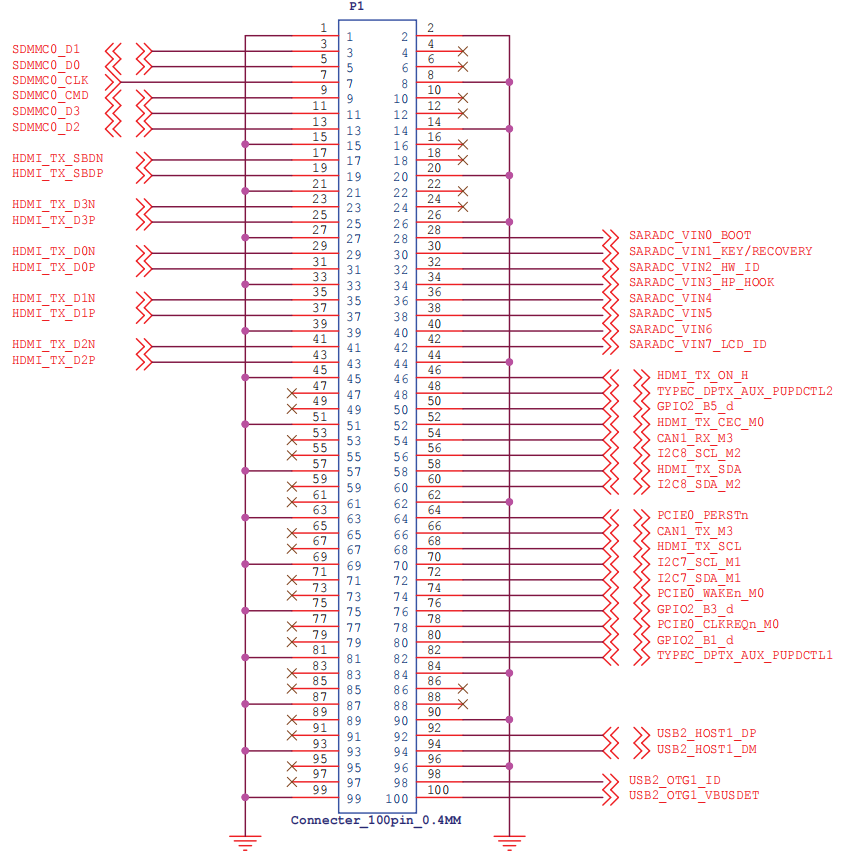
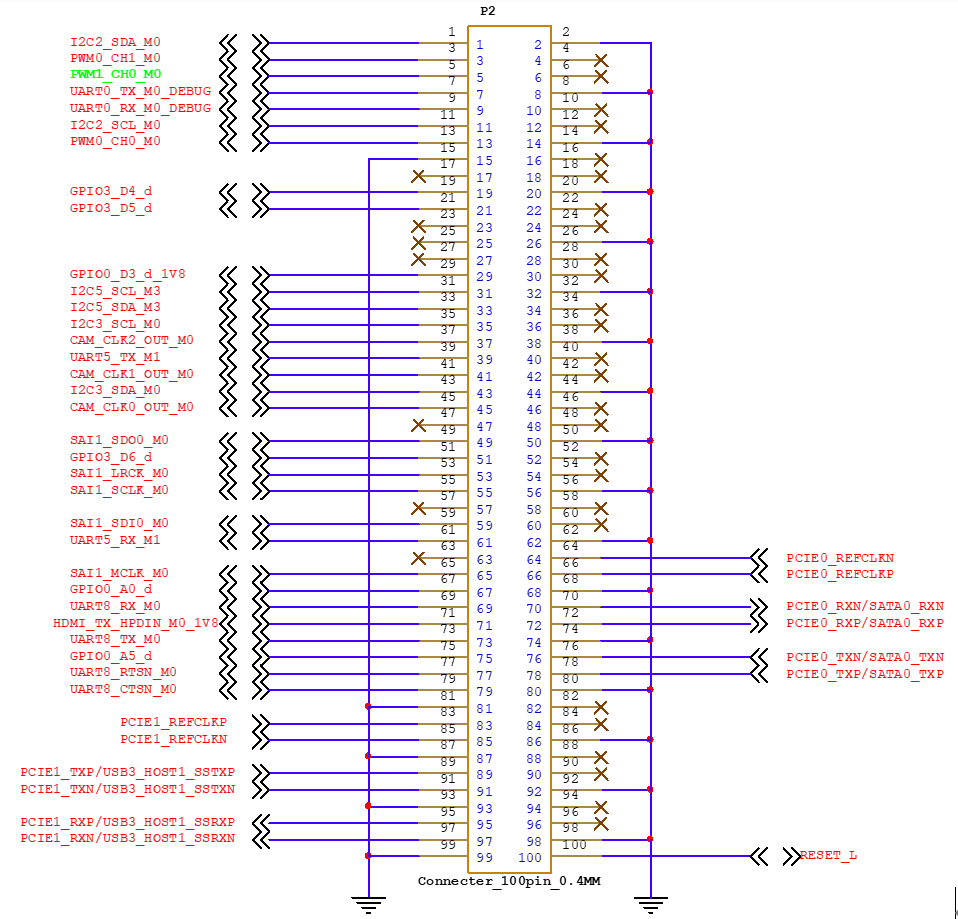
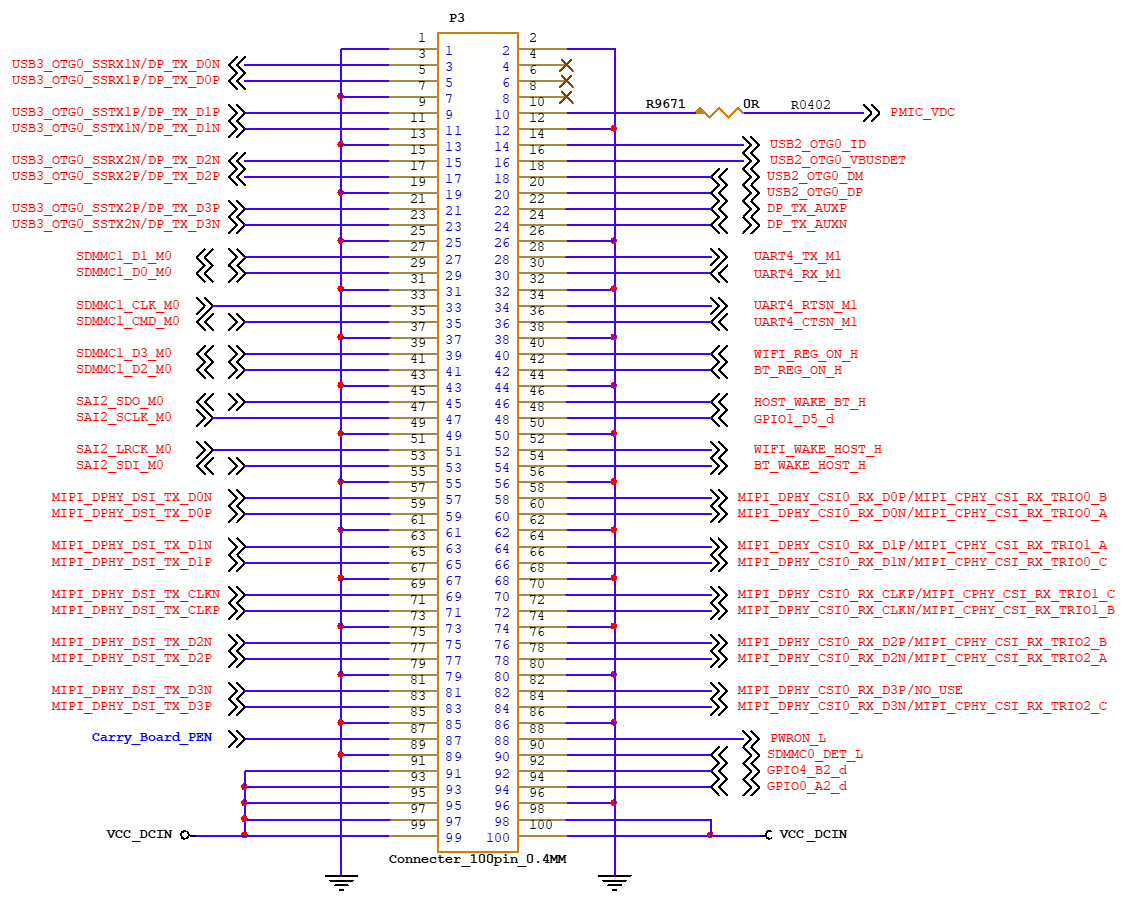
2.6.1 FET3576-C/ FET3576-C2 SoM Pin Schematic
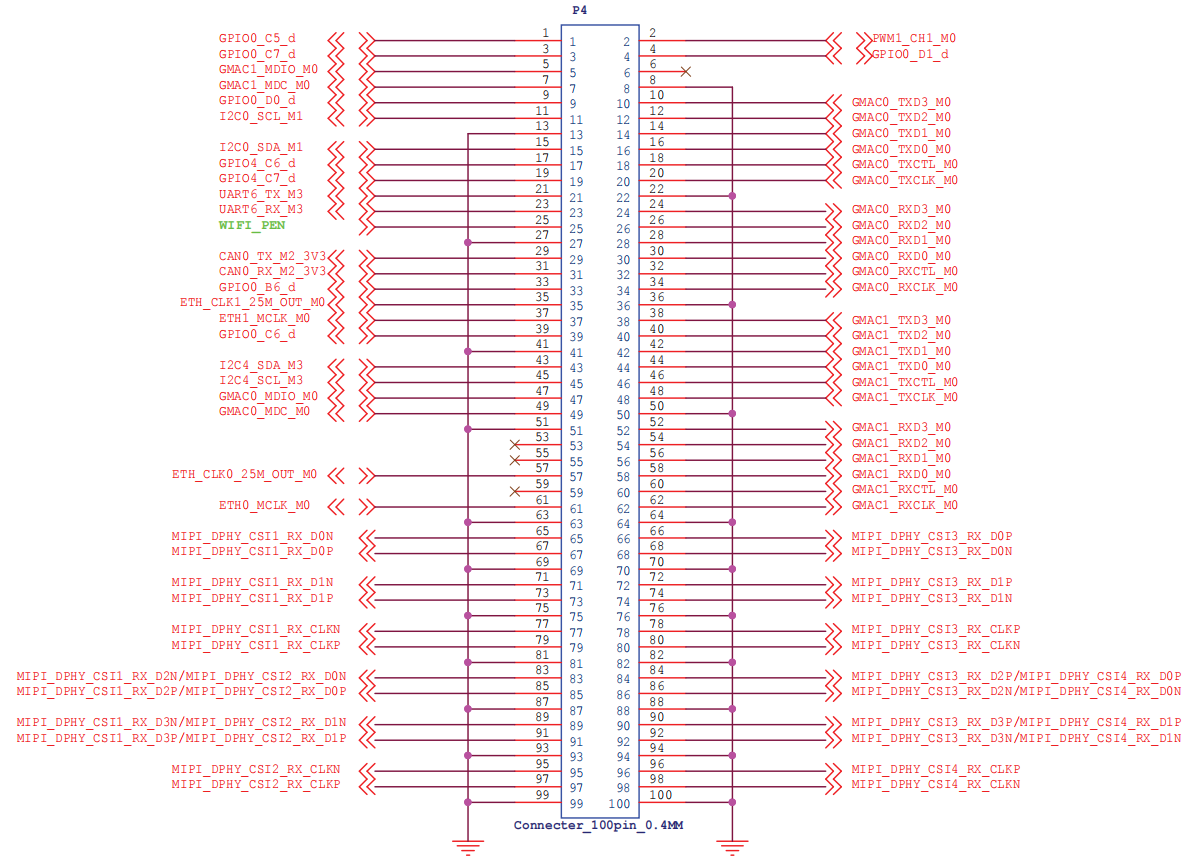
2.6.2 FET3576-C SoM Pin Function Description
Note:
Num ——SoM connector pin no.:
Ball —— CPU pin ball no.
GPIO ——CPU pin general I/O port serial number;
Vol —— Pin signal electrical level
Signal Name — The net name on the SoM Connector. The meanings of the superscript symbols on the signals are as shown in the figure below:
Superscript Number |
Superscript Meaning |
|---|---|
[1] |
The pin can be configured for interrupt use. |
[2] |
The default pin level is 1.8 V. |
[3] |
This pin is related to CPU startup and is not recommended for use as a GPIO. |
[4] |
Dedicated pin and cannot be used as a GPIO. |
Pin Description — Description of the SoM pin signal name.
Default Function — All pin functions on the SoM are defined according to the “Default Function” in the table below. Please do not modify; otherwise, it may conflict with the factory drivers. If you have any questions, please contact our sales or technical support promptly.
Note: Pins marked with “Don’t use for the carrier board” in the “Default functions” are for SoM, which can not be used for carrier board design.
Table 1 P1 Connector Interface (Odd) Pin Definition
NUM |
BALL |
Signal Name |
GPIO |
VOL |
Pin Description |
Default Function |
|---|---|---|---|---|---|---|
1 |
—— |
GND |
—— |
—— |
Ground |
GND |
3 |
B25 |
SDMMC_D1 |
1.8V/3.3V |
SD/MMC Interface Data Signal 1 |
SDMMC_D1 |
|
5 |
B24 |
SDMMC_D0 |
1.8V/3.3V |
SD/MMC Interface Data Signal 0 |
SDMMC_D0 |
|
7 |
1B21 |
SDMMC_CLK |
1.8V/3.3V |
SD/MMC Interface Clock Signal |
SDMMC_CLK |
|
9 |
1A21 |
SDMMC_CMD |
1.8V/3.3V |
SD/MMC Interface Command Signal |
SDMMC_CMD |
|
11 |
B23 |
SDMMC_D3 |
1.8V/3.3V |
SD/MMC Interface Data Signal 3 |
SDMMC_D3 |
|
13 |
A23 |
SDMMC_D2 |
1.8V/3.3V |
SD/MMC Interface Data Signal 2 |
SDMMC_D2 |
|
15 |
—— |
GND |
—— |
—— |
Ground |
GND |
17 |
2U12 |
HDMI_TX_SBDN |
—— |
—— |
HDMISBD signal- |
HDM0_TX_SBD_N |
19 |
2T12 |
HDMI_TX_SBDP |
—— |
—— |
HDMISBD signal+ |
HDM0_TX_SBD_P |
21 |
—— |
GND |
—— |
—— |
Ground |
GND |
23 |
AK26 |
HDMI_TX_D3N |
—— |
—— |
HDMI differential signal 3- |
HDMI_TX_D3_N |
25 |
AL26 |
HDMI_TX_D3P |
—— |
—— |
HDMI differential signal 3+ |
HDMI_TX_D3_P |
29 |
AK27 |
HDMI_TX_D0N |
—— |
—— |
HDMI differential signal 0- |
HDMI_TX_D0_N |
31 |
1AE24 |
HDMI_TX_D0P |
—— |
—— |
HDMI differential signal 0+ |
HDMI_TX_D0_P |
33 |
—— |
GND |
—— |
—— |
Ground |
GND |
35 |
AL28 |
HDMI_TX_D1N |
—— |
—— |
HDMI differential signal 1- |
HDMI_TX_D1_N |
37 |
AK28 |
HDMI_TX_D1P |
—— |
—— |
HDMI differential signal 1+ |
HDMI_TX_D1_P |
39 |
—— |
GND |
—— |
—— |
Ground |
GND |
41 |
AK29 |
HDMI_TX_D2N |
—— |
—— |
HDMI differential signal 2- |
HDMI_TX_D2_N |
43 |
AJ28 |
HDMI_TX_D2P |
—— |
—— |
HDMI differential signal 2+ |
HDMI_TX_D2_P |
45 |
—— |
GND |
—— |
—— |
Ground |
GND |
47 |
—— |
—— |
—— |
—— |
||
49 |
—— |
—— |
—— |
—— |
||
51 |
—— |
GND |
—— |
—— |
Ground |
GND |
53 |
—— |
—— |
—— |
—— |
||
55 |
—— |
—— |
—— |
—— |
||
57 |
—— |
GND |
—— |
—— |
Ground |
GND |
59 |
—— |
—— |
—— |
—— |
||
61 |
—— |
—— |
—— |
—— |
||
63 |
—— |
GND |
—— |
—— |
Ground |
GND |
65 |
—— |
—— |
—— |
—— |
||
67 |
—— |
—— |
—— |
—— |
||
69 |
—— |
GND |
—— |
—— |
Ground |
GND |
71 |
—— |
—— |
—— |
—— |
||
73 |
—— |
—— |
—— |
—— |
||
75 |
—— |
GND |
—— |
—— |
Ground |
GND |
77 |
—— |
—— |
—— |
—— |
||
79 |
—— |
—— |
—— |
—— |
||
81 |
—— |
GND |
—— |
—— |
Ground |
GND |
83 |
—— |
—— |
—— |
—— |
||
85 |
—— |
—— |
—— |
—— |
||
87 |
—— |
GND |
—— |
—— |
Ground |
GND |
89 |
—— |
—— |
—— |
—— |
||
91 |
—— |
—— |
—— |
—— |
||
93 |
—— |
GND |
—— |
—— |
Ground |
GND |
95 |
—— |
—— |
—— |
—— |
||
97 |
—— |
—— |
—— |
—— |
||
99 |
—— |
GND |
—— |
—— |
Ground |
GND |
Table 2 P1 Connector Interface (Even) Pin Definition
NUM |
BALL |
Signal Name |
GPIO |
VOL |
Pin Description |
Default Function |
|---|---|---|---|---|---|---|
2 |
—— |
GND |
—— |
—— |
Ground |
GND |
4 |
—— |
—— |
—— |
—— |
—— |
—— |
6 |
—— |
—— |
—— |
—— |
—— |
—— |
8 |
—— |
GND |
—— |
—— |
Ground |
GND |
10 |
—— |
—— |
—— |
—— |
—— |
—— |
12 |
—— |
—— |
—— |
—— |
—— |
—— |
14 |
—— |
GND |
—— |
—— |
Ground |
GND |
16 |
—— |
—— |
—— |
—— |
—— |
—— |
18 |
—— |
—— |
—— |
—— |
—— |
—— |
20 |
—— |
GND |
—— |
—— |
Ground |
GND |
22 |
—— |
—— |
—— |
—— |
—— |
—— |
24 |
—— |
—— |
—— |
—— |
—— |
—— |
26 |
—— |
GND |
—— |
—— |
Ground |
GND |
28 |
A25 |
SARADC_VIN0_BOOT |
—— |
1.8V |
BOOT start configuration input |
SARADC_VIN0_BOOT |
30 |
1A22 |
SARADC_VIN1_KEY/RECOVERY |
—— |
1.8V |
General ADC1 |
SARADC_VIN1_KEY/RECOVERY |
32 |
1B19 |
SARADC_VIN2_HW_ID |
—— |
1.8V |
General ADC2 |
SARADC_VIN2_HW_ID |
34 |
1C19 |
SARADC_VIN3_HP_HOOK |
—— |
1.8V |
General ADC3 |
SARADC_VIN3_HP_HOOK |
36 |
1E18 |
SARADC_VIN4 |
—— |
1.8V |
General ADC4 |
SARADC_VIN4 |
38 |
1D19 |
SARADC_VIN5 |
—— |
1.8V |
General ADC5 |
SARADC_VIN5 |
40 |
1D21 |
SARADC_VIN6 |
—— |
1.8V |
General ADC6 |
SARADC_VIN6 |
42 |
1E19 |
SARADC_VIN7_LCD_ID |
—— |
1.8V |
General ADC7 |
SARADC_VIN7_LCD_ID |
44 |
—— |
GND |
—— |
—— |
Ground |
GND |
46 |
B19 |
HDMI_TX_ON_H |
3.3V |
HDMI_TX signal enabled |
HDMI_TX_ON_H |
|
48 |
B20 |
TYPEC_DPTX_AUX_PUPDCTL2 |
3.3V |
TYPEC_DPTX_AUX_PUPDCTL22 signal |
TYPEC_DPTX_AUX_PUPDCTL2 |
|
50 |
1C18 |
GPIO2_B5_d |
3.3V |
USB_HUB_RST_3V3 reset signal |
USB_HUB_RST_3V3 |
|
52 |
AK3 |
HDMI_TX_CEC_M0 |
3.3V |
HDMICEC signal |
HDMI_TX_CEC_M0 |
|
54 |
1A19 |
CAN1_RX_M3 |
3.3V |
CAN1 data receiving |
CAN1_RX_M3_3V3 |
|
56 |
A21 |
I2C8_SCL_M2 |
3.3V |
I2C8 clock |
I2C8_SCL_M2 |
|
58 |
1AE2 |
HDMI_TX_SDA |
3.3V |
HDMI serial data |
HDMI_TX_SDA |
|
60 |
B21 |
I2C8_SDA_M2 |
3.3V |
I2C8 Data |
I2C8_SDA_M2 |
|
62 |
—— |
GND |
—— |
—— |
Ground |
GND |
64 |
A19 |
PCIE0_PERSTn |
3.3V |
PCIE Reset Signal |
PCIE0_PERSTn |
|
66 |
1A20 |
CAN1_TX_M3 |
3.3V |
CAN1 data sending |
CAN1_TX_M3_3V3 |
|
68 |
AL2 |
HDMI_TX_SCL |
3.3V |
HDMI serial clock |
HDMI_TX_SCL |
|
70 |
1D16 |
I2C7_SCL_M1 |
3.3V |
I2C7 clock |
I2C7_SCL_M1 |
|
72 |
1B18 |
I2C7_SDA_M1 |
3.3V |
I2C7 Data |
I2C7_SDA_M1 |
|
74 |
1Y22 |
PCIE0_WAKEn_M0 |
3.3V |
PCIE wake-up activation signal |
PCIE0_WAKEn_M0 |
|
76 |
1B16 |
GPIO2_B3_d |
3.3V |
4G/5G module reset signal |
4G/5G_PWREN |
|
78 |
1A17 |
PCIE0_CLKREQn_M0 |
3.3V |
PCIE clock request signal |
PCIE0_CLKREQn_M0 |
|
80 |
1A18 |
GPIO2_B1_d |
3.3V |
4G/5G module power control signal |
4G/5G_MOD_PWREN |
|
82 |
B22 |
TYPEC_DPTX_AUX_PUPDCTL1 |
3.3V |
TYPEC_DPTX_AUX_PUPDCTL1 signal |
TYPEC_DPTX_AUX_PUPDCTL1 |
|
84 |
—— |
GND |
—— |
—— |
Ground |
GND |
86 |
—— |
—— |
—— |
—— |
—— |
—— |
88 |
—— |
—— |
—— |
—— |
—— |
—— |
90 |
—— |
GND |
—— |
—— |
Ground |
GND |
92 |
2T4 |
USB2_HOST1_DP |
—— |
—— |
USB20_HOST1 data+ |
USB20_HOST1_D_P |
94 |
2T5 |
USB2_HOST1_DM |
—— |
—— |
USB20_HOST1 data- |
USB20_HOST1_D_N |
96 |
—— |
GND |
—— |
—— |
Ground |
GND |
98 |
2T9 |
USB2_OTG1_ID |
—— |
—— |
USB2_OTG1_ID signal |
x |
100 |
2T10 |
USB2_OTG1_VBUSDET |
—— |
—— |
USB2_OTG1_VBUSDET insert detection |
USB2_OTG1_VBUSDET |
Table 3 P2 Connector Interface (Odd) Pin Definition
NUM |
BALL |
Signal Name |
GPIO |
VOL |
Pin Description |
Default Function |
|---|---|---|---|---|---|---|
1 |
AB29 |
I2C2_SDA_M0 |
3.3V |
I2C2 Data |
I2C2_SDA_M0 |
|
3 |
1W21 |
PWM0_CH1_M0 |
3.3V |
PWM0_CH1_M0 |
x |
|
5 |
AD28 |
PWM1_CH0_M0 |
3.3V |
Occupied by the SoM and not available. |
x |
|
7 |
1U24 |
UART0_TX_M0_DEBUG |
3.3V |
UART0 sending |
UART0_TX_M0_DEBUG |
|
9 |
AA28 |
UART0_RX_M0_DEBUG |
3.3V |
UART0 receiving |
UART0_RX_M0_DEBUG |
|
11 |
1W24 |
I2C2_SCL_M0 |
3.3V |
I2C2 clock |
I2C2_SCL_M0 |
|
13 |
1W22 |
PWM0_CH0_M0 |
3.3V |
PWM0_CH0_M0 |
PWM0_CH0_M0 (MIPI screen backlight PWM) |
|
15 |
—— |
GND |
—— |
—— |
Ground |
GND |
17 |
—— |
—— |
—— |
—— |
—— |
—— |
19 |
1E21 |
GPIO3_D4_d |
GPIO3_D4_d |
1.8V |
GMAC1_INT interrupt |
GMAC1_INT |
21 |
1D10 |
GPIO3_D5_d |
GPIO3_D5_d |
1.8V |
GMAC1_RESET reset |
GMAC1_RESET |
23 |
—— |
—— |
—— |
—— |
—— |
—— |
25 |
—— |
—— |
—— |
—— |
—— |
—— |
27 |
—— |
—— |
—— |
—— |
—— |
—— |
29 |
1AA23 |
GPIO0_D3_d_1V8 |
1.8V |
HP_DET_L Headphone insertion detection |
HP_DET_L (headphone) |
|
31 |
1D9 |
I2C5_SCL_M3 |
1.8V |
I2C5 clock |
I2C5_SCL_M3 |
|
33 |
1B10 |
I2C5_SDA_M3 |
1.8V |
I2C5 Data |
I2C5_SDA_M3 |
|
35 |
1A4 |
I2C3_SCL_M0 |
1.8V |
I2C3 clock |
I2C3_SCL_M0 |
|
37 |
1B7 |
CAM_CLK2_OUT_M0 |
1.8V |
CAM_CLK2_OUT_M0 |
x |
|
39 |
1A5 |
UART5_TX_M1 |
1.8V |
UART5 send data |
UART5_TX_M1_1V8 |
|
41 |
1B12 |
CAM_CLK1_OUT_M0 |
1.8V |
CAM_CLK1_OUT_M0 |
x |
|
43 |
B8 |
I2C3_SDA_M0 |
1.8V |
I2C3 Data |
I2C3_SDA_M0 |
|
45 |
1E7 |
CAM_CLK0_OUT_M0 |
1.8V |
CAM_CLK0_OUT_M0 |
x |
|
47 |
—— |
—— |
—— |
—— |
—— |
—— |
49 |
A7 |
SAI1_SDO0_M0 |
1.8V |
I2S output data |
SAI1_SDO0_M0 |
|
51 |
1C10 |
GPIO3_D6_d |
1.8V |
4G/5G reset |
4G/5G_RESET |
|
53 |
1B6 |
SAI1_LRCK_M0 |
1.8V |
I2S send frame clock |
SAI1_LRCK_M0 |
|
55 |
1C6 |
SAI1_SCLK_M0 |
1.8V |
I2S bit clock |
SAI1_SCLK_M0 |
|
57 |
—— |
—— |
—— |
—— |
—— |
—— |
59 |
1A6 |
SAI1_SDI0_M0 |
1.8V |
I2S input data |
SAI1_SDI0_M0 |
|
61 |
B7 |
UART5_RX_M1 |
1.8V |
UART5 receive data |
UART5_RX_M1_1V8 |
|
63 |
—— |
NC |
—— |
—— |
Floated |
Floated |
65 |
1D6 |
SAI1_MCLK_M0 |
1.8V |
I2S main clock |
SAI1_MCLK_M0 |
|
67 |
V29 |
GPIO0_A0_d |
1.8V |
IIC Interrupt |
IIC_GPIO_INT |
|
69 |
1B9 |
UART8_RX_M0 |
1.8V |
UART8 receive data |
UART8_RX_M0_1V8 |
|
71 |
AK2 |
HDMI_TX_HPDIN_M0_1V8 |
1.8V |
HDMI send link detection |
HDMI_TX_HPDIN_M0_1V8 |
|
73 |
1D7 |
UART8_TX_M0 |
1.8V |
UART8 send data |
UART8_TX_M0_1V8 |
|
75 |
Y29 |
GPIO0_A5_d |
1.8V |
TYPEC0 interrupt |
TYPEC0_INT |
|
77 |
1C7 |
UART8_RTSN_M0 |
1.8V |
UART8 send request |
UART8_RTSN_M0_1V8 |
|
79 |
1C12 |
UART8_CTSN_M0 |
1.8V |
UART8 clear sending |
UART8_CTSN_M0_1V8 |
|
81 |
—— |
GND |
—— |
—— |
Ground |
GND |
83 |
1L23 |
PCIE1_REFCLKP |
—— |
—— |
PCIe 1 Clock output/input + |
x |
85 |
1M23 |
PCIE1_REFCLKN |
—— |
—— |
PCIe 1 Clock output/input- |
x |
87 |
—— |
GND |
—— |
—— |
Ground |
GND |
89 |
N28 |
PCIE1_TXP/USB3_HOST1_SSTXP |
—— |
—— |
USB3_HOST1 send differential+ |
USB3_HOST1_SSTXP |
91 |
N29 |
PCIE1_TXN/USB3_HOST1_SSTXN |
—— |
—— |
USB3_HOST1 send differential- |
USB3_HOST1_SSTXN |
93 |
—— |
GND |
—— |
—— |
Ground |
GND |
95 |
M28 |
PCIE1_RXP/USB3_HOST1_SSRXP |
—— |
—— |
USB3_HOST1 receive differential+ |
USB3_HOST1_SSRXP |
97 |
M29 |
PCIE1_RXN/USB3_HOST1_SSRXN |
—— |
—— |
USB3_HOST1 receive differential- |
USB3_HOST1_SSRXN |
99 |
—— |
GND |
—— |
—— |
Ground |
GND |
Table 4 P2 Connector Interface (Even) Pin Definition
NUM |
BALL |
Signal Name |
GPIO |
VOL |
Pin Description |
Default Function |
|---|---|---|---|---|---|---|
2 |
—— |
GND |
—— |
—— |
Ground |
GND |
4 |
—— |
—— |
—— |
—— |
—— |
—— |
6 |
—— |
—— |
—— |
—— |
—— |
—— |
8 |
—— |
GND |
—— |
—— |
Ground |
GND |
10 |
—— |
—— |
—— |
—— |
—— |
—— |
12 |
—— |
—— |
—— |
—— |
—— |
—— |
14 |
—— |
GND |
—— |
—— |
Ground |
GND |
16 |
—— |
—— |
—— |
—— |
—— |
—— |
18 |
—— |
—— |
—— |
—— |
—— |
—— |
20 |
—— |
GND |
—— |
—— |
Ground |
GND |
22 |
—— |
—— |
—— |
—— |
—— |
—— |
24 |
—— |
—— |
—— |
—— |
—— |
—— |
26 |
—— |
GND |
—— |
—— |
Ground |
GND |
28 |
—— |
—— |
—— |
—— |
—— |
—— |
30 |
—— |
—— |
—— |
—— |
—— |
—— |
32 |
—— |
GND |
—— |
—— |
Ground |
GND |
34 |
—— |
—— |
—— |
—— |
—— |
—— |
36 |
—— |
—— |
—— |
—— |
—— |
—— |
38 |
—— |
GND |
—— |
—— |
Ground |
GND |
40 |
—— |
—— |
—— |
—— |
—— |
—— |
42 |
—— |
—— |
—— |
—— |
—— |
—— |
44 |
—— |
GND |
—— |
—— |
Ground |
GND |
46 |
—— |
—— |
—— |
—— |
—— |
—— |
48 |
—— |
—— |
—— |
—— |
—— |
—— |
50 |
—— |
GND |
—— |
—— |
Ground |
GND |
52 |
—— |
—— |
—— |
—— |
—— |
—— |
54 |
—— |
—— |
—— |
—— |
—— |
—— |
56 |
—— |
GND |
—— |
—— |
Ground |
GND |
58 |
—— |
—— |
—— |
—— |
—— |
—— |
60 |
—— |
—— |
—— |
—— |
—— |
—— |
62 |
—— |
GND |
—— |
—— |
Ground |
GND |
64 |
1N23 |
PCIE0_REFCLKN |
—— |
—— |
PCIe 0 Clock Output/Input— |
PCIE0_REFCLKN |
66 |
1N22 |
PCIE0_REFCLKP |
—— |
—— |
PCIe 0 Clock Output/Input + |
PCIE0_REFCLKP |
68 |
—— |
GND |
—— |
—— |
Ground |
GND |
70 |
R29 |
PCIE0_RXN/SATA0_RXN |
—— |
—— |
PCIE0 data receive- |
PCIE0_RXN |
72 |
R28 |
PCIE0_RXP/SATA0_RXP |
—— |
—— |
PCIE0 data receive + |
PCIE0_RXP |
74 |
—— |
GND |
—— |
—— |
Ground |
GND |
76 |
P28 |
PCIE0_TXN/SATA0_TXN |
—— |
—— |
PCIE0 data sending- |
PCIE0_TXN |
78 |
P29 |
PCIE0_TXP/SATA0_TXP |
—— |
—— |
PCIE0 data sending+ |
PCIE0_TXP |
80 |
—— |
GND |
—— |
—— |
Ground |
GND |
82 |
—— |
—— |
—— |
—— |
—— |
—— |
84 |
—— |
—— |
—— |
—— |
—— |
—— |
86 |
—— |
GND |
—— |
—— |
Ground |
GND |
88 |
—— |
—— |
—— |
—— |
—— |
—— |
90 |
—— |
—— |
—— |
—— |
—— |
—— |
92 |
—— |
GND |
—— |
—— |
Ground |
GND |
94 |
—— |
—— |
—— |
—— |
—— |
—— |
96 |
—— |
—— |
—— |
—— |
—— |
—— |
98 |
—— |
GND |
—— |
—— |
Ground |
GND |
100 |
—— |
RESET_L |
—— |
—— |
Reset |
RESET_L |
Table 5 P3 Connector Interface (Odd) Pin Definition
NUM |
BALL |
Signal Name |
GPIO |
VOL |
Pin Description |
Default Function |
|---|---|---|---|---|---|---|
1 |
—— |
GND |
—— |
—— |
Ground |
GND |
3 |
AL10 |
USB3_OTG0_SSRX1N/DP_TX_D0N |
—— |
—— |
USB3_OTG0_SSRX1N receive differential signal 1- |
USB3_OTG0_SSRX1N |
5 |
AK10 |
USB3_OTG0_SSRX1P/DP_TX_D0P |
—— |
—— |
USB3_OTG0_SSRX1P receive differential signal 1+ |
USB3_OTG0_SSRX1P |
7 |
—— |
GND |
—— |
—— |
Ground |
GND |
9 |
AL11 |
USB3_OTG0_SSTX1P/DP_TX_D1P |
—— |
—— |
USB3_OTG0_SSTX1P send differential signal 1+ |
USB3_OTG0_SSTX1P |
11 |
AK11 |
USB3_OTG0_SSTX1N/DP_TX_D1N |
—— |
—— |
USB3_OTG0_SSTX1N send differential signal 1- |
USB3_OTG0_SSTX1N |
13 |
—— |
GND |
—— |
—— |
Ground |
GND |
15 |
AL12 |
USB3_OTG0_SSRX2N/DP_TX_D2N |
—— |
—— |
USB3_OTG0_SSRX2N receive differential signal 2- |
USB3_OTG0_SSRX2N |
17 |
AK12 |
USB3_OTG0_SSRX2P/DP_TX_D2P |
—— |
—— |
USB3_OTG0_SSRX2P receive differential signal 2+ |
USB3_OTG0_SSRX2P |
19 |
—— |
GND |
—— |
—— |
Ground |
GND |
21 |
AL13 |
USB3_OTG0_SSTX2P/DP_TX_D3P |
—— |
—— |
USB3_OTG0_SSTX2P send differential signal 2+ |
USB3_OTG0_SSTX2P |
23 |
AK13 |
USB3_OTG0_SSTX2N/DP_TX_D3N |
—— |
—— |
USB3_OTG0_SSTX2N send differential signal 2- |
USB3_OTG0_SSTX2N |
25 |
—— |
GND |
—— |
—— |
Ground |
GND |
27 |
B27 |
SDMMC1_D1_M0 |
1.8V |
SD/MMC Interface Data Signal 1 |
SDMMC1_D1_M0 |
|
29 |
A28 |
SDMMC1_D0_M0 |
1.8V |
SD/MMC Interface Data Signal 0 |
SDMMC1_D0_M0 |
|
31 |
—— |
GND |
—— |
—— |
Ground |
GND |
33 |
1B22 |
SDMMC1_CLK_M0 |
1.8V |
SD/MMC Interface Clock Signal |
SDMMC1_CLK_M0 |
|
35 |
B26 |
SDMMC1_CMD_M0 |
1.8V |
SD/MMC Interface Command Signal |
SDMMC1_CMD_M0 |
|
37 |
—— |
GND |
—— |
—— |
Ground |
GND |
39 |
A27 |
SDMMC1_D3_M0 |
1.8V |
SD/MMC Interface Data Signal 3 |
SDMMC1_D3_M0 |
|
41 |
1A23 |
SDMMC1_D2_M0 |
1.8V |
SD/MMC Interface Data Signal 2 |
SDMMC1_D2_M0 |
|
43 |
—— |
GND |
—— |
—— |
Ground |
GND |
45 |
C29 |
SAI2_SDO_M0 |
1.8V |
I2S output data |
SAI2_SDO_M0 |
|
47 |
1D22 |
SAI2_SCLK_M0 |
1.8V |
I2S bit clock |
SAI2_SCLK_M0 |
|
49 |
—— |
GND |
—— |
—— |
Ground |
GND |
51 |
1A24 |
SAI2_LRCK_M0 |
1.8V |
I2S send frame clock |
SAI2_LRCK_M0 |
|
53 |
C28 |
SAI2_SDI_M0 |
1.8V |
I2S input data |
SAI2_SDI_M0 |
|
55 |
—— |
GND |
—— |
—— |
Ground |
GND |
57 |
AK15 |
MIPI_DPHY_DSI_TX_D0N |
—— |
—— |
MIPI_DPHY_DSI send data 0- |
MIPI_DPHY_DSI_TX_D0N |
59 |
AL15 |
MIPI_DPHY_DSI_TX_D0P |
—— |
—— |
MIPI_DPHY_DSI send data 0+ |
MIPI_DPHY_DSI_TX_D0P |
61 |
—— |
GND |
—— |
—— |
Ground |
GND |
63 |
AK16 |
MIPI_DPHY_DSI_TX_D1N |
—— |
—— |
MIPI_DPHY_DSI send data 1- |
MIPI_DPHY_DSI_TX_D1N |
65 |
AL16 |
MIPI_DPHY_DSI_TX_D1P |
—— |
—— |
MIPI_DPHY_DSI send data 1+ |
MIPI_DPHY_DSI_TX_D1P |
67 |
—— |
GND |
—— |
—— |
Ground |
GND |
69 |
AL17 |
MIPI_DPHY_DSI_TX_CLKN |
—— |
—— |
MIPI_DPHY_DSI send clock- |
MIPI_DPHY_DSI_TX_CLKN |
71 |
AL17 |
MIPI_DPHY_DSI_TX_CLKP |
—— |
—— |
MIPI_DPHY_DSI send clock+ |
MIPI_DPHY_DSI_TX_CLKP |
73 |
—— |
GND |
—— |
—— |
Ground |
GND |
75 |
AK18 |
MIPI_DPHY_DSI_TX_D2N |
—— |
—— |
MIPI_DPHY_DSI send data 2- |
MIPI_DPHY_DSI_TX_D2N |
77 |
AL18 |
MIPI_DPHY_DSI_TX_D2P |
—— |
—— |
MIPI_DPHY_DSI send data 2+ |
MIPI_DPHY_DSI_TX_D2P |
79 |
—— |
GND |
—— |
—— |
Ground |
GND |
81 |
AK19 |
MIPI_DPHY_DSI_TX_D3N |
—— |
—— |
MIPI_DPHY_DSI send data 3- |
MIPI_DPHY_DSI_TX_D3N |
83 |
AL19 |
MIPI_DPHY_DSI_TX_D3P |
—— |
—— |
MIPI_DPHY_DSI send data 3+ |
MIPI_DPHY_DSI_TX_D3P |
85 |
—— |
GND |
—— |
—— |
Ground |
GND |
87 |
CARRIER_BOARD_EN |
—— |
—— |
CARRIER enable |
CARRIER_BOARD_EN |
|
89 |
—— |
GND |
—— |
—— |
Ground |
GND |
91 |
VCC_DCIN |
—— |
—— |
5-13V power input |
VCC_DCIN |
|
93 |
VCC_DCIN |
—— |
—— |
5-13V power input |
VCC_DCIN |
|
95 |
VCC_DCIN |
—— |
—— |
5-13V power input |
VCC_DCIN |
|
97 |
VCC_DCIN |
—— |
—— |
5-13V power input |
VCC_DCIN |
|
99 |
VCC_DCIN |
—— |
—— |
5-13V power input |
VCC_DCIN |
Table 6 P3 Connector Interface (Even) Pin Definition
NUM |
BALL |
Signal Name |
GPIO |
VOL |
Pin Description |
Default Function |
|---|---|---|---|---|---|---|
2 |
—— |
GND |
—— |
—— |
Ground |
GND |
4 |
—— |
—— |
—— |
—— |
—— |
—— |
6 |
—— |
—— |
—— |
—— |
—— |
—— |
8 |
—— |
—— |
—— |
—— |
—— |
—— |
10 |
—— |
PMIC_VDC |
—— |
—— |
PMIC_VDC signal |
SoM startup mode switching |
12 |
—— |
GND |
—— |
—— |
Ground |
GND |
14 |
2R6 |
USB2_OTG0_ID |
—— |
—— |
USB2_OTG0_ID signal |
X |
16 |
2P3 |
USB2_OTG0_VBUSDET |
—— |
—— |
USB2_OTG0_VBUSDET insert detection |
USB2_OTG0_VBUSDET |
18 |
AL9 |
USB2_OTG0_DM |
—— |
—— |
USB2_OTG0_DM data- |
USB2_OTG0_DM |
20 |
AK9 |
USB2_OTG0_DP |
—— |
—— |
USB2_OTG0_DP data+ |
USB2_OTG0_DP |
22 |
2T2 |
DP_TX_AUXP |
—— |
—— |
DP_TX_AUXP signal |
DP_TX_AUXP |
24 |
2T3 |
DP_TX_AUXN |
—— |
—— |
DP_TX_AUXN signal |
DP_TX_AUXN |
26 |
—— |
GND |
—— |
—— |
Ground |
GND |
28 |
1B23 |
UART4_TX_M1 |
—— |
1.8V |
UART4 send data |
UART4_TX_M1 |
30 |
B28 |
UART4_RX_M1 |
—— |
1.8V |
UART4 receive data |
UART4_RX_M1 |
32 |
—— |
GND |
—— |
—— |
Ground |
GND |
34 |
B29 |
UART4_RTSN_M1 |
—— |
1.8V |
UART4 send request |
UART4_RTSN_M1 |
36 |
1C23 |
UART4_CTSN_M1 |
—— |
1.8V |
UART4 clear sending |
UART4_CTSN_M1 |
38 |
—— |
GND |
—— |
—— |
Ground |
GND |
40 |
A26 |
WIFI_REG_ON_H |
—— |
1.8V |
WIFI_REG_ON_H signal |
WIFI_REG_ON_H |
42 |
1C22 |
BT_REG_ON_H |
—— |
1.8V |
BT_REG_ON_H signal |
BT_REG_ON_H |
44 |
—— |
GND |
—— |
—— |
Ground |
GND |
46 |
1E21 |
HOST_WAKE_BT_H |
—— |
1.8V |
HOST_WAKE_BT_H signal |
HOST_WAKE_BT_H |
48 |
1E22 |
GPIO1_D5_d |
—— |
1.8V |
GPIO_D5_d_1V8 signal |
GPIO_D5_d_1V8 |
50 |
—— |
GND |
—— |
—— |
Ground |
GND |
52 |
1U22 |
WIFI_WAKE_HOST_H |
—— |
1.8V |
WIFI_WAKE_HOST_H signal |
WIFI_WAKE_HOST_H |
54 |
1P23 |
BT_WAKE_HOST_H |
—— |
1.8V |
BT_WAKE_HOST_H signal |
BT_WAKE_HOST_H |
56 |
—— |
GND |
—— |
—— |
Ground |
GND |
58 |
AK20 |
MIPI_DPHY_CSI0_RX_D0P/MIPI_CPHY_CSI_RX_TRIO0_B |
—— |
—— |
MIPI_DPHY_CSI0_RX_D0P receive data 0+ |
MIPI_DPHY_CSI0_RX_D0P |
60 |
AL20 |
MIPI_DPHY_CSI0_RX_D0N/MIPI_CPHY_CSI_RX_TRIO0_A |
—— |
—— |
MIPI_DPHY_CSI0_RX_D0N receive data 0- |
MIPI_DPHY_CSI0_RX_D0N |
62 |
—— |
GND |
—— |
—— |
Ground |
GND |
64 |
AK21 |
MIPI_DPHY_CSI0_RX_D1P/MIPI_CPHY_CSI_RX_TRIO1_A |
—— |
—— |
MIPI_DPHY_CSI0_RX_D1P receive data 1+ |
MIPI_DPHY_CSI0_RX_D1P |
66 |
AL21 |
MIPI_DPHY_CSI0_RX_D1N/MIPI_CPHY_CSI_RX_TRIO0_C |
—— |
—— |
MIPI_DPHY_CSI0_RX_D1N receive data 1- |
MIPI_DPHY_CSI0_RX_D1N |
68 |
—— |
GND |
—— |
—— |
Ground |
GND |
70 |
AK22 |
MIPI_DPHY_CSI0_RX_CLKP/MIPI_CPHY_CSI_RX_TRIO1_C |
—— |
—— |
MIPI_DPHY_CSI0_RX_CLKP receive clock+ |
MIPI_DPHY_CSI0_RX_CLKP |
72 |
AL22 |
MIPI_DPHY_CSI0_RX_CLKN/MIPI_CPHY_CSI_RX_TRIO1_B |
—— |
—— |
MIPI_DPHY_CSI0_RX_CLKN receive clock- |
MIPI_DPHY_CSI0_RX_CLKN |
74 |
—— |
GND |
—— |
—— |
Ground |
GND |
76 |
AK23 |
MIPI_DPHY_CSI0_RX_D2P/MIPI_CPHY_CSI_RX_TRIO2_B |
—— |
—— |
MIPI_DPHY_CSI0_RX_D2P receive data 2+ |
MIPI_DPHY_CSI0_RX_D2P |
78 |
AL23 |
MIPI_DPHY_CSI0_RX_D2N/MIPI_CPHY_CSI_RX_TRIO2_A |
—— |
—— |
MIPI_DPHY_CSI0_RX_D2N receive data 2- |
MIPI_DPHY_CSI0_RX_D2N |
80 |
—— |
GND |
—— |
—— |
Ground |
GND |
82 |
AK24 |
MIPI_DPHY_CSI0_RX_D3P/NO_USE |
—— |
—— |
MIPI_DPHY_CSI0_RX_D3P receive data 3+ |
MIPI_DPHY_CSI0_RX_D3P |
84 |
AL24 |
MIPI_DPHY_CSI0_RX_D3N/MIPI_CPHY_CSI_RX_TRIO2_C |
—— |
—— |
MIPI_DPHY_CSI0_RX_D3N receive data 3- |
MIPI_DPHY_CSI0_RX_D3N |
86 |
—— |
GND |
—— |
—— |
Ground |
GND |
88 |
—— |
PWRON_L |
—— |
—— |
Power-on control |
PWRON_L |
90 |
1U21 |
SDMMC0_DET_L |
1.8V |
SDMMC card detection signal |
SDMMC_DET_L |
|
92 |
B6 |
GPIO4_B2_d |
GPIO4_B2_d |
1.8V |
GMAC0 reset |
GMAC0_RESET |
94 |
1U23 |
GPIO0_A2_d |
GPIO0_A2_d |
1.8V |
GMAC0 interrupt |
GMAC0_INT |
96 |
—— |
GND |
—— |
—— |
Ground |
GND |
98 |
—— |
VCC_DCIN |
—— |
—— |
5-13V power input |
VCC_DCIN |
100 |
—— |
VCC_DCIN |
—— |
—— |
5-13V power input |
VCC_DCIN |
Table 7 P4 Connector Interface (Odd) Pin Definition
NUM |
BALL |
Signal Name |
GPIO |
VOL |
Pin Description |
Default Function |
|---|---|---|---|---|---|---|
1 |
1AA22 |
GPIO0_C5_d |
GPIO0_C5_d |
3.3V |
MIPI_DSI1 interrupt |
MIPI_DSI1_INT |
3 |
1Y23 |
GPIO0_C7_d |
GPIO0_C7_d |
3.3V |
PCIE0_PRSN2_3V3 hot plug detect |
PCIE0_PRSN2_3V3 |
5 |
1B15 |
GMAC1_MDIO_M0 |
3.3V |
GMAC1 serial management data |
GMAC1_MDIO_M0 |
|
7 |
1B13 |
GMAC1_MDC_M0 |
3.3V |
GMAC1 serial management clock |
GMAC1_MDC_M0 |
|
9 |
1W23 |
GPIO0_D0_d |
GPIO0_D0_d |
3.3V |
MIPI_DSI1 reset |
MIPI_DSI1_RESET |
11 |
AB28 |
I2C0_SCL_M1 |
3.3V |
I2C0 clock |
I2C0_SCL_M1 |
|
13 |
—— |
GND |
—— |
—— |
Ground |
GND |
15 |
1V24 |
I2C0_SDA_M1 |
3.3V |
I2C0 Data |
I2C0_SDA_M1 |
|
17 |
1AE1 |
GPIO4_C6_d |
GPIO4_C6_d |
3.3V |
GPIO4_C6_d |
GPIO4_C6_d |
19 |
AJ1 |
GPIO4_C7_d |
GPIO4_C7_d |
3.3V |
MIPI_DSI2 reset signal |
PCIE_PWR_EN_3V3 |
21 |
AL3 |
UART6_TX_M3 |
3.3V |
UART6 send data |
UART6_TX_M3_3V3 |
|
23 |
ALK1 |
UART6_RX_M3 |
3.3V |
UART6 receive data |
UART6_RX_M3_3V3 |
|
25 |
WIFI_PEN_3V3 |
3.3V |
WIFI _ PEN _ 3 V3 enable signal (3.3 V pull-up, no GPIO connected) |
WIFI_PEN_3V3 |
||
27 |
—— |
GND |
—— |
—— |
Ground |
GND |
29 |
1C5 |
CAN0_TX_M2_3V3 |
3.3V |
CAN0 data sending |
CAN0_TX_M2_3V3 |
|
31 |
1B5 |
CAN0_RX_M2_3V3 |
3.3V |
CAN0 data receiving |
CAN0_RX_M2_3V3 |
|
33 |
1Y24 |
GPIO0_B6_d |
GPIO0_B6_d |
3.3V |
TF_PWR_EN_3V3 enable signal |
TF_PWR_EN_3V3 |
35 |
1D18 |
ETH_CLK1_25M_OUT_M0 |
3.3V |
PHY 25MHz reference clock output |
ETH_CLK1_25M_OUT_M0 |
|
37 |
1E15 |
ETH1_MCLK_M0 |
3.3V |
PHY 125MHz sync clock input |
ETH1_MCLK_M0 |
|
39 |
1Y21 |
GPIO0_C6_d |
GPIO0_C6_d |
3.3V |
MIPI_DSI1 enable signal |
MIPI_DSI1_EN |
41 |
—— |
GND |
—— |
—— |
Ground |
GND |
43 |
1D12 |
I2C4_SDA_M3 |
1.8V |
I2C4 Data |
I2C4_SDA_M3 |
|
45 |
1E9 |
I2C4_SCL_M3 |
1.8V |
I2C4 clock |
I2C4_SCL_M3 |
|
47 |
A9 |
GMAC0_MDIO_M0 |
1.8V |
GMAC0 serial management data |
GMAC0_MDIO_M0 |
|
49 |
1A7 |
GMAC0_MDC_M0 |
1.8V |
GMAC0 serial management clock |
GMAC0_MDC_M0 |
|
51 |
—— |
GND |
—— |
—— |
Ground |
GND |
53 |
—— |
—— |
—— |
—— |
—— |
—— |
55 |
—— |
—— |
—— |
—— |
—— |
—— |
57 |
1D13 |
ETH_CLK0_25M_OUT_M0 |
1.8V |
PHY 25MHz reference clock output |
ETH_CLK0_25M_OUT_M0 |
|
59 |
—— |
—— |
—— |
—— |
—— |
—— |
61 |
B14 |
ETH0_MCLK_M0 |
1.8V |
PHY 125MHz sync clock input |
ETH0_MCLK_M0 |
|
63 |
—— |
GND |
—— |
—— |
Ground |
GND |
65 |
AE28 |
MIPI_DPHY_CSI1_RX_D0N |
—— |
—— |
MIPI_DPHY_CSI1_RX_D0N data receive 0- |
MIPI_DPHY_CSI1_RX_D0N |
67 |
AE29 |
MIPI_DPHY_CSI1_RX_D0P |
—— |
—— |
MIPI_DPHY_CSI1_RX_D0P data receive 0+ |
MIPI_DPHY_CSI1_RX_D0P |
69 |
—— |
GND |
—— |
—— |
Ground |
GND |
71 |
AF28 |
MIPI_DPHY_CSI1_RX_D1N |
—— |
—— |
MIPI_DPHY_CSI1_RX_D1N data receive 1- |
MIPI_DPHY_CSI1_RX_D1N |
73 |
AF29 |
MIPI_DPHY_CSI1_RX_D1P |
—— |
—— |
MIPI_DPHY_CSI1_RX_D1P data receive 1+ |
MIPI_DPHY_CSI1_RX_D1P |
75 |
—— |
GND |
—— |
—— |
Ground |
GND |
77 |
1AC23 |
MIPI_DPHY_CSI1_RX_CLKN |
—— |
—— |
MIPI_DPHY_CSI1_RX_CLKN clock + |
MIPI_DPHY_CSI1_RX_CLKN |
79 |
1AC22 |
MIPI_DPHY_CSI1_RX_CLKP |
—— |
—— |
MIPI_DPHY_CSI1_RX_CLKP clock + |
MIPI_DPHY_CSI1_RX_CLKP |
81 |
—— |
GND |
—— |
—— |
Ground |
GND |
83 |
AG28 |
MIPI_DPHY_CSI1_RX_D2N/ MIPI_DPHY_CSI2_RX_D0N |
—— |
—— |
MIPI_DPHY_CSI2_RX_D0N data receive 0- |
MIPI_DPHY_CSI2_RX_D0N |
85 |
AG29 |
MIPI_DPHY_CSI1_RX_D2P/ MIPI_DPHY_CSI2_RX_D0P |
—— |
—— |
MIPI_DPHY_CSI2_RX_D0P data receive 0+ |
MIPI_DPHY_CSI2_RX_D0P |
87 |
—— |
GND |
—— |
—— |
Ground |
GND |
89 |
AH28 |
MIPI_DPHY_CSI1_RX_D3N/ MIPI_DPHY_CSI2_RX_D1N |
—— |
—— |
MIPI_DPHY_CSI2_RX_D1N data receive 1- |
MIPI_DPHY_CSI2_RX_D1N |
91 |
AH29 |
MIPI_DPHY_CSI1_RX_D3P/ MIPI_DPHY_CSI2_RX_D1P |
—— |
—— |
MIPI_DPHY_CSI2_RX_D1P data receive 1+ |
MIPI_DPHY_CSI2_RX_D1P |
93 |
—— |
GND |
—— |
—— |
Ground |
GND |
95 |
1AD22 |
MIPI_DPHY_CSI2_RX_CLKN |
—— |
—— |
MIPI_DPHY_CSI2_RX_CLKN clock + |
MIPI_DPHY_CSI2_RX_CLKN |
97 |
1AD21 |
MIPI_DPHY_CSI2_RX_CLKN |
—— |
—— |
MIPI_DPHY_CSI2_RX_CLKN clock + |
MIPI_DPHY_CSI2_RX_CLKN |
99 |
—— |
GND |
—— |
—— |
Ground |
GND |
Table 8 P4 Connector Interface (Even) Pin Definition
NUM |
BALL |
Signal Name |
GPIO |
VOL |
Pin Description |
Default Function |
|---|---|---|---|---|---|---|
2 |
AD29 |
PWM1_CH1_M0 |
3.3V |
PWM1 |
x |
|
4 |
AC28 |
GPIO0_D1_d |
3.3V |
TYPEC enable |
TYPEC0_PWREN |
|
6 |
—— |
—— |
—— |
—— |
—— |
—— |
8 |
—— |
GND |
—— |
—— |
Ground |
GND |
10 |
B9 |
GMAC0_TXD3_M0 |
1.8V |
GMAC0 data send 3 |
GMAC0_TXD3_M0 |
|
12 |
1A8 |
GMAC0_TXD2_M0 |
1.8V |
GMAC0 data send 2 |
GMAC0_TXD2_M0 |
|
14 |
B10 |
GMAC0_TXD1_M0 |
1.8V |
GMAC0 data send 1 |
GMAC0_TXD1_M0 |
|
16 |
1A9 |
GMAC0_TXD0_M0 |
1.8V |
GMAC0 data send 0 |
GMAC0_TXD0_M0 |
|
18 |
A11 |
GMAC0_TXCTL_M0 |
1.8V |
GMAC0 send control |
GMAC0_TXCTL_M0 |
|
20 |
B11 |
GMAC0_TXCLK_M0 |
1.8V |
GMAC0 send clock |
GMAC0_TXCLK_M0 |
|
22 |
—— |
GND |
—— |
—— |
Ground |
GND |
24 |
1A10 |
GMAC0_RXD3_M0 |
1.8V |
GMAC0 receive data 3 |
GMAC0_RXD3_M0 |
|
26 |
B12 |
GMAC0_RXD2_M0 |
1.8V |
GMAC0 receive data 2 |
GMAC0_RXD2_M0 |
|
28 |
1A11 |
GMAC0_RXD1_M0 |
1.8V |
GMAC0 receive data 1 |
GMAC0_RXD1_M0 |
|
30 |
A13 |
GMAC0_RXD0_M0 |
1.8V |
GMAC0 receive data 0 |
GMAC0_RXD0_M0 |
|
32 |
B13 |
GMAC0_RXCTL_M0 |
1.8V |
GMAC0 receive control |
GMAC0_RXCTL_M0 |
|
34 |
1A12 |
GMAC0_RXCLK_M0 |
1.8V |
GMAC0 receive clock |
GMAC0_RXCLK_M0 |
|
36 |
—— |
GND |
—— |
—— |
Ground |
GND |
38 |
1A13 |
GMAC1_TXD3_M0 |
3.3V |
GMAC1 data send 3 |
GMAC1_TXD3_M0 |
|
40 |
A15 |
GMAC1_TXD2_M0 |
3.3V |
GMAC1 data send 2 |
GMAC1_TXD2_M0 |
|
42 |
B15 |
GMAC1_TXD1_M0 |
3.3V |
GMAC1 data send 1 |
GMAC1_TXD1_M0 |
|
44 |
1A14 |
GMAC1_TXD0_M0 |
3.3V |
GMAC1 data send 0 |
GMAC1_TXD0_M0 |
|
46 |
B16 |
GMAC1_TXCTL_M0 |
3.3V |
GMAC1 send control |
GMAC1_TXCTL_M0 |
|
48 |
1C15 |
GMAC1_TXCLK_M0 |
3.3V |
GMAC1 send clock |
GMAC1_TXCLK_M0 |
|
50 |
—— |
GND |
—— |
—— |
Ground |
GND |
52 |
1A15 |
GMAC1_RXD3_M0 |
3.3V |
GMAC1 receive data 3 |
GMAC1_RXD3_M0 |
|
54 |
A17 |
GMAC1_RXD2_M0 |
3.3V |
GMAC1 receive data 2 |
GMAC1_RXD2_M0 |
|
56 |
B17 |
GMAC1_RXD1_M0 |
3.3V |
GMAC1 receive data 1 |
GMAC1_RXD1_M0 |
|
58 |
1A16 |
GMAC1_RXD0_M0 |
3.3V |
GMAC1 receive data 0 |
GMAC1_RXD0_M0 |
|
60 |
B18 |
GMAC1_RXCTL_M0 |
3.3V |
GMAC1 receive control |
GMAC1_RXCTL_M0 |
|
62 |
1D15 |
GMAC1_RXCLK_M0 |
3.3V |
GMAC1 receive clock |
GMAC1_RXCLK_M0 |
|
64 |
—— |
GND |
—— |
—— |
Ground |
GND |
66 |
H28 |
MIPI_DPHY_CSI3_RX_D0P |
—— |
—— |
MIPI_DPHY_CSI3_RX_D0P data |
receive 0+ |
68 |
H29 |
MIPI_DPHY_CSI3_RX_D0N |
—— |
—— |
MIPI_DPHY_CSI3_RX_D0N data receive 0- |
MIPI_DPHY_CSI3_RX_D0N |
70 |
—— |
GND |
—— |
—— |
Ground |
GND |
72 |
J28 |
MIPI_DPHY_CSI3_RX_D1P |
—— |
—— |
MIPI_DPHY_CSI3_RX_D1P data receive 1+ |
MIPI_DPHY_CSI3_RX_D1P |
74 |
J29 |
MIPI_DPHY_CSI3_RX_D1N |
—— |
—— |
MIPI_DPHY_CSI3_RX_D1N data receive 1- |
MIPI_DPHY_CSI3_RX_D1N |
76 |
—— |
GND |
—— |
—— |
Ground |
GND |
78 |
1H22 |
MIPI_DPHY_CSI3_RX_CLKP |
—— |
—— |
MIPI_DPHY_CSI3_RX_CLKP clock + |
MIPI_DPHY_CSI3_RX_CLKP |
80 |
1H23 |
MIPI_DPHY_CSI3_RX_CLKN |
—— |
—— |
MIPI_DPHY_CSI3_RX_CLKN clock + |
MIPI_DPHY_CSI3_RX_CLKN |
82 |
—— |
GND |
—— |
—— |
Ground |
GND |
84 |
K28 |
MIPI_DPHY_CSI3_RX_D2P/ MIPI_DPHY_CSI4_RX_D0P |
—— |
—— |
MIPI_DPHY_CSI4_RX_D0P data receive 0+ |
MIPI_DPHY_CSI4_RX_D0P |
86 |
K29 |
MIPI_DPHY_CSI3_RX_D2N/ MIPI_DPHY_CSI4_RX_D0N |
—— |
—— |
MIPI_DPHY_CSI4_RX_D0N data receive 0- |
MIPI_DPHY_CSI4_RX_D0N |
88 |
—— |
GND |
—— |
—— |
Ground |
GND |
90 |
L28 |
MIPI_DPHY_CSI3_RX_D3P/ MIPI_DPHY_CSI4_RX_D1P |
—— |
—— |
MIPI_DPHY_CSI4_RX_D1P data receive 1+ |
MIPI_DPHY_CSI4_RX_D1P |
92 |
L29 |
MIPI_DPHY_CSI3_RX_D3N/ MIPI_DPHY_CSI4_RX_D1N |
—— |
—— |
MIPI_DPHY_CSI4_RX_D1N data receive 1- |
MIPI_DPHY_CSI4_RX_D1N |
94 |
—— |
GND |
—— |
—— |
Ground |
GND |
96 |
1K22 |
MIPI_DPHY_CSI4_RX_CLKP |
—— |
—— |
MIPI_DPHY_CSI4_RX_CLKP clock + |
MIPI_DPHY_CSI4_RX_CLKP |
98 |
1K23 |
MIPI_DPHY_CSI4_RX_CLKN |
—— |
—— |
MIPI_DPHY_CSI4_RX_CLKN clock + |
MIPI_DPHY_CSI4_RX_CLKN |
100 |
—— |
GND |
—— |
—— |
Ground |
GND |
2.7 FET3576-C/ FET3576-C2 SoM Pin Description (by Function)
Note:
The default functions for all pins on the SoM are predefined and fixed in the table below. To ensure compatibility with the factory drivers, please strictly adhere to this default configuration and do not make any modifications. If you have any questions, please feel free to contact our sales or technical support team for assistance;
When you have multiple functional expansion requirements, please refer to the “FET3576 SoM Pin Multiplexing Comparison Table” in the materials. However, for more detailed information, please refer to the relevant documentation, chip datasheets, and user manuals;
The “Signal Name” column lists the default pin names corresponding to the SoM connections to the carrier board.
2.7.1 Power Pin
Function |
Signal Name |
I/O |
Default Function |
Pin Number |
|---|---|---|---|---|
Power supply |
VCC_DCIN |
Power Input |
SoM power supply pin, 5-13V |
P3_91 |
P3_93 |
||||
P3_95 |
||||
P3_97 |
||||
P3_99 |
||||
P3_98 |
||||
P3_100 |
||||
Carry_Board_PEN |
Power enable |
Peripheral power enable for carrier board |
P3_87 |
|
GND |
Ground |
SoM power ground, all GND pins need to be connected |
—— |
2.7.2 Control Pin Reset
Function |
Signal Name |
I/O |
Default Function |
Pin Number |
|---|---|---|---|---|
SoM Reset |
RESET_L |
I |
SoM power-off reset, low level active |
P2_100 |
2.7.3 SoM Startup Control Pin
Function |
Signal Name |
I/O |
Default Function |
Pin Number |
|---|---|---|---|---|
SoM startup mode switching |
PMIC_VDC |
I |
When the pin is left floating (unconnected), the SoM will power on and boot up by default. |
P3_10 |
2.7.4 Flashing Control Pin Reset
Function |
Signal Name |
I/O |
Default Function |
Pin Number |
|---|---|---|---|---|
Maskrom Mode |
SARADC_VIN0_BOOT |
I |
Go to Maskrom mode by pulling low before powering on. |
P1_28 |
Recovery Mode |
SARADC_VIN1_KEY/RECOVERY |
I |
Pull low before power-on to enter Recovery mode. |
P1_30 |
2.7.5 Function Key Pin
Function |
Signal Name |
I/O |
Default Function |
Pin Number |
|---|---|---|---|---|
Maskrom button |
SARADC_VIN0_BOOT |
I |
Go to Maskrom mode by pulling low before powering on |
P1_28 |
On/Off |
PWRON_L |
I |
SoM power supply switch, low level shutdown |
P3_88 |
V+/RECOVERY KEY |
SARADC_VIN1_KEY/RECOVERY |
I |
Volume + /Recovery button |
P1_30 |
V- Key |
I |
V- Key |
P1_30 |
|
MENU button |
I |
Button button |
P1_30 |
|
ESC button |
I |
ESC key |
P1_30 |
2.7.6 USB Data/Control Pins
Function |
Signal Name |
I/O |
Default Function |
Pin Number |
|---|---|---|---|---|
USB |
TYPEC_DPTX_AUX_PUPDCTL2 |
O |
DP_AUX pull up & down |
P1_48 |
USB_HUB_RST_3V3 |
O |
USB_HUB reset |
P1_50 |
|
TYPEC_DPTX_AUX_PUPDCTL1 |
O |
DP_AUX pull up & down |
P1_82 |
|
USB2_HOST1_D_P |
I/O |
USB2.0_HOST data+ |
P1_92 |
|
USB2_HOST1_D_N |
I/O |
USB2.0_HOST data- |
P1_94 |
|
USB2_OTG1_ID |
I |
USB2_OTG1_ID pin |
P1_98 |
|
USB2_OTG1_VBUSDET |
I |
USB2_OTG1_VBUSDET pin |
P1_100 |
|
TYPEC0_INT |
I |
Interruption of the CC chip in the Type-C interface |
P2_75 |
|
USB3_HOST1_SSTX_P |
O |
USB3.0_HOST1 send+ |
P2_89 |
|
USB3_HOST1_SSTX_N |
O |
USB3.0_HOST1 send- |
P2_91 |
|
USB3_HOST1_SSRX_P |
I |
USB3.0_HOST1 receive+ |
P2_95 |
|
USB3_HOST1_SSRX_N |
I |
USB3.0_HOST1 receive- |
P2_97 |
|
USB3_OTG0_SSRX1_N |
I |
USB3.0_OTG0 receive 1- |
P3_3 |
|
USB3_OTG0_SSRX1_P |
I |
USB3.0_OTG0 receive 1+ |
P3_5 |
|
USB3_OTG0_SSTX1_P |
O |
USB3.0_OTG0 send 1+ |
P3_9 |
|
USB3_OTG0_SSTX1_N |
O |
USB3.0_OTG0 send 1- |
P3_11 |
|
USB3_OTG0_SSRX2_N |
I |
USB3.0_OTG receive 2- |
P3_15 |
|
USB3_OTG0_SSRX2_P |
I |
USB3.0_OTG receive 2+ |
P3_17 |
|
USB3_OTG0_SSTX2_P |
O |
USB3.0_OTG0 send 2+ |
P3_21 |
|
USB3_OTG0_SSTX2_N |
O |
USB3.0_OTG0 send 2- |
P3_23 |
|
USB2_OTG0_ID |
I |
USB2_OTG0_ID pin |
P3_14 |
|
USB2_OTG0_VBUSDET |
I |
USB2_OTG0_VBUSDET pin |
P3_16 |
|
USB2_OTG0_D_N |
I/O |
USB2.0_OTG data- |
P3_18 |
|
USB2_OTG0_D_P |
I/O |
USB2.0_OTG data+ |
P3_20 |
|
DP_TX_AUX_P |
I/O |
DP_TX_AUX data+ |
P3_22 |
|
DP_TX_AUX_N |
I/O |
DP_TX_AUX data- |
P3_24 |
|
TYPEC0_PWREN |
O |
Type - C power enable |
P4_4 |
2.7.7 SD Interface Control Pins
Function |
Signal Name |
I/O |
Default Function |
Pin Number |
|---|---|---|---|---|
SDIO |
SDMMC0_D0 |
I/O |
SDIO data bit 0 |
P1_5 |
SDMMC0_D1 |
I/O |
SDIO data bit 1 |
P1_3 |
|
SDMMC0_D2 |
I/O |
SDIO data bit 2 |
P1_13 |
|
SDMMC0_D3 |
I/O |
SDIO data bit 3 |
P1_11 |
|
SDMMC0_CLK |
O |
SDIO clock |
P1_7 |
|
SDMMC0_CMD |
I/O |
SDIO Command Signal |
P1_9 |
|
SDMMC0_DET_L |
I |
SD Card Plug Detection |
P3_90 |
|
TF_PWR_EN_3V3 |
O |
SD power enable |
P4_33 |
2.7.8 WIFI Interface Control Pins
Function |
Signal Name |
I/O |
Default Function |
Pin Number |
|---|---|---|---|---|
Control Pin |
WIFI_REG_ON_H |
O |
WIFI Power Enable |
P3_40 |
WIFI_WAKE_HOST_H |
I/O |
The wireless network wakes up the host. |
P3_52 |
|
BT_WAKE_HOST_H |
I/O |
The bluetooth wakes up the host. |
P3_54 |
|
HOST_WAKE_BT_H |
I/O |
The host wakes up Bluetooth. |
P3_46 |
|
BT_REG_ON_H |
O |
Bluetooth Power Enable |
P3_42 |
|
WIFI_PEN_3V3 |
O |
WIFI Module Power Enable |
P4_25 |
|
SDIO |
SDMMC1_D0_M0 |
I/O |
SDIO data bit 0 |
P3_29 |
SDMMC1_D1_M0 |
I/O |
SDIO data bit 1 |
P3_27 |
|
SDMMC1_D2_M0 |
I/O |
SDIO data bit 2 |
P3_41 |
|
SDMMC1_D3_M0 |
I/O |
SDIO data bit 3 |
P3_39 |
|
SDMMC1_CLK_M0 |
O |
SDIO clock |
P3_33 |
|
SDMMC1_CMD_M0 |
I/O |
SDIO Command Signal |
P3_35 |
|
PCM |
SAI2_SDI_M0 |
I |
PCM data input |
P3_53 |
SAI2_SDO_M0 |
O |
PCM Data output |
P3_45 |
|
SAI2_LRCK_M0 |
O |
PCM Synchronization Control Signal |
P3_51 |
|
SAI2_SCLK_M0 |
O |
PCM clock signal |
P3_47 |
|
UART |
UART4_TX_M1 |
O |
UART4 data sending |
P3_28 |
UART4_RX_M1 |
I |
UART4 data receiving |
P3_30 |
|
UART4_RTSN_M1 |
O |
UART4 sending request |
P3_34 |
|
UART4_CTSN_M1 |
I |
UART4 transmit enable |
P3_36 |
2.7.9 UART Interface Control Pins
Default Function |
Signal Name |
I/O |
Default Function |
Pin Number |
|---|---|---|---|---|
UART0 |
UART0_TX_M0_DEBUG |
O |
UART0 data sending |
P2_7 |
UART0_RX_M0_DEBUG |
I |
UART0 data receiving |
P2_9 |
|
UART5 |
UART5_TX_M1 |
O |
UART5 data sending |
P2_39 |
UART5_RX_M1 |
I |
UART5 data receiving |
P2_61 |
|
UART6 |
UART6_TX_M3 |
O |
UART6 data sending |
P4_21 |
UART6_RX_M3 |
I |
UART6 data receiving |
P4_23 |
|
UART8 |
UART8_TX_M0 |
O |
UART8 data sending |
P2_73 |
UART8_RX_M0 |
I |
UART8 data receiving |
P2_69 |
|
UART8_RTSN_M0 |
O |
UART8 sending request |
P2_77 |
|
UART8_CTSN_M0 |
I |
UART8 transmit enable |
P2_79 |
2.7.10 IIC Interface Control Pins
Default Function |
Signal Name |
I/O |
Default Function |
Pin Number |
|---|---|---|---|---|
I2C0 |
I2C0_SCL_M1 |
O |
I2C clock |
P4_11 |
I2C0_SDA_M1 |
I/O |
I2C Data |
P4_15 |
|
I2C2 |
I2C2_SCL_M0 |
O |
I2C clock |
P2_11 |
I2C2_SDA_M0 |
I/O |
I2C Data |
P2_1 |
|
I2C3 |
I2C3_SCL_M0 |
O |
I2C clock |
P2_35 |
I2C3_SDA_M0 |
I/O |
I2C Data |
P2_43 |
|
I2C4 |
I2C4_SCL_M3 |
O |
I2C clock |
P4_45 |
I2C4_SDA_M3 |
I/O |
I2C Data |
P4_43 |
|
I2C5 |
I2C5_SCL_M3 |
O |
I2C clock |
P5_31 |
I2C5_SDA_M3 |
I/O |
I2C Data |
P5_33 |
|
I2C7 |
I2C7_SCL_M1 |
O |
I2C clock |
P1_70 |
I2C7_SDA_M1 |
I/O |
I2C Data |
P1_72 |
|
I2C8 |
I2C8_SCL_M2 |
O |
I2C clock |
P1_56 |
I2C8_SDA_M2 |
I/O |
I2C Data |
P1_60 |
|
HDMI_I2C |
HDMI_TX_SCL |
O |
I2C clock |
P1_68 |
HDMI_TX_SDA |
I/O |
I2C Data |
P1_58 |
2.7.11 Ethernet Interface Control Pins
Function |
Signal Name |
I/O |
Default Function |
Pin Number |
|---|---|---|---|---|
GMAC0 |
ETH_CLK0_25M_OUT_M0 |
O |
PHY 25MHz reference clock output |
P4_57 |
ETH0_MCLK_M0 |
I |
PHY 125MHz sync clock input |
P4_61 |
|
GMAC0_INT |
I |
RGMII Interrupt |
P3_94 |
|
GMAC0_RESET |
O |
RGMII Reset |
P3_92 |
|
GMAC0_MDC_M0 |
O |
Serial Management Clock |
P4_49 |
|
GMAC0_MDIO_M0 |
I/O |
Serial Management Data |
P4_47 |
|
GMAC0_TXD3_M0 |
O |
RGMII Data Send 3 |
P4_10 |
|
GMAC0_TXD2_M0 |
O |
RGMII Data Send 2 |
P4_12 |
|
GMAC0_TXD1_M0 |
O |
RGMII Data Send 1 |
P4_14 |
|
GMAC0_TXD0_M0 |
O |
RGMII Data Send 0 |
P4_16 |
|
GMAC0_TXCTL_M0 |
O |
RGMII send control |
P4_18 |
|
GMAC0_TXCLK_M0 |
O |
RGMII send clock |
P4_20 |
|
GMAC0_RXD3_M0 |
I |
RGMII receive data 3 |
P4_24 |
|
GMAC0_RXD2_M0 |
I |
RGMII receive data 2 |
P4_26 |
|
GMAC0_RXD1_M0 |
I |
RGMII receive data 1 |
P4_28 |
|
GMAC0_RXD0_M0 |
I |
RGMII receive data 0 |
P4_30 |
|
GMAC0_RXCTL_M0 |
I |
RGMII receive control |
P4_32 |
|
GMAC0_RXCLK_M0 |
I |
RGMII receive clock |
P4_34 |
|
GMAC1 |
ETH_CLK1_25M_OUT_M0 |
O |
PHY 25MHz reference clock output |
P4_35 |
ETH1_MCLK_M0 |
I |
PHY 125MHz sync clock input |
P4_37 |
|
GMAC1_INT |
I |
RGMII Interrupt |
P2_19 |
|
GMAC1_RESET |
O |
RGMII Reset |
P2_21 |
|
GMAC1_MDC_M0 |
O |
Serial Management Clock |
P4_7 |
|
GMAC1_MDIO_M0 |
I/O |
Serial Management Data |
P4_5 |
|
GMAC1_TXD3_M0 |
O |
RGMII Data Send 3 |
P4_38 |
|
GMAC1_TXD2_M0 |
O |
RGMII Data Send 2 |
P4_40 |
|
GMAC1_TXD1_M0 |
O |
RGMII Data Send 1 |
P4_42 |
|
GMAC1_TXD0_M0 |
O |
RGMII Data Send 0 |
P4_44 |
|
GMAC1_TXCTL_M0 |
O |
RGMII send control |
P4_46 |
|
GMAC1_TXCLK_M0 |
O |
RGMII send clock |
P4_48 |
|
GMAC1_RXD3_M0 |
I |
RGMII receive data 3 |
P4_52 |
|
GMAC1_RXD2_M0 |
I |
RGMII receive data 2 |
P4_54 |
|
GMAC1_RXD1_M0 |
I |
RGMII receive data 1 |
P4_56 |
|
GMAC1_RXD0_M0 |
I |
RGMII receive data 0 |
P4_58 |
|
GMAC1_RXCTL_M0 |
I |
RGMII receive control |
P4_60 |
|
GMAC1_RXCLK_M0 |
I |
RGMII receive clock |
P4_62 |
2.7.12 MIPI_CSI Output Interface
Function |
Signal Name |
I/O |
Default Function |
Pin Number |
|---|---|---|---|---|
MIPI_CSI0 |
MIPI_DPHY_CSI0_RX_D0_P |
I |
CSI Data 0+ |
P3_58 |
MIPI_DPHY_CSI0_RX_D0_N |
I |
CSI Data 0- |
P3_60 |
|
MIPI_DPHY_CSI0_RX_D1_P |
I |
CSI Data 1+ |
P3_64 |
|
MIPI_DPHY_CSI0_RX_D1_N |
I |
CSI Data 1- |
P3_66 |
|
MIPI_DPHY_CSI0_RX_CLK_P |
I |
CSI clock+ |
P3_70 |
|
MIPI_DPHY_CSI0_RX_CLK_N |
I |
CSI clock- |
P3_72 |
|
MIPI_DPHY_CSI0_RX_D2_P |
I |
CSI Data 2+ |
P3_76 |
|
MIPI_DPHY_CSI0_RX_D2_N |
I |
CSI Data 2- |
P3_78 |
|
MIPI_DPHY_CSI0_RX_D3_P |
I |
CSI Data 3+ |
P3_82 |
|
MIPI_DPHY_CSI0_RX_D3_N |
I |
CSI Data 3- |
P3_84 |
|
MIPI_CSI1 |
MIPI_DPHY_CSI1_RX_D0_P |
I |
CSI Data 0+ |
P4_67 |
MIPI_DPHY_CSI1_RX_D0_N |
I |
CSI Data 0- |
P4_65 |
|
MIPI_DPHY_CSI1_RX_D1_P |
I |
CSI Data 1+ |
P4_73 |
|
MIPI_DPHY_CSI1_RX_D1_N |
I |
CSI Data 1- |
P4_71 |
|
MIPI_DPHY_CSI1_RX_CLK_P |
I |
CSI clock+ |
P4_79 |
|
MIPI_DPHY_CSI1_RX_CLK_N |
I |
CSI clock- |
P4_77 |
|
MIPI_CSI2 |
MIPI_DPHY_CSI2_RX_D0_P |
I |
CSI Data 0+ |
P4_85 |
MIPI_DPHY_CSI2_RX_D0_N |
I |
CSI Data 0- |
P4_83 |
|
MIPI_DPHY_CSI2_RX_D1_P |
I |
CSI Data 1+ |
P4_91 |
|
MIPI_DPHY_CSI2_RX_D1_N |
I |
CSI Data 1- |
P4_89 |
|
MIPI_DPHY_CSI2_RX_CLK_P |
I |
CSI clock+ |
P4_97 |
|
MIPI_DPHY_CSI2_RX_CLK_N |
I |
CSI clock- |
P4_95 |
|
MIPI_CSI3 |
MIPI_DPHY_CSI3_RX_D0_P |
I |
CSI Data 0+ |
P4_66 |
MIPI_DPHY_CSI3_RX_D0_N |
I |
CSI Data 0- |
P4_68 |
|
MIPI_DPHY_CSI3_RX_D1_P |
I |
CSI Data 1+ |
P4_72 |
|
MIPI_DPHY_CSI3_RX_D1_N |
I |
CSI Data 1- |
P4_74 |
|
MIPI_DPHY_CSI3_RX_CLK_P |
I |
CSI clock+ |
P4_78 |
|
MIPI_DPHY_CSI3_RX_CLK_N |
I |
CSI clock- |
P4_80 |
|
MIPI_CSI4 |
MIPI_DPHY_CSI4_RX_D0_P |
I |
CSI Data 0+ |
P4_84 |
MIPI_DPHY_CSI4_RX_D0_N |
I |
CSI Data 0- |
P4_86 |
|
MIPI_DPHY_CSI4_RX_D1_P |
I |
CSI Data 1+ |
P4_90 |
|
MIPI_DPHY_CSI4_RX_D1_N |
I |
CSI Data 1- |
P4_92 |
|
MIPI_DPHY_CSI4_RX_CLK_P |
I |
CSI clock+ |
P4_96 |
|
MIPI_DPHY_CSI4_RX_CLK_N |
I |
CSI clock- |
P4_98 |
2.7.13 MIPI_DSI Interface Control Pin
Function |
Signal Name |
I/O |
Default Function |
Pin Number |
|---|---|---|---|---|
MIPI_DSI |
MIPI_DPHY_DSI_TX_D0_P |
O |
DSI Data 0+ |
P3_59 |
MIPI_DPHY_DSI_TX_D0_N |
O |
DSI Data 0- |
P3_57 |
|
MIPI_DPHY_DSI_TX_D1_P |
O |
DSI Data 1+ |
P3_65 |
|
MIPI_DPHY_DSI_TX_D1_N |
O |
DSI Data 1- |
P3_63 |
|
MIPI_DPHY_DSI_TX_CLK_P |
O |
DSI clock+ |
P3_71 |
|
MIPI_DPHY_DSI_TX_CLK_N |
O |
DSI clock- |
P3_69 |
|
MIPI_DPHY_DSI_TX_D2_P |
O |
DSI Data 2+ |
P3_77 |
|
MIPI_DPHY_DSI_TX_D2_N |
O |
DSI Data 2- |
P3_75 |
|
MIPI_DPHY_DSI_TX_D3_P |
O |
DSI Data 3+ |
P3_83 |
|
MIPI_DPHY_DSI_TX_D3_N |
O |
DSI Data 3- |
P3_81 |
|
PWM0_CH0_M0 |
O |
Screen PWM dimming |
P2_13 |
|
MIPI_DSI1_EN |
O |
Screen Power Enable |
P4_39 |
|
MIPI_DSI1_RESET |
O |
Touchscreen Reset |
P4_9 |
|
MIPI_DSI1_INT |
I |
Touch screen interrupt |
P4_1 |
2.7.14 PCIE Interface Control Pins
Function |
Signal Name |
I/O |
Default Function |
Pin Number |
|---|---|---|---|---|
PCIE |
PCIE0_TX_P |
O |
PCIE Data Send+ |
P2_78 |
PCIE0_TX_N |
O |
PCIE Data Send- |
P2_76 |
|
PCIE0_RX_P |
I |
PCIE Data Receive+ |
P2_72 |
|
PCIE0_RX_N |
I |
PCIE Data Receive- |
P2_70 |
|
PCIE0_REFCLK_P |
O |
PCIE Clock Output+ |
P2_66 |
|
PCIE0_REFCLK_N |
O |
PCIE Clock Output- |
P2_64 |
|
PCIE0_WAKEn_M0 |
I |
PCIE wake-up activation signal |
P1_74 |
|
PCIE0_CLKREQn_M0 |
O |
PCIE clock request signal |
P1_78 |
|
PCIE0_PERSTn |
I |
PCIE Reset Signal |
P1_64 |
|
PCIE0_PRSN2_3V3 |
I |
PCIE Card Detection Signal |
P4_3 |
|
PCIE_PWR_EN_3V3 |
O |
PCIE 3.3V power enable |
P4_19 |
2.7.15 HDMI Interface Control Pins
Function |
Signal Name |
I/O |
Default Function |
Pin Number |
|---|---|---|---|---|
HDMI |
HDMI_TX_HPDIN_M0_1V8 |
I |
HDMI Hot Plug Detection |
P2_71 |
HDMI_TX_CEC_M0 |
I/O |
HDMI_CEC Recogonition |
P1_52 |
|
HDMI_TX_SBD_N |
O |
HDMI_SBD(ARC)- |
P1_17 |
|
HDMI_TX_SBD_P |
O |
HDMI_SBD(ARC)+ |
P1_19 |
|
HDMI_TX_D3_N |
O |
HDMI Differential Data 3- |
P1_23 |
|
HDMI_TX_D3_P |
O |
HDMI Differential Data 3+ |
P1_25 |
|
HDMI_TX_D0_N |
O |
HDMI Differential Data 0- |
P1_29 |
|
HDMI_TX_D0_P |
O |
HDMI Differential Data 0+ |
P1_31 |
|
HDMI_TX_D1_N |
O |
HDMI Differential Data 1- |
P1_35 |
|
HDMI_TX_D1_P |
O |
HDMI Differential Data 1+ |
P1_37 |
|
HDMI_TX_D2_N |
O |
HDMI Differential Data 2- |
P1_41 |
|
HDMI_TX_D2_P |
O |
HDMI Differential Data 2+ |
P1_43 |
|
HDMI_TX_SCL |
O |
I2C clock |
P1_68 |
|
HDMI_TX_SDA |
I/O |
I2C Data |
P1_58 |
2.7.16 I2S AUDIO Interface Control Pins
Function |
Signal Name |
I/O |
Default Function |
Pin Number |
|---|---|---|---|---|
I2S |
SAI1_MCLK_M0 |
O |
I2S main Clock |
P2_65 |
SAI1_SCLK_M0 |
I/O |
I2S serial clock |
P2_55 |
|
SAI1_LRCK_M0 |
I/O |
I2S Left/Right Channel Switching |
P2_53 |
|
SAI1_SDO0_M0 |
O |
I2S serial data output |
P2_49 |
|
SAI1_SDI0_M0 |
I |
I2S serial data input |
P2_59 |
|
HP_DET_L |
I |
Earphone insert detection |
P2_29 |
|
SARADC_VIN3_HP_HOOK |
I |
Headphone in-line control buttons |
P1_34 |
2.7.17 CAN Interface Control Pins
Function |
Signal Name |
I/O |
Default Function |
Pin Number |
|---|---|---|---|---|
CAN0 |
CAN0_TX_M2_3V3 |
O |
CAN0 data sending |
P4_29 |
CAN0_RX_M2_3V3 |
I |
CAN0 data receiving |
P4_31 |
|
CAN1 |
CAN1_TX_M3_3V3 |
O |
CAN1 data sending |
P1_66 |
CAN1_RX_M3_3V3 |
I |
CAN1 data receiving |
P1_54 |
2.7.18 4G/5G Module Control Pins
Function |
Signal Name |
I/O |
Default Function |
Pin Number |
|---|---|---|---|---|
4G/5G module control |
4G/5G_PWREN |
O |
Power enable |
P1_76 |
4G/5G_RESET |
O |
4G/5G module reset |
P2_51 |
|
4G/5G_MOD_PWREN |
O |
4G/5G module power enable |
P1_80 |
2.7.19 ADC Control Interface
Function |
Signal Name |
I/O |
Default Function |
Pin Number |
|---|---|---|---|---|
ADC |
SARADC_VIN2_HW_ID |
I |
ADC input |
P1_32 |
SARADC_VIN4 |
I |
ADC input |
P1_36 |
|
SARADC_VIN5 |
I |
ADC input |
P1_38 |
|
SARADC_VIN6 |
I |
ADC input |
P1_40 |
|
SARADC_VIN7 |
I |
ADC input |
P1_42 |
2.7.20 Other Control Pins
Function |
Signal Name |
I/O |
Default Function |
Pin Number |
|---|---|---|---|---|
IO Expansion |
IIC_GPIO_INT |
I |
IO Expansion Chip Interrupt |
P2_67 |
2.8 SoM Hardware Design Description
2.8.1 SoM Circuit Design Guidelines
FET3576-C/ The FET3576-C2 SoM integrates power supply and storage circuits into a compact module, requiring minimal external circuitry. To form a minimal system, only a 5-13V power supply, a reset button, a programming SD card, and boot configuration are needed, as illustrated below:
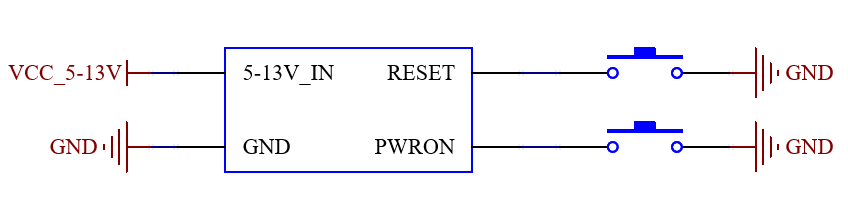 Refer to “Appendix IV. Minimum System Diagram” However, in most cases, it is recommended to connect some external peripherals beyond the minimal system. For instance, connecting a debug serial port can be used to view printed information, while reserving an OTG interface allows for debugging information output. After completing these steps, you can then add the required functions based on the SoM’s default interface definition provided by Forlinx.
For the design of the SoM’s peripheral circuits, please refer to Section 3.5, “OK3576-C Carrier Board Description”.
2.8.2 SoM Anti-Vibration Design Guidelines
It uses M2 pre-applied nylon (NYLOK) screws to fix the SoM through the pre-drilled mounting holes at its four corners. The fastening torque should be controlled at 0.15 N·m. The specific assembly diagram is as follows:
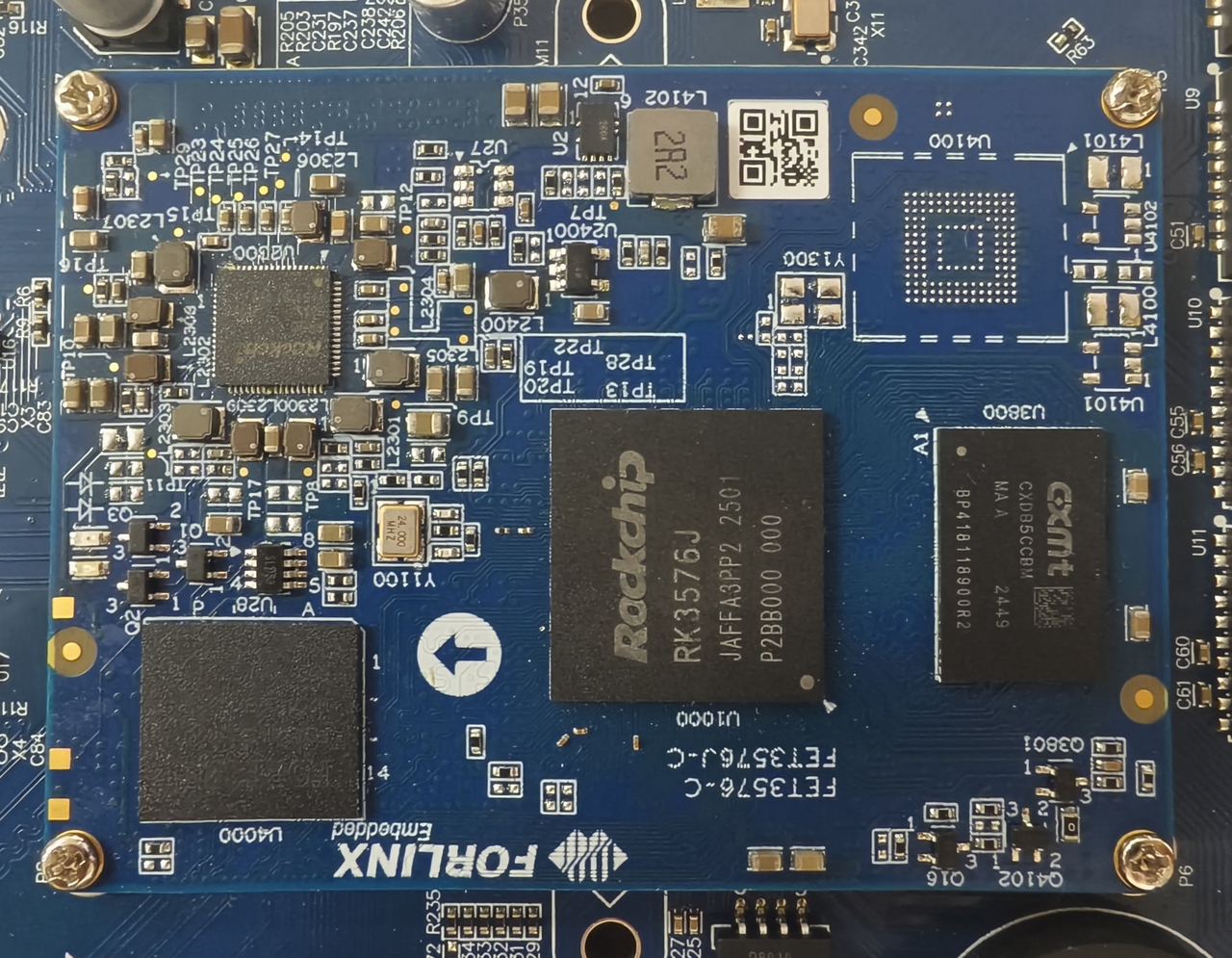
This design has been validated by vibration tests specified in the GB/T 2423.10-2008 / IEC 60068-2-6:1995 standards, achieving the following levels: Frequency range: 10 Hz ~ 150 Hz
Test axes: X, Y, Z axes
Displacement amplitude: 0.35 mm
Acceleration amplitude: 5 g
The performance data listed in this manual are derived from tests conducted in a standard laboratory environment and are applicable to general industrial equipment. Performance in actual applications may vary due to factors such as installation methods and combined stresses.
3. OK3576-C & OK3576-C21 Embedded Development Platform Description
3.1 OK3576-C / OK3576-C21 Development Board Interface Diagram
The FET3576-C and FET3576-C2 SoMs share the same pin definitions and can be used with the same carrier board. When the FET3576-C is combined with the OK3576-C carrier board, the development board is named the OK3576-C Development Board. When the FET3576-C2 is combined with the OK3576-C carrier board, the development board is named the OK3576-C21 Development Board.
Connection method: Board-to-board.
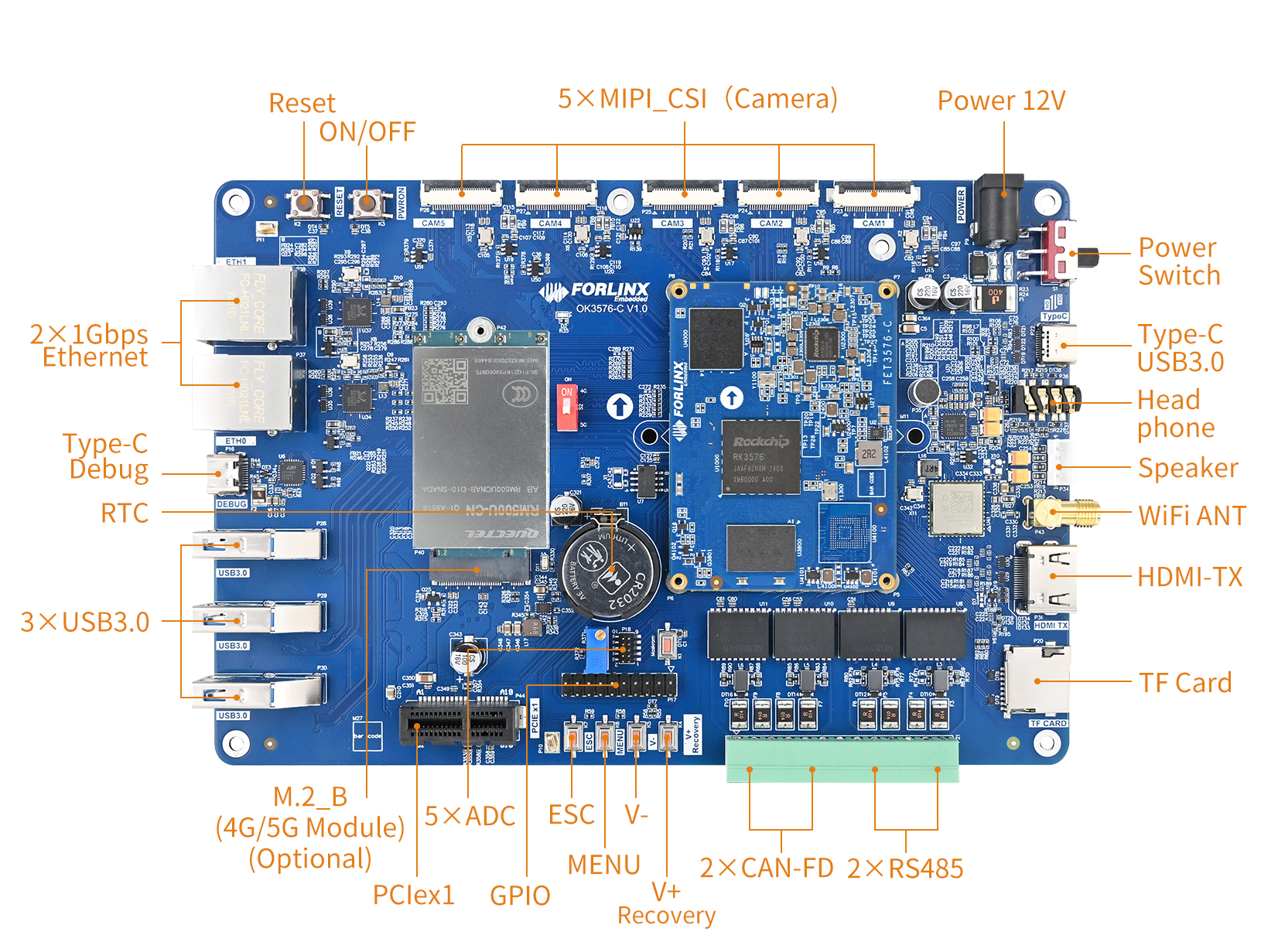
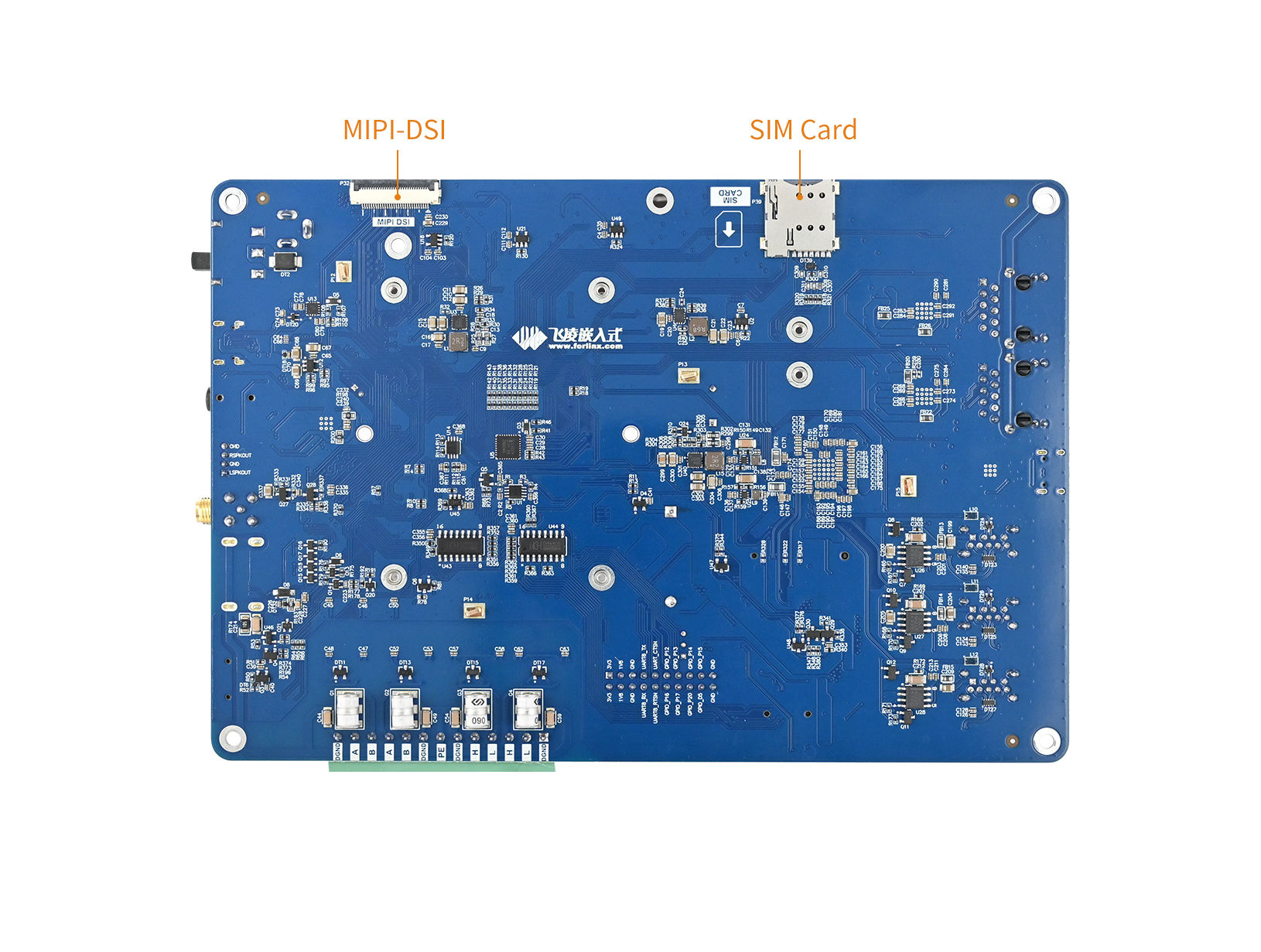
3.2 OK3576-C-OK3576-C21 Development Board Dimension Diagram
OK3576-C/OK3576-C21 Development Board Dimension Diagram:
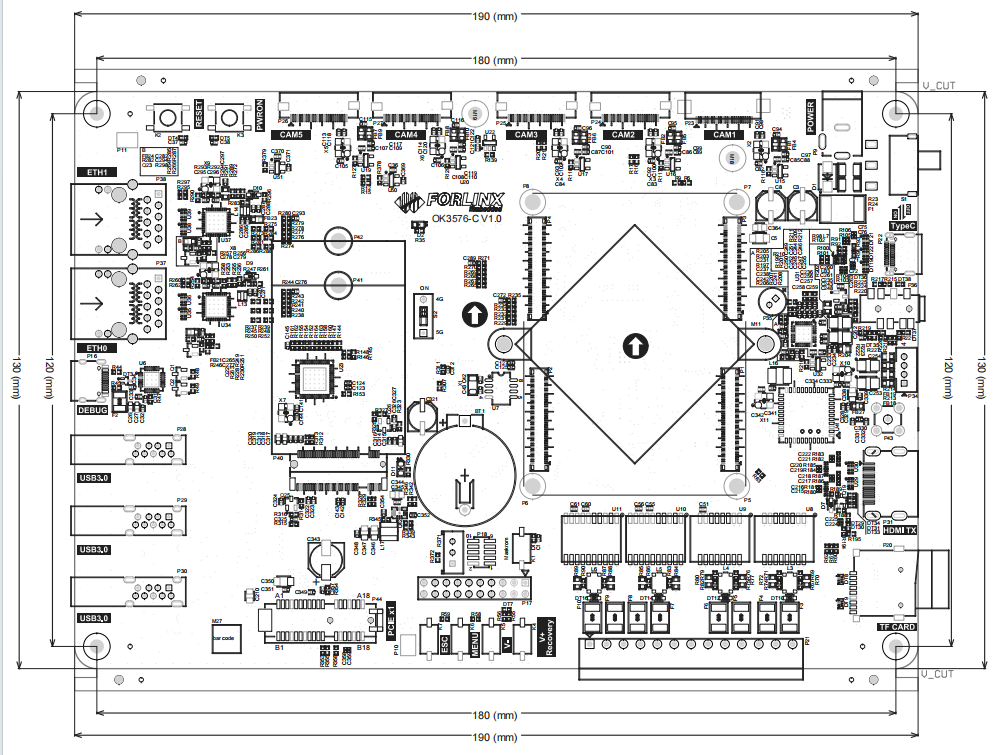
Carrier Board PCB size: 130mm × 190mm, for more detailed dimensions, please refer to the user information DXF document;
Mounting hole dimensions: Pitch: 120mm × 180mm, hole diameter: 3.2mm;
Plate making process: 1.6mm thickness, 4-layer PCB;
Power Voltage: DC 12V
Antenna board is used for installing and fixing 4G and 5G antennas, with overall dimension of 20mm × 140mm. See the following figure for more detailed dimensions:
The OK3576-C carrier board is equipped with two mounting holes for heat sinks (3.2 mm in diameter). You may choose to install a heat sink according to the on-site environment. Please add a insulating thermal pad between the contact surface of the heat sink and the SoM. Recommended heat sink: 38mm × 38mm × 10mm. See below for details.
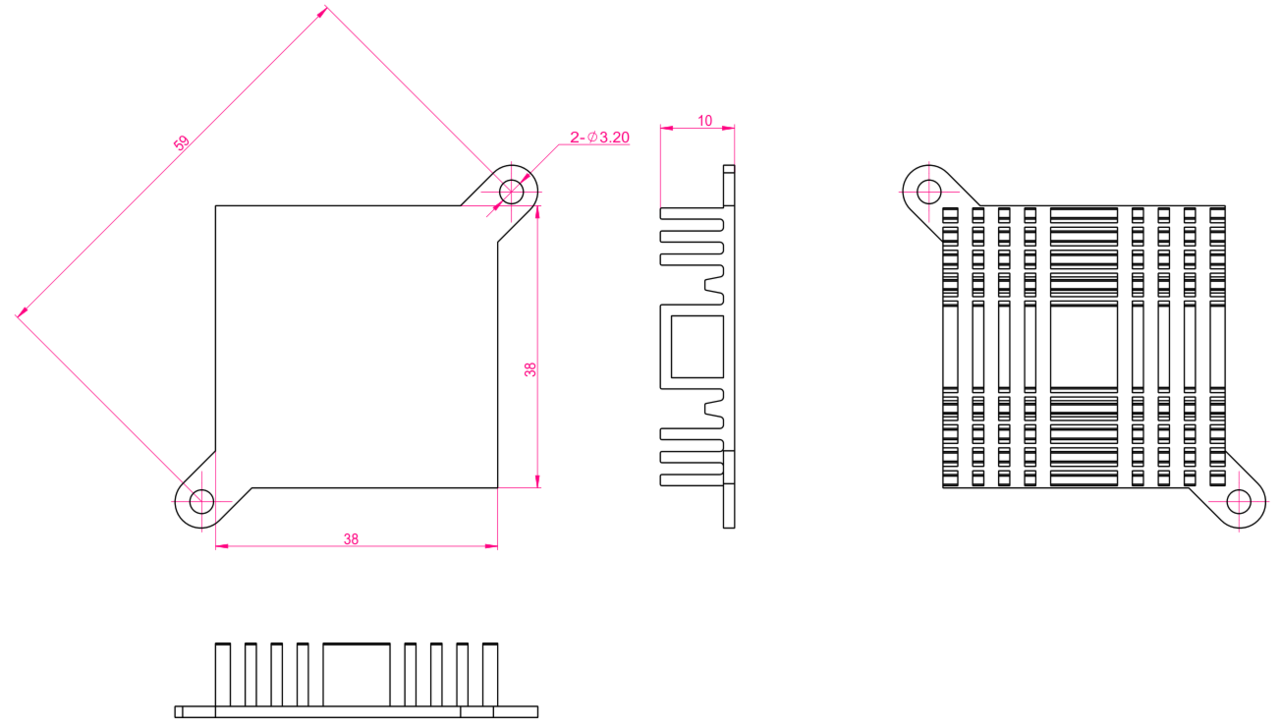
3.3 Naming Rules
ABC-D+IK:M
Field |
Field Description |
Value |
Description |
|---|---|---|---|
A |
Grade |
PC |
Prototype Sample |
Blank |
Mass Production |
||
B |
Product Line Identification |
OK |
Forlinx Embedded development board |
C |
CPU Name |
RK3576 |
RK3576 |
- |
Segment Identification |
- |
|
D |
Connection |
Cx |
Board to board connector |
+ |
Segment Identification |
+ |
The configuration parameter section follows this identifier. |
I |
Operation Temperature |
I |
-40 to 85℃ |
K |
PCB Version |
10 |
V1.0 |
xx |
Vx.x |
||
:M |
Internal Identification of the Manufacturer |
:X |
This is the internal identification of the manufacturer and has no impact on the use. |
3.4 Carrier Board Interfaces
Function |
Quantity |
Parameter |
|---|---|---|
MIPI CSI |
5 |
1 x MIPI DPHY V2.0 4-lane interface, supporting up to 4.5 Gbps per lane; Connected via a 26-pin FPC socket; |
4 x MIPI DPHY V1.2 2-lane interfaces, supporting up to 2.4 Gbps per lane; |
||
MIPI DSI |
1 |
The MIPI interface supports 4-lane output, with a maximum resolution of 2560 x 1600@60Hz. |
Compatible with Forlinx’s 7-inch MIPI screen, featuring a resolution of 1024x 600@30fps. |
||
HDMI TX |
1 |
Connected via a standard HDMI socket. |
HDMI v2.1 supports up to 4K@120Hz. |
||
DP TX |
1 |
1 x DP in combination with USB 3.1 Gen1, led out through Type-C connector. |
DisplayPort v1.4, up to 4K@120Hz. |
||
USB3.1 Gen1 |
1 |
Routed through a Type-C connector. |
Combined with DP TX. |
||
USB3.0 HOST |
3 |
Led out through 3 x Type-A USB |
PCIe2.0 |
1 |
Led out via PCIe X 1 slot: |
Supports a data rate of 5Gbps. |
||
Ethernet |
2 |
Routed out via 2 x RJ45; |
Supports data transmission rates of 10/100/1000 Mbps. |
||
TF Card |
1 |
TF card is available, rate up to 150MHz, support SDR104 mode. |
Audio |
1 |
Codec chip on board, support headphone output, MIC input level Speaker output and other functions. |
CAN |
2 |
Two CAN buses are routed out from the CAN transceiver. |
Compliy with the CAN and CAN FD specifications. |
||
RS485 |
2 |
2 x RS485 CAN bus routed out through RS485 transceiver. |
UART |
1 |
Routed via a 2.44mm pitch connector. |
Baud rates up to 4Mbps. |
||
4G/5G |
1 |
Supports M.2 packaged 4G/5G modules. |
WIFI&BT |
1 |
On-board AW-CM358SM-WIFI&BT module. |
WIFI 2.4G/5G , bluetooth 5.0. |
||
ADC |
5 |
Exposed/connected via a 2.44mm pitch header. |
A 12-bit single-ended input SAR-ADC, with a sampling rate of up to 1 MS/s. |
||
RTC |
1 |
On-board RTC chip and battery socket; |
GPIO |
8 |
A 12-bit single-ended input SAR-ADC, with a sampling rate of up to 1 MS/s. |
Note:
The parameters in the table are the theoretical values of hardware design or CPU;
“TBD” means the function has not been developed in this phase.
3.5 OK3576-C/ OK3576-C21 Carrier Board Description
Note:
The component UID with “_DNP” mark in the diagram below represents it is not soldered by default;
The schematics in this section are provided for convenience and may be subject to changes. Please ensure your design strictly follows the original schematic files.
3.5.1 Carrier Board Power
It uses a 12V power adapter for the power supply, and the power connector is a DC005 socket. The DIP switch S1 serves as the power switch for the development board. Move the switch in the direction indicated on the carrier board to turn it on or off. A TVS diode is connected in parallel after switch S1 for ESD protection. Fuse F1 provides overcurrent protection. Diode D1 works alongside F1 to offer reverse-connection protection. VCC12V_DCIN supplies power to both the FET3576 SoM and other peripherals on the carrier board.
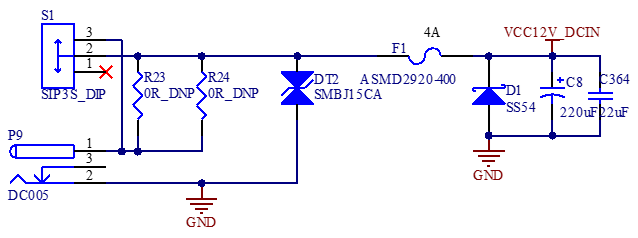
VCC12V_DCIN is stepped down to VCC_5V via U3 (DC-DC converter). VCC_5V powers other peripherals on the carrier board. (Note: When selecting the 12V-to-5V DC-DC chip, ensure its output power is sufficiently high. It is recommended to support an output current of 6A or above to guarantee adequate current supply for downstream stages.)
After the SoM starts up normally with 12V power supply, it outputs a high level via the CARRIER_BOARD_EN pin to enable U3, thereby outputting VCC_5V to power certain peripherals on the development board. (This signal level is 3.3V with a drive capability of 10K pull-up. If the enabled device’s enable pin requires drive capability beyond this range, buffers or gate circuits should be added to enhance drive capability, ensuring proper power-up of both the SoM and the carrier board.)
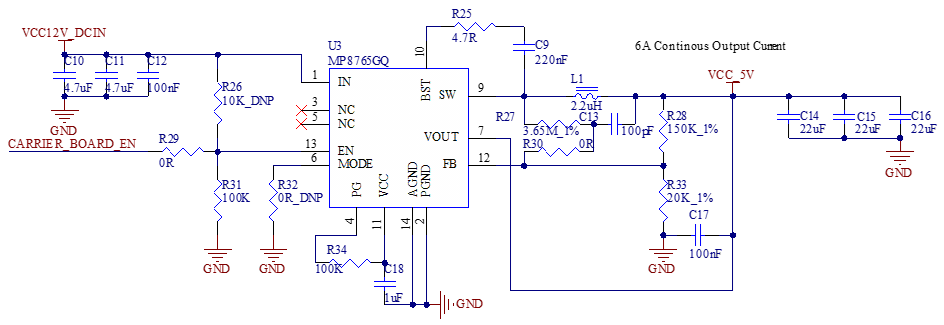
VCC_5V is further stepped down to VCC_3V3 via U4 (DC-DC converter). VCC_3V3 supplies power to certain devices on the development board.
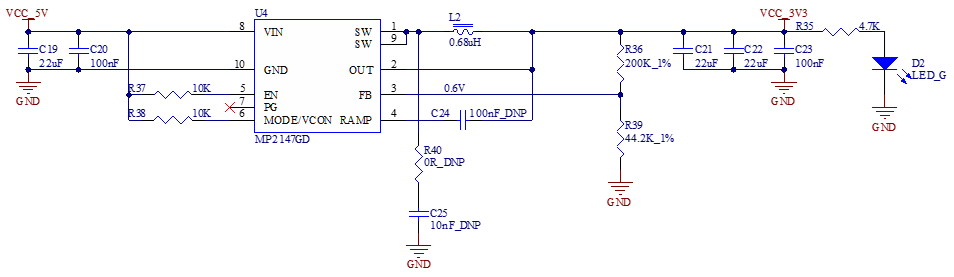
VCC_3V3 is then stepped down to VCC_1V8 via U2 (LDO). VCC_1V8 supplies power to certain devices on the development board.
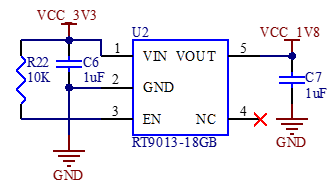
Note:
When designing independently, please strictly adhere to the power-up sequencing;
The selection of step-up/step-down converter chips and their external layout must refer to the corresponding chip manuals to ensure proper power return paths.
3.5.2 Reset and On/Off Signal
RESET_L is the reset signal input for the SoM; for ease of debugging, it is connected to a pushbutton.
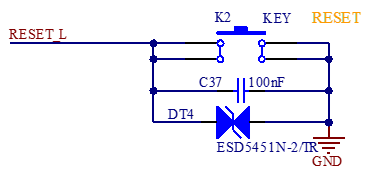
PWRON_L serves as the power-on/power-off signal input for the SoM; for ease of debugging, it is connected to a pushbutton.
Additionally, one 2.54mm pitch terminal block is reserved for the PWRON_L signal, which is left unpopulated by default to facilitate expansion.
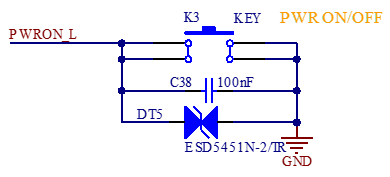
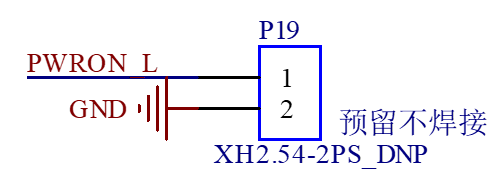
Please pay attention to the PMIC_VDC signal on pin P3_10 of the System on Module (SoM) connector. This signal can toggle between two power-on modes for the SoM: automatic power-on boot or button-triggered boot.
On the OK3576-C, this functionality is controlled by the presence of resistor R331:
If R331 is not installed (floating pin), the SoM will automatically boot upon power-up (default configuration);
If R331 is installed (pulling the pin low), the SoM will not boot immediately after power-on; instead, it will start only after the PWRON_L button is pressed.
3.5.3 Boot Configuration
RK3576 supports multiple boot modes. After the chip reset is completed, the built-in boot code can boot from the following interface devices. The specific boot sequence can be selected according to actual application requirements:
·Serial Flash(FSPI0, FSPI1_M0, FSPI1_M1)
·eMMC
·UFS
·SDMMC0 Card
If no boot code is detected in the above devices, system code can be downloaded to these devices via the USB2.0 OTG0 interface using the USB2_OTG0_DP/DM signals. It also supports firmware burning through the USB 3.2 Gen1x1 OTG0 interface using the USB3_OTG0_SSRX1P/N and USB3_OTG0_SSTX1P/N signals. Note: If USB3.0 firmware upgrade is required while supporting 2‑Lane DP, the USB3.2 Gen1x1 OTG0 + DP 2‑Lane (Swap ON) solution must be adopted.
Boot Sequence Selection:
The boot order of the RK3576 can be configured using the SARADC_VIN0_BOOT Pin (PIN: P1_28). By applying different pull-up or pull-down resistor values to this pin, various peripheral boot sequences can be set. The hardware design supports 11 boot modes (Config1–Config11), which are defined below. It is important to select the appropriate configuration based on the specific application requirements.
Table 3.5.3.1 Boot Sequence Configuration
Item |
Rup |
Rdown |
ADC |
BOOT MODE |
|---|---|---|---|---|
Config1 |
DNP |
10K |
0 |
USB (Maskrom mode) |
Config2 |
10K |
1.13K |
416 |
FSPI0→USB |
Confi 3 |
10K |
2.49K |
816 |
FSPI1_M0→EMMC→USB |
Config4 |
10K |
4.3K |
1231 |
FSPI1_M1→EMMC→USB |
Config5 |
10K |
6.8K |
1658 |
FSPI0→UFS→USB |
Config6 |
10K |
10K |
2048 |
FSPI1_M0→UFS→USB |
Config7 |
10K |
14.7K |
2437 |
UFS→USB |
Config8 |
10K |
23.2K |
2862 |
UFS→SDMMC0→USB |
Config9 |
10K |
40.2K |
3279 |
RFU |
Config10 |
10K |
88.7K |
3680 |
EMMC→SDMMC0→USB |
Config11 |
10K |
DNP |
4095 |
EMMC→USB |
On the SoM, SARADC_VIN0_BOOT is configured with a 10 kΩ pull‑up resistor, so the SoM boots from eMMC by default. A pull‑down resistor can be added on the carrier baord to implement other boot sequences. According to the Config1 setting above, OK3576‑C connects SARADC_VIN0_BOOT to GND via a tactile switch to enable Maskrom mode.
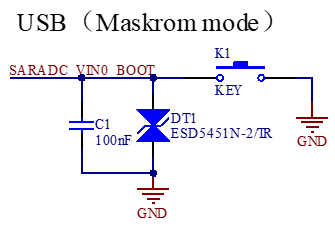
SARADC_VIN1 is used to enter Recovery state by shorting to GND. The SoM pulls it up to 1.8 V through a 10 kΩ resistor. On OK3576-C, the key array is of parallel type, and the input key value can be adjusted by increasing or decreasing the keys and adjusting the proportion of the divider resistor, so as to realize multi-key input to meet the customer’s product requirements; it is recommended in the design that the key value of any two keys must be greater than ± 35, that is, the center voltage difference must be greater than 123 mV. As shown in the figure:
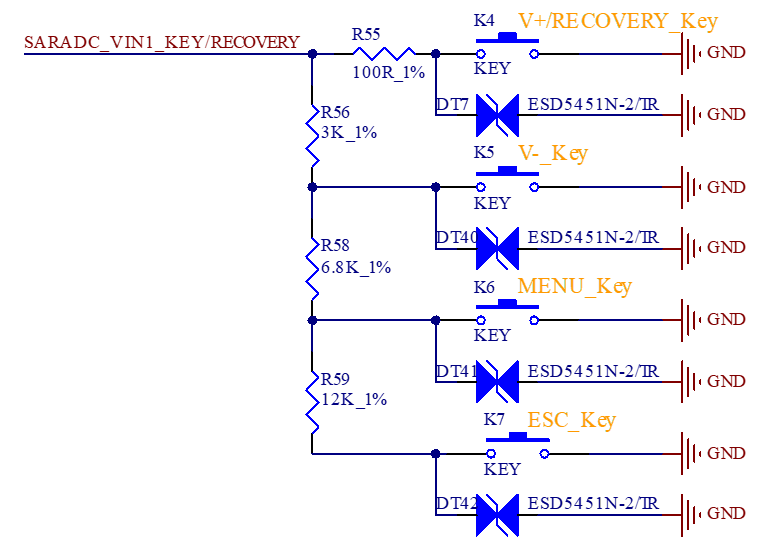
Note:
When doing key acquisition, ESD protection is required near the keys. And 0 key value must be connected in series with a 100ohm resistor to strengthen the anti-static surge capacity (If there is only one button, ESD must be close to the button, ESD → 100ohm resistor → 1nF → chip pin). Where there are multiple buttons, place an ESD tube near each button.
3.5.4 System Initialization Configuration Signal
In FET3576, there is an important signal that affects the system boot configuration. It must be configured before power‑on and kept stable.
SDMMC0_DET_L (PIN: P3_90) (default function: SDMMC_DET): Determines whether the VCCIO1 power domain I/O is configured for SDMMC0 or JTAG functionality.
The JTAG and SDMMC functions of the FET3576 are multiplexed; the IOMUX function is switched via the SDMMC0_DET_L pin. Consequently, this pin must also be configured before power-up; otherwise, the absence of an output from the JTAG function will affect debugging during the boot phase, whilst the absence of an output from SDMMC0 will affect the SDMMC0 boot function.
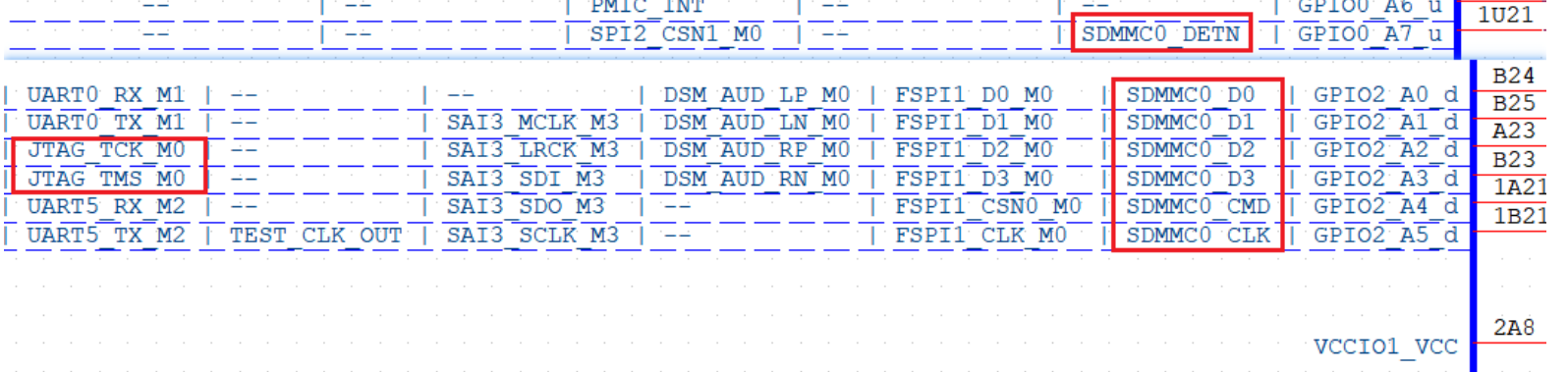
If this pin is detected as high, the corresponding I/O pin switches to JTAG mode.
When this pin detects low level (Most SD cards inserted will pull down this pin, if not need special treatment), the corresponding IO switches to SDMMC0 function.
After the system is up, it can be switched to have registers to control IOMUX, then the pin can be released.
For easy reference, the configuration status of this pin corresponds to its function shown as follows:
Table 3.5.4.1 FET3576 System Initialization Configuration Signal Description
Signal Name |
Internal Pull-up&down |
Description |
|---|---|---|
SDMMC0_DET_L |
Pull-up |
SDMMC/ARM JTAG Pin Multiplexing Selection Control Signal: |
3.5.5 JTAG and UART Debug Circuits
The JTAG interface on the RK3576 chip complies with the IEEE 1149.1 standard; a PC can connect to the DSTREAM emulator via SWD mode (two-wire mode) to debug the ARM core within the chip.
Used for emulators to debug the internal ARM Core.
The JTAG interface is described in the table below:
Table 3.5.5.1 FET3576 JTAG Debug Interface Signals
Signal Name |
Description |
|---|---|
JTAG_TCK_M0/M1 |
SWD Mode clock input |
JTAG_TMS_M0/M1 |
SWD Mode Data Input/Output |
The RK3576 has two JTAG multiplexes: JTAG_TCK_M0/JTAG_TMS_M0 is located in the VCCIO1 domain and is multiplexed with SDMMC0 via the IOMUX; JTAG_TCK_M1/JTAG_TMS_M1 is located in the PMUIO1 domain and is multiplexed with UART_Debug—UART0_M0. The IOMUX multiplexing configuration is shown in the figure below.
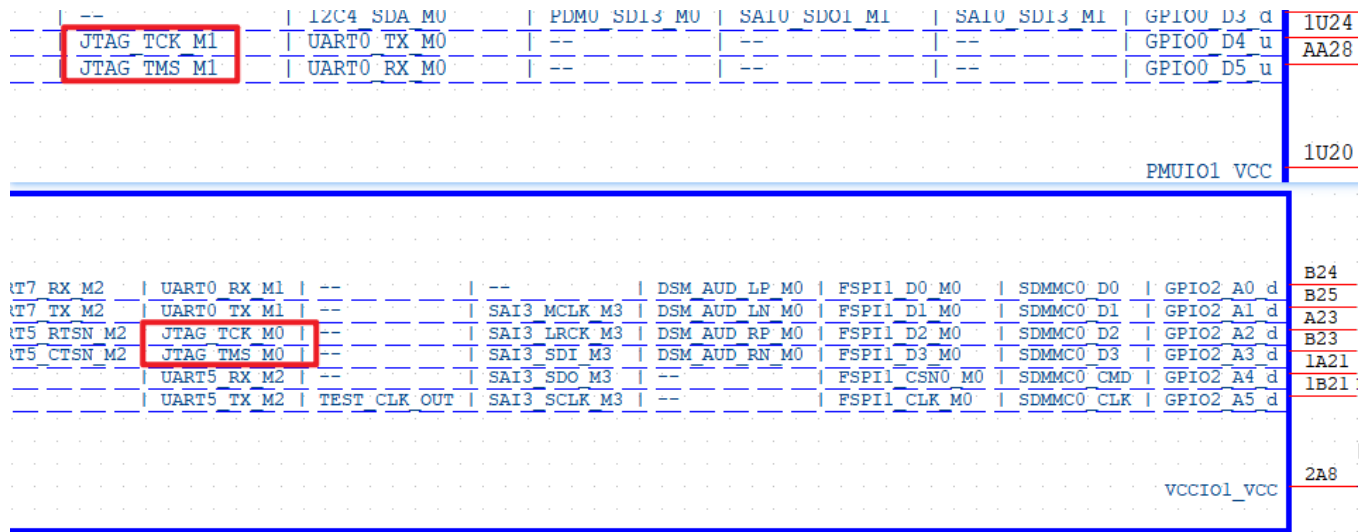
In FET3576, the default UART Debug selection is: UART0_TX_M0_DEBUG (P2_7) / UART0_RX_M0_DEBUG (P2_9). If the UART Debug signal is brought out via a plug-in connector, a series 100ohm resistor should be added, and a TVS diode should be placed near the connector.
For debugging, the OK3576-C/OK3576-C21 development board uses a USB-to-UART chip to convert the UART Debug signal into a USB signal, which is then output through a Type‑C socket. You can connect the P16 port of the OK3576-C to a PC using a USB Type‑A to USB Type‑C cable, and then install the CP2102 driver. The schematic is as follows:
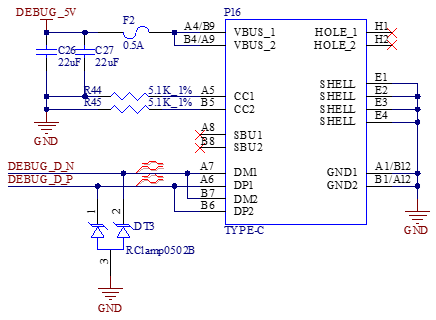
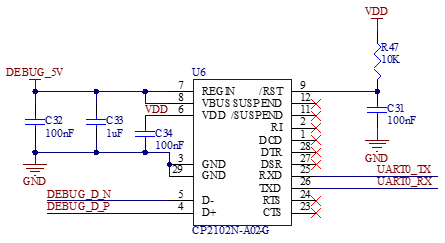
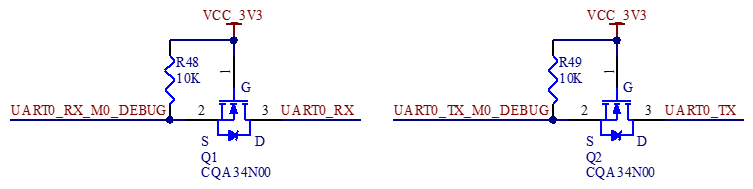
Note:
For future debugging convenience, route out these debug ports on custom carrier boards;
It is recommended to keep Q1 and Q2, which can effectively prevent the U6 current from flowing back to the CPU through UART0_TX/RX when the core board is not powered-up, affecting the startup and even causing damage.
3.5.6 IIC Expanded for IO
To route out more comprehensive interface expansion, the enable and reset signals on the carrier board are controlled by the I2C-to-IO converter chip U5. At the same time, the remaining spare IOs from U5 are led out through connector P17 to facilitate user-defined extensions, as shown in the schematic diagram below:
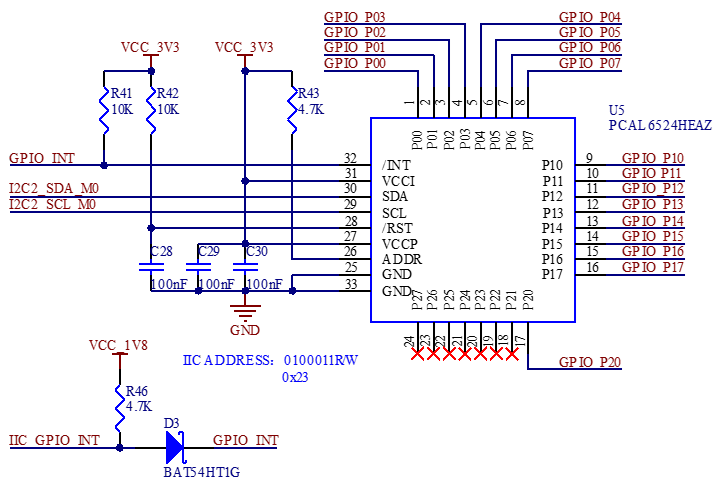
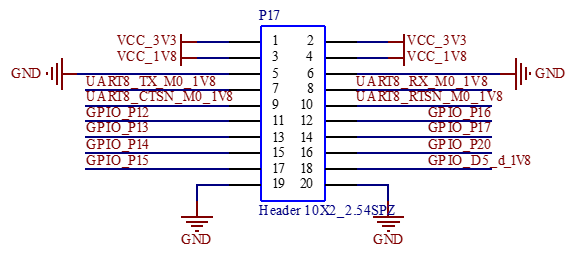
3.5.7 SARADC Interface
The signals VIN2, VIN4, VIN5, VIN6, and VIN7 are routed out through P18 from the OK3576-C and OK3576-C21. R371 is a variable resistor. By connecting the SARADC inputs (VIN2, VIN4, VIN5, VIN6, and VIN7) to pins 4, 6, 8, and 10 of P18, the voltage change can be monitored by the ADC while adjusting the resistance of the R371 variable resistor. As shown in the figure below:
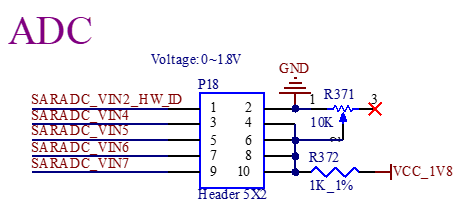
Note: When using the SARADC_VINx, a 1 nF capacitor must be added near the pin to eliminate jitter.
3.5.8 TF Card
The P20 socket on the carrier board is a TF card slot, which supports system boot-up and flashing.
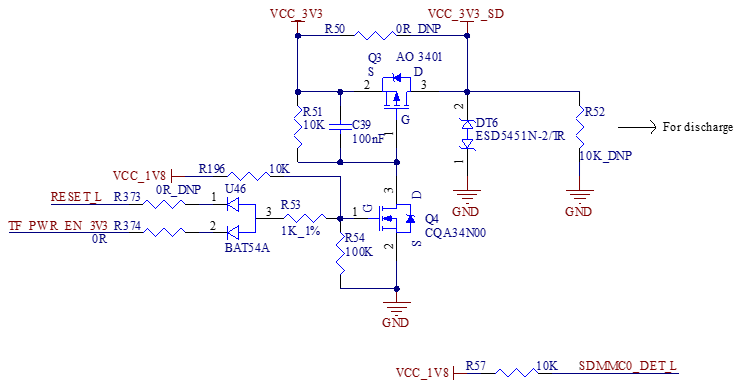
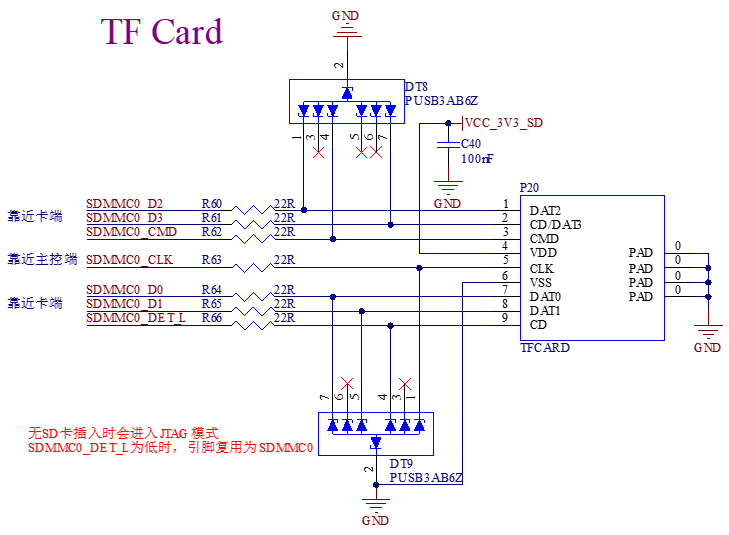
Note:
The power supply to the TF card must be controlled; refer to the carrier board circuit for implementation;
SDIO impedance requirements: Single‑ended impedance: 50ohm;
Signal length matching tolerance: ±50 mil.
3.5.9 RTC Circuit
The OK3576-C/OK3576-C21 features an on-board external RTC function to enable more accurate timing and lower power consumption. The schematic diagram is shown below:
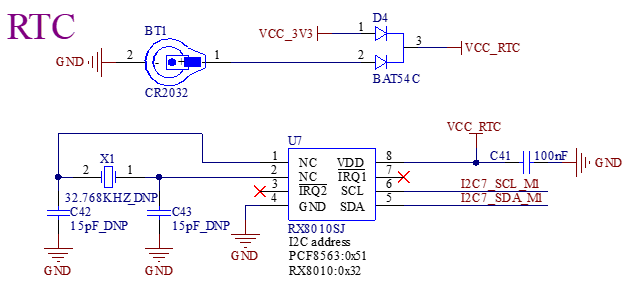
3.5.10 Ethernet Circuit
Supports 1000/100/10M adaptive network port, led out via RJ45.
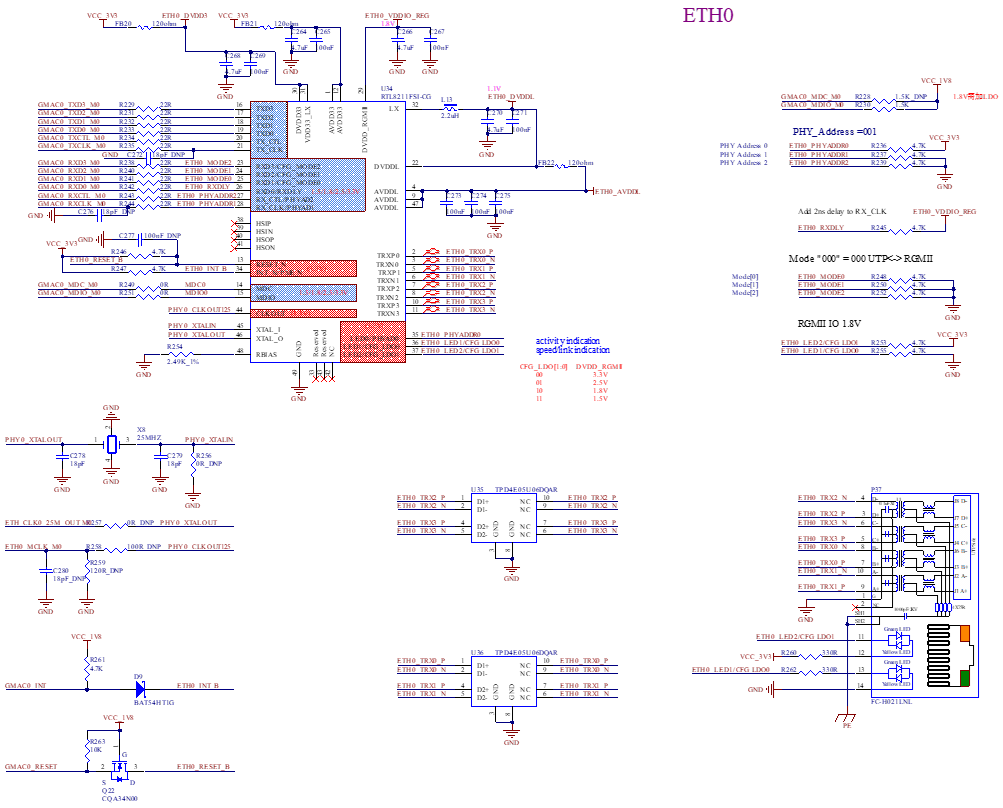
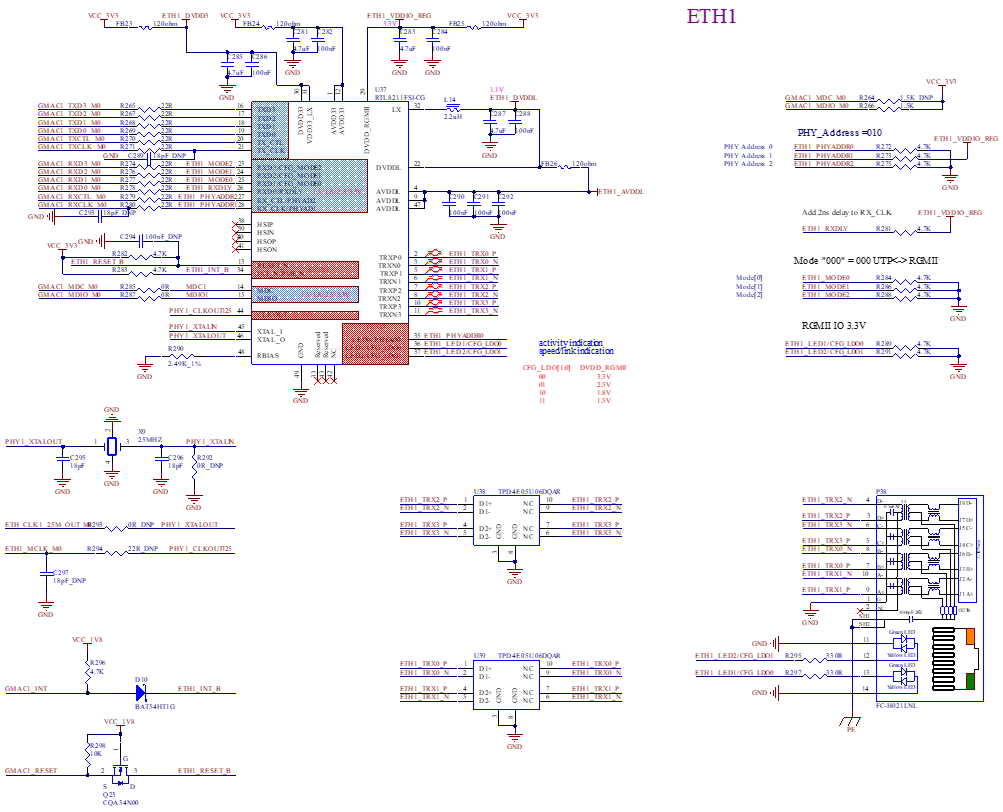
The RK3576 RGMII/RMII interface design is as follows:
Table 3.5.10.1 RK3576 RGMII/RMII Interface Design
Signal |
IO Type (chip-side) |
RGMII |
Signal Description |
RMII |
Signal Description |
|---|---|---|---|---|---|
GMACx_TXD[3:0] |
Output |
RGMIIxTXD[3:0] |
Data sending |
RMIIx_TXD[1:0] |
Data sending |
GMACx_TXCLK |
Output |
RGMIIx_TXCLK |
Data sending reference clock |
– |
– |
GMACx_TXCTL |
Output |
RGMIIx_TXCTL |
Data sending enable (rising edge) and data sending error (falling edge) |
RMIIx_TXEN |
Data sending enable signal |
GMACx_RXD[3:0] |
Input |
RGMIIx_RXD[3:0] |
Data receiving |
RMIIx_RXD[1:0] |
Data receiving |
GMACx_RXCLK |
Input |
RGMIIx_RXCLK |
Data receiving reference clock |
– |
– |
GMACx_RXCTL |
Input |
RGMIIx_RXCTL |
Data receiving valid (rising edge) and data receiving error (falling edge) |
RMIIx_RXCTL |
Data receiving valid and carrier sense |
GMACx_MCLKINOUT |
Inputs/Outputs |
RGMIIx_MCLKI_ 125M |
PHY sends 125MHz to MAC, (optional) |
RMII_MCLKIN_50M or RMII_MCLKOUT_50M |
RMII data sending and receiving reference clock |
ETHx_REFCLKO_ 25M |
Output |
ETHx_REFCLK_ 25M |
RK3576 provides 25MHz clock to replace PHY crystal |
ETHx_REFCLKO_ 25M |
RK3576 provides 25MHz clock to replace PHY crystal |
GMACx_MDC |
Output |
RGMIIx_MDC |
Managing the data clock |
RMIIx_MDC |
Managing the data clock |
GMACx_MDIO |
Inputs/Outputs |
RGMIIx_MDIO |
Managing data output/input |
RMIIx_MDIO |
Managing data output/input |
In RGMII mode, the internal TX/RX clock path of RK3576 chip integrates delayline, which supports adjustment; default configuration of the reference chart: the timing between TXCLK and data is controlled by the MAC, the timing between RXCLK and data is controlled by PHY(If using RTL8211F/FI, i.e. RXCLK, 2nS delay is enabled by default, and other PHYs should note this configuration);
The GMAC0 interface operates at 1.8V only, whilst the GMAC1 interface operates at 3.3V by default (if you need to change this to 1.8V, please contact Forlinx). Please ensure that the supply voltage of the RGMII signal power domain on the PHY chip matches the GMACx interface voltage;
Ethernet PHY Reset signal needs to be controlled by GPIO, and the level of GPIO must match the PHY IO level; 100nF capacitor must be added near the PHY pin to strengthen the anti-static capability, note: the reset pin of RTL8211F/FI only supports 3.3V level;
TXD0- TXD3, TXCLK, TXEN need to reserve 0ohm resistors at the FET3576 to improve signal quality according to actual situation;
RXD0- RXD3, RXCLK, RXDV need to be connected with 22ohm resistors in series at the PHY end to improve the signal quality;
When PHY uses an external crystal, please select the crystal capacitance according to the load capacitance value of the actual crystal used, and control the frequency deviation within ±20ppm;
The RSET pin of RTL8211F/FI has an external resistance of 2.49K ohm with an accuracy of 1%, which must not be modified at will;
MDIO must be externally added with a pull-up resistor (recommended 1.5-1.8Kohm), and the pull-up power supply must be consistent with the IO power supply;
PCB Layout needs to ensure the integrity of the RGMII signal reference plane and the PHY chip peripheral power reference plane;
Equivalent length requirement: the receiving and sending of RGMII can be grouped into equal lengths, with an equal length requirement ≤ 12.4 mil;
Impedance requirements: single-ended 50ohm.
3.5.11 RS485 Interface
OK3576-C/ OK3576-C21 supports dual RS485 interfaces.
The RS485 transceiver chips U8 and U9 are TDH341S485S, which feature:
Isolation withstand voltage up to 5000 VDC.
Bus ESD protection capability up to 15 kV (HBM).
Transient immunity > 25 kV/µs. Meanwhile, the OK3576-C carrier board is compatible with a higher level of surge pulse group multi-level protection circuit, as shown in the following figure:
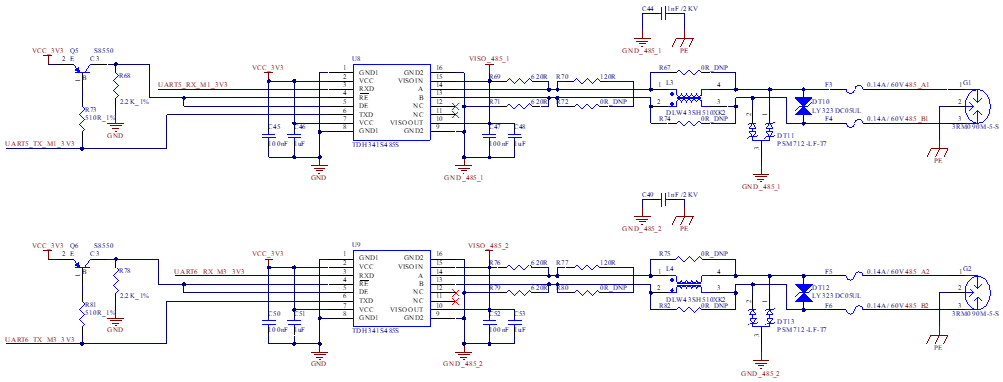
3.5.12 CAN Interface
The FET3576 SoM supports up to 2 x CAN, including CAN0 and CAN1. Among them, CAN1_RX_M2_3V3 and CAN1_TX_M2_3V3 are native CAN signals directly routed from the CPU to the carrier board. In contrast, CAN0_RX_M2_3V3 and CAN0_TX_M2_3V3 are routed from the CPU via a level-shifting chip. Note when using: The level-shifting chip features an internal 10K pull-up resistor, and the SoM additionally features an external 1.5K pull-up resistor. It is recommended to prioritize using the CAN control circuit design on the carrrier board. If there is a requirement to use a CAN transceiver with 5V I/O levels, the recommended circuit design is as follows. For the diode, a Schottky diode with a low forward voltage drop should be selected.
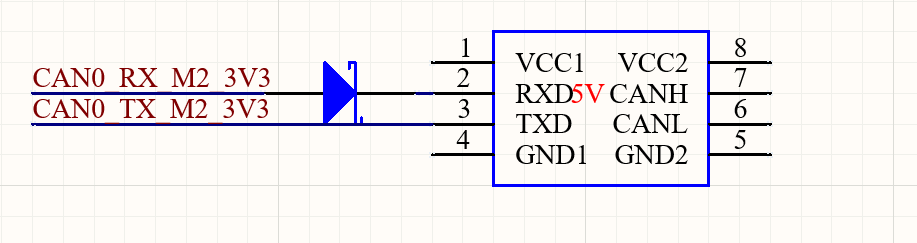
Compliant with CAN & CAN FD specifications, supports standard & extended frame transmission, 8192‑bit receive FIFO;
The OK3576-C/OK3576-C21 development board supports two CAN interfaces utilizing isolated CAN transceivers. The isolation withstand voltage is as high as 5000VDC, with bus electrostatic discharge protection capability reaching 15kV (HBM) and a transient immunity of >25kV/μs. Meanwhile, the OK357-C carrier board is compatible with a higher level of surge pulse group multi-level protection circuit, as shown in the following figure:
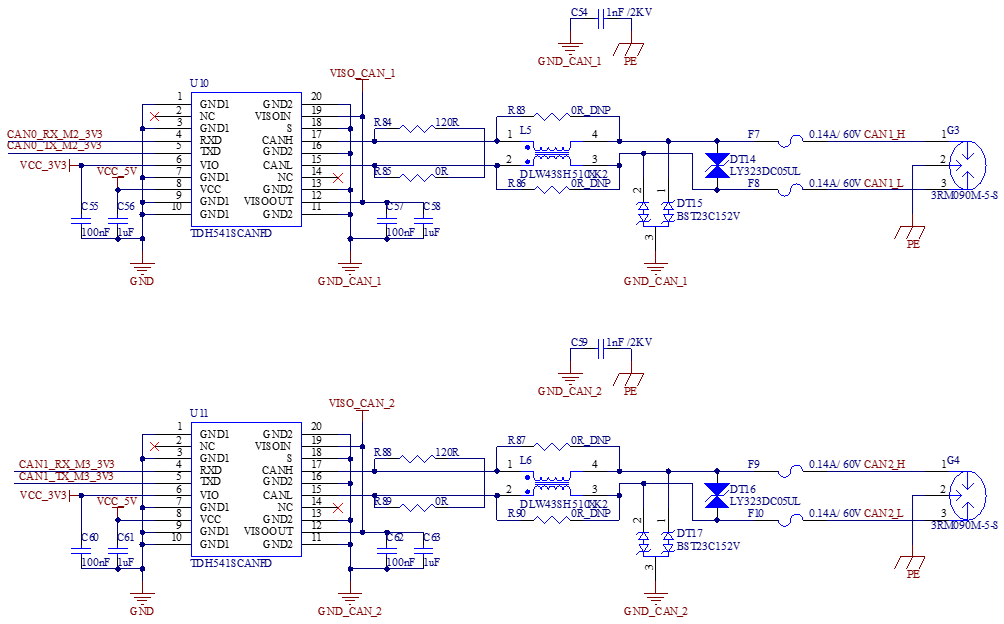
3.5.13 Audio
The OK3576-C/OK3576-C21 features an on-board I2S-interface Codec chip U31, supporting MIC input, headphone output, and 1W 8Ω speaker output. As shown in the figure below:
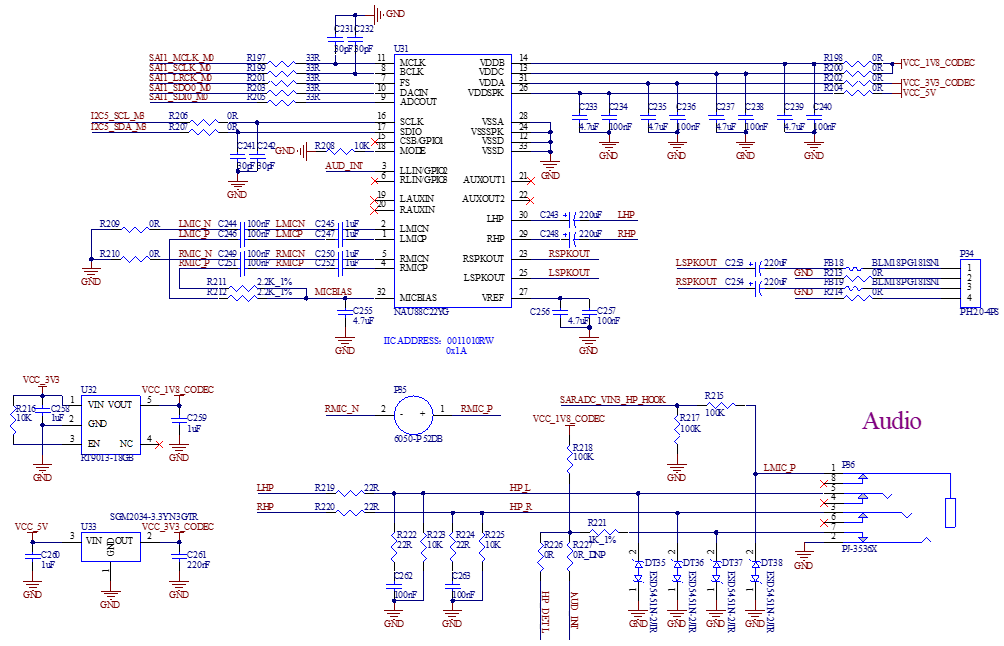
3.5.14 4G&5G Interface
The OK3576-C/OK3576-C21 integrates an M.2 Key-B interface, compatible with 4G and 5G modules. Since 4G and 5G modules operate at different supply voltages, the switch S2 must be toggled to select the corresponding power supply voltage.
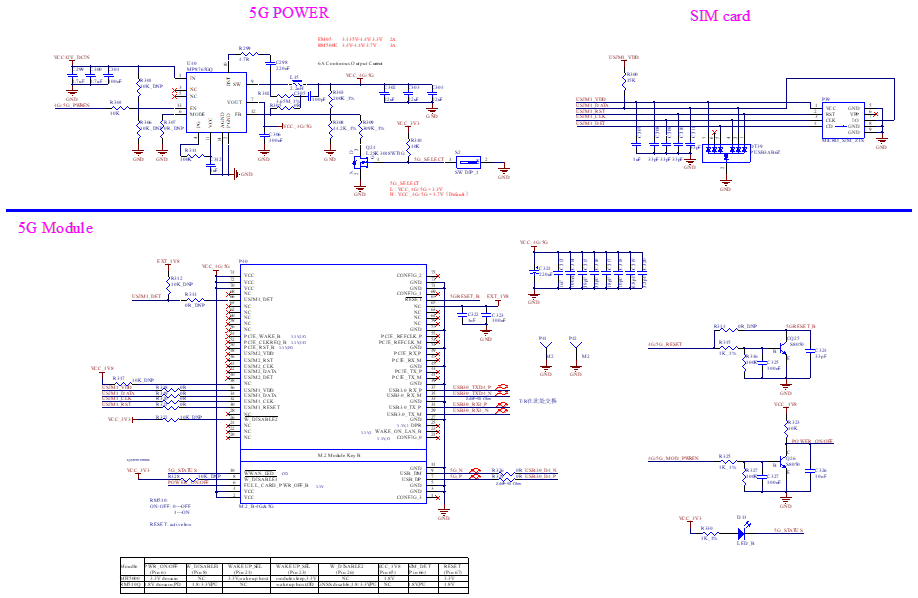
3.5.15 USB2.0/USB3.0_A/Type-C USB3.0 Circuit
The RK3576 chip integrates two USB3 OTG controllers. Both USB3 controllers embed USB2.0 OTG functionality.
The USB 3.0 OTG 0/DP 1.4 interface is used as follows:
The USB3.2 Gen1x1 OTG0 / DP1.4 form a Combo PHY. The internal multiplexing diagram between the USB3 OTG0 controller and the PHY is as shown below:
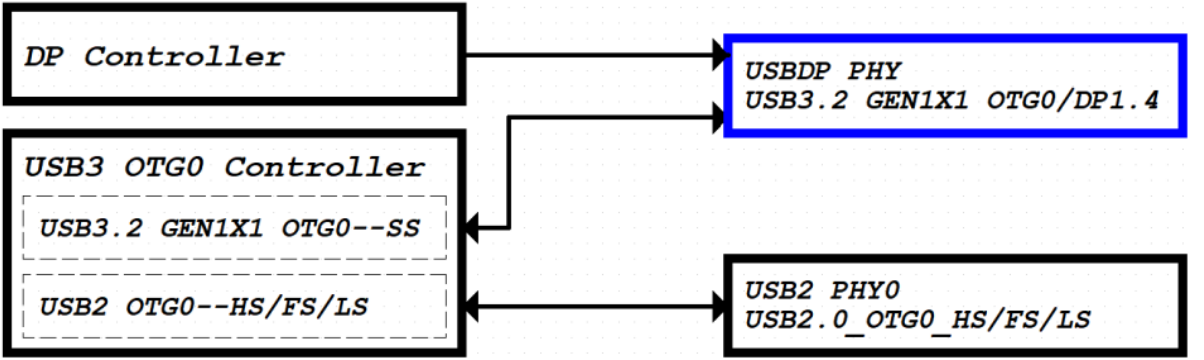
The USB 3.0 OTG controller supports SS, HS, FS and LS modes. The embedded USB 2.0 (HS, FS and LS) signals utilise a USB 2.0 OTG PHY; the signal names are shown within the red boxes in the figure below. The RK3576 uses this interface by default for Fireware downloads; please ensure that this interface is reserved for this purpose in your application.
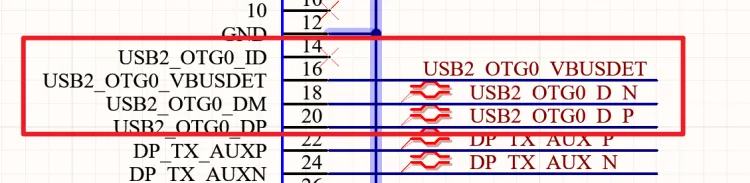
Note: USB2_OTG0_DP/USB2_OTG0_DM supports firmware download. If the product does not utilise this interface, it must be left accessible during debugging and production. Please note: USB2_OTG0_VBUSDET must also be connected!
The USB 3.2 SS signals (5 Gbps) are multiplexed with DP1.4, utilizing a USB/DP Combo PHY. The signals are indicated within the red boxes in the figure below.
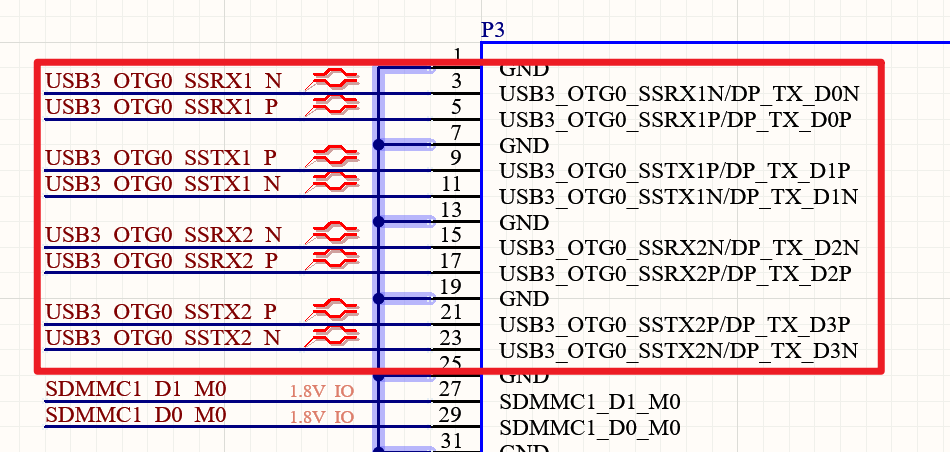
Since the USB3 OTG and USB2.0 OTG share the same USB3 controller, the USB3 and USB2.0 OTG functions can only operate simultaneously as either Device or Host. It is not possible for the USB3 OTG to act as a Host while the USB2.0 OTG acts as a Device, or vice versa.
The USB3 OTG0 Controller and DP1.4 Controller are combined into a complete Type-C port via the USB3/DP1.4 Combo PHY. This Combo PHY supports DisplayPort Alternate Mode. In DP mode, Lane0 and Lane2 act as TX; in USB mode, they act as RX. TX and RX share Lane0 and Lane2.
This USB3/DP1.4 Combo PHY supports lane swapping (SWAP). Therefore, a standard Type-C port can be configured in the following five ways:
Configuration 1: Type-C 4-Lane (with DP function)
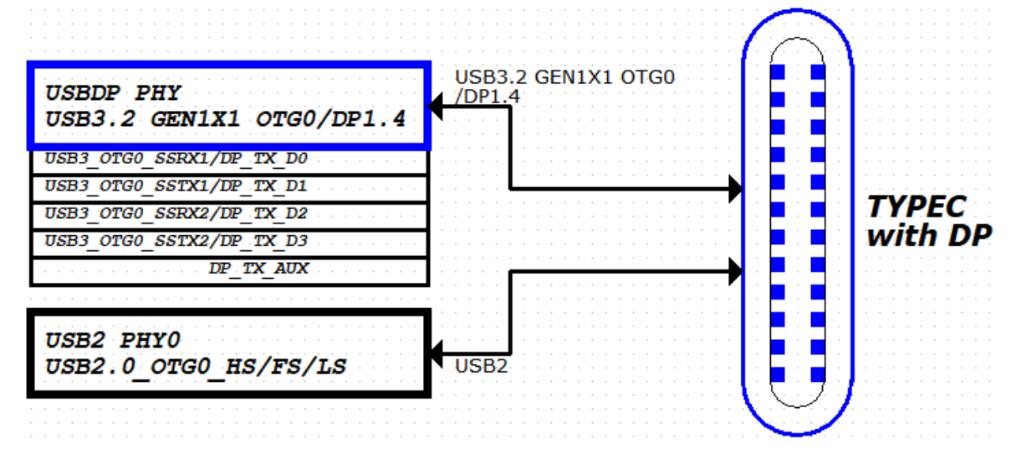
Configuration 2: USB2.0 OTG + DP1.4 4-Lane (Swap OFF)
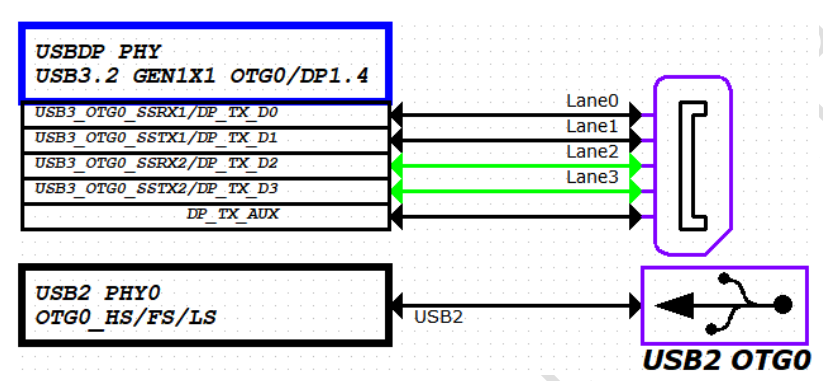
Configuration 3: USB2.0 OTG + DP1.4 4-Lane (Swap ON)
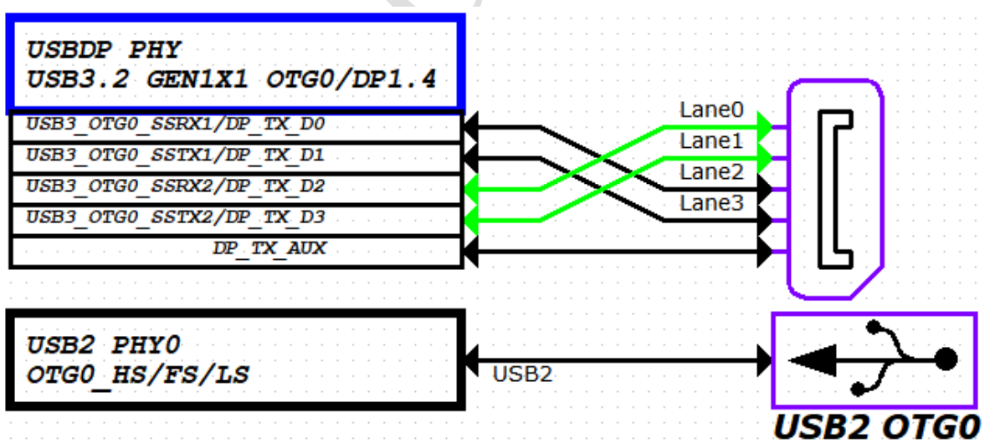
Configuration 4: USB3.2 Gen1x1 OTG0 + DP1.4 2-Lane (Swap OFF)
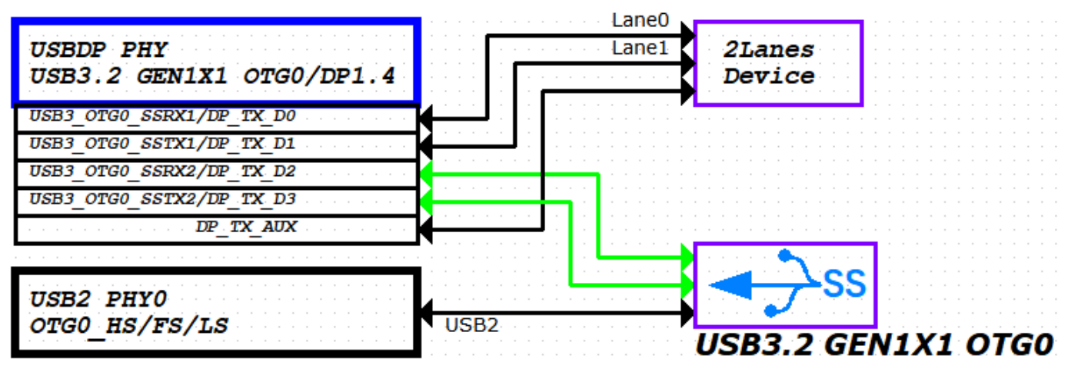
Configuration 5: USB3.2 Gen1x1 OTG0 + DP1.4 2-Lane (Swap ON)
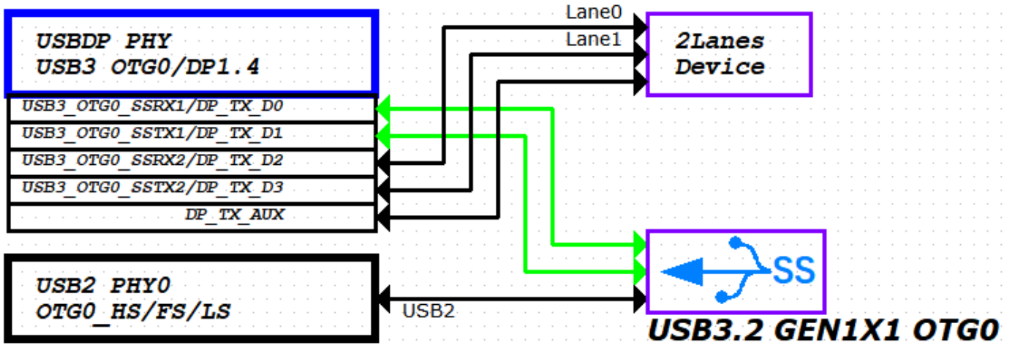
Note: The RK3576 supports firmware download via the USB3_OTG0_SSRX1P/N and USB3_OTG0_SSTX1P/N signals from the USB 3.2 Gen1x1 OTG0 interface. To support USB3.0 firmware upgrade and also require 2-Lane DP support, the USB3.2 Gen1x1 OTG0 + DP 2-Lane (Swap ON) configuration must be used.
The USB3 OTG1 interface is used as follows:
The PCIe1 / SATA1 / USB3 OTG1 form a Combo PHY1. The internal multiplexing diagram between the USB3 OTG1 controller and the PHY is as shown below:
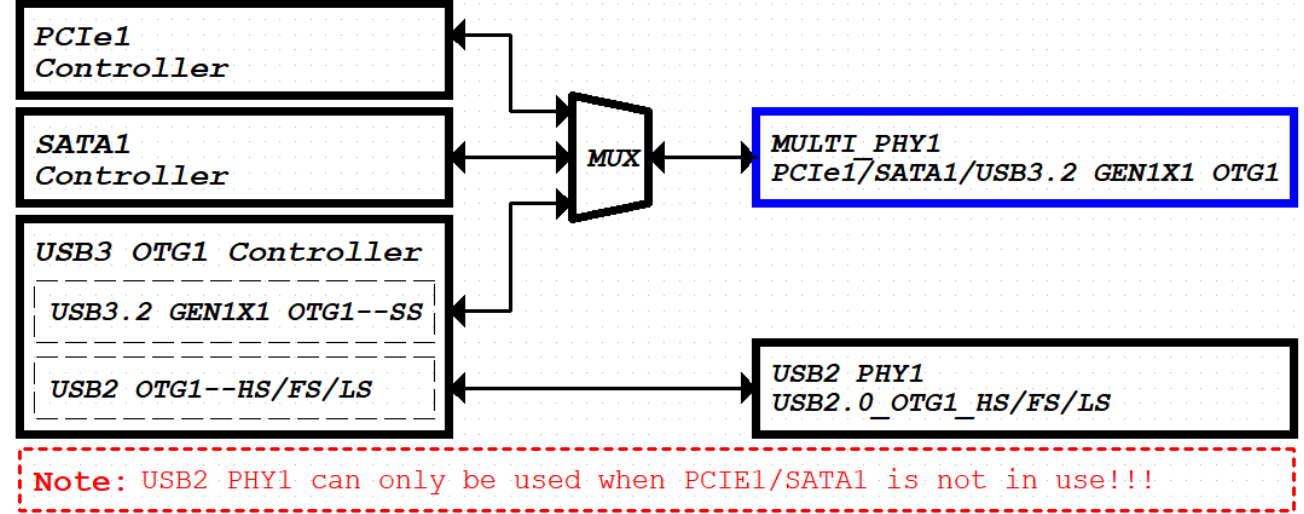
The USB3 OTG1 controller supports SS/HS/FS/LS. The embedded USB2.0 (HS/FS/LS) signals constitute the PCIe1/SATA1/USB3 OTG1 COMBO PHY1. The pin distribution is as follows:

The USB2.0 OTG1 pin assignment is as shown in the figure below.
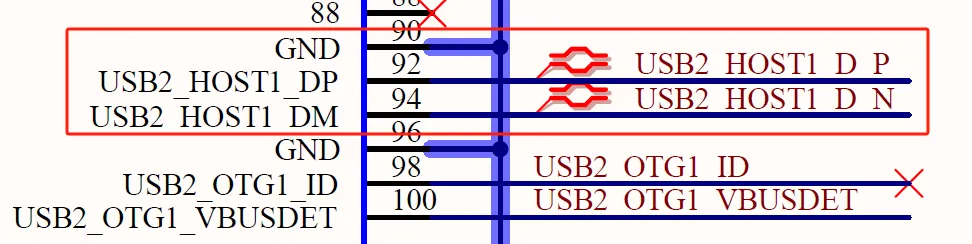
Since the USB3 OTG1 and USB2.0 OTG1 share the same USB3 controller, the USB3 and USB2.0 OTG1 functions can only operate simultaneously as either Device or Host. It is not possible for the USB3 OTG to act as a Host while the USB2.0 OTG acts as a Device, or vice versa.
Note: When the PCIe1/SATA1/USB3 OTG1 COMBO PHY1 is configured for PCIe or SATA functionality, the USB3 OTG1 function cannot be used, and the USB2.0 PHY1 also becomes unavailable. Therefore, to use USB2.0 OTG1, the PCIe1/SATA1/USB3 OTG1 COMBO PHY1 must be configured for USB3 functionality!
The application modes for USB3 OTG1 within the PCIe1/SATA1/USB3 OTG1 COMBO PHY1 are as follows:
Configuration 1: USB3.2 Gen1x1 OTG1
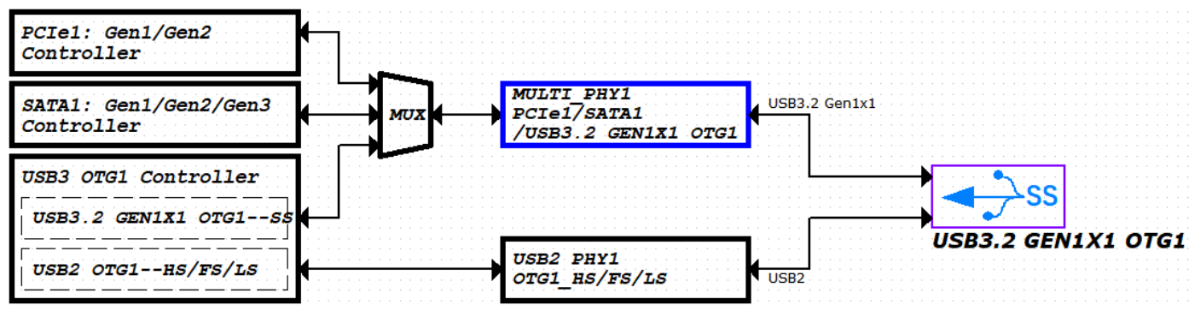
Configuration 2: USB2.0 OTG1
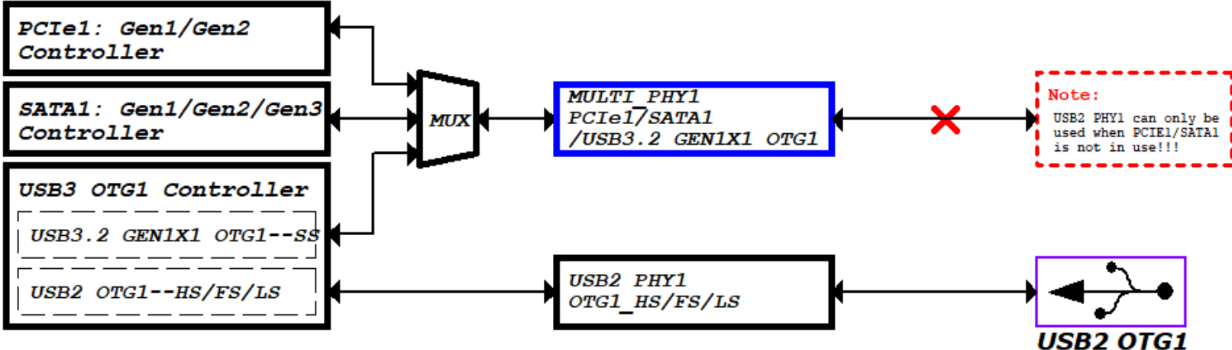
Configuration 3: Both USB2/USB3 unused (specific application methods for PCIe and SATA are detailed in the PCIe and SATA chapters).
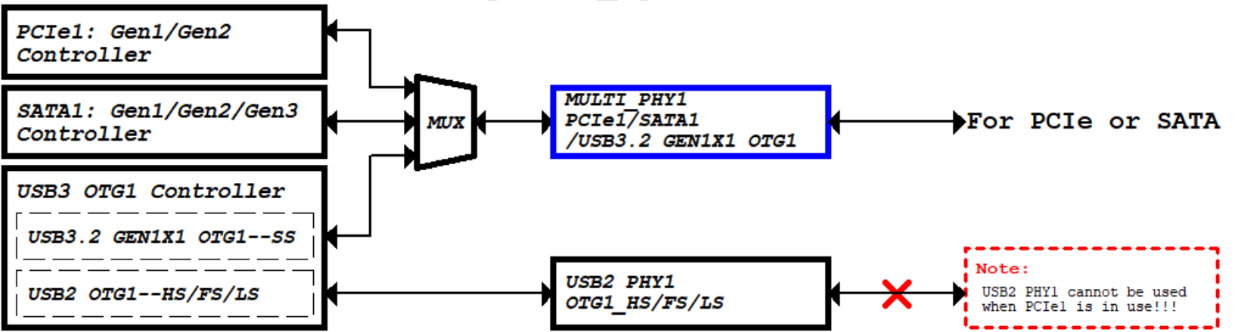
The OK3576-C/OK3576-C21 development board features a single USB Hub chip to convert one USB2.0/USB3.0_HOST channel into four channels. Three of the USB3.0 channels are connected to three Type-A interfaces for customer use, each capable of providing a maximum 1A output current with current-limiting switch protection. The remaining USB3.0 channel is provided for the 4G & 5G module.
The FET3576 supports one USB/DP combo interface, supporting USB 3.2 Gen1x1 and DisplayPort v1.4. On the OK3576-C carrier board, this is implemented as a standard Type-C USB 3.0 full-featured interface, supporting both data transfer and DP display output.
The figure below shows the circuit for the USB3.0 Hub section:
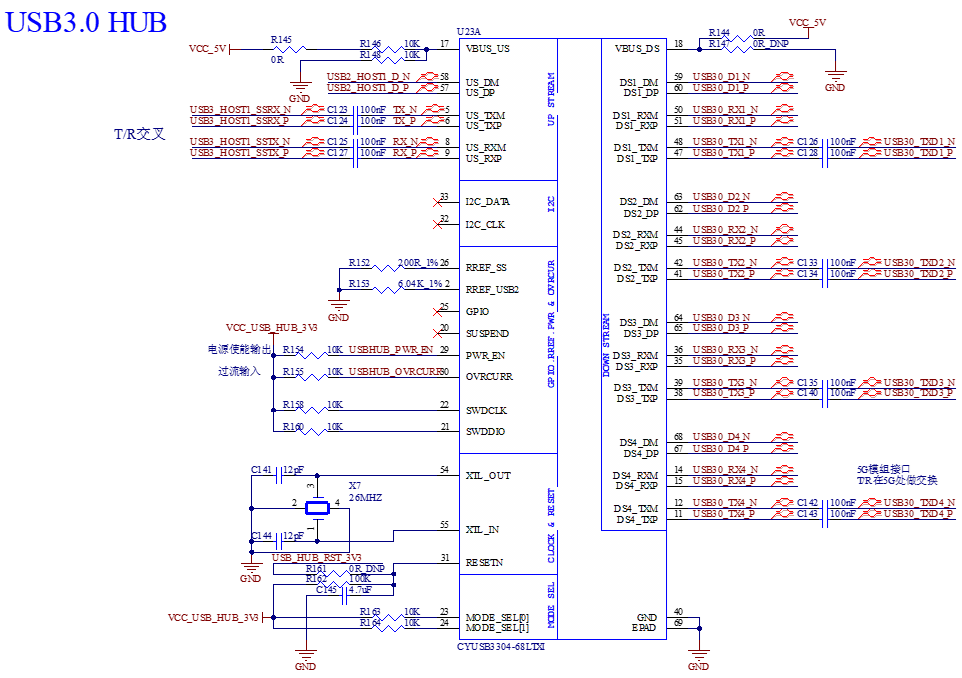
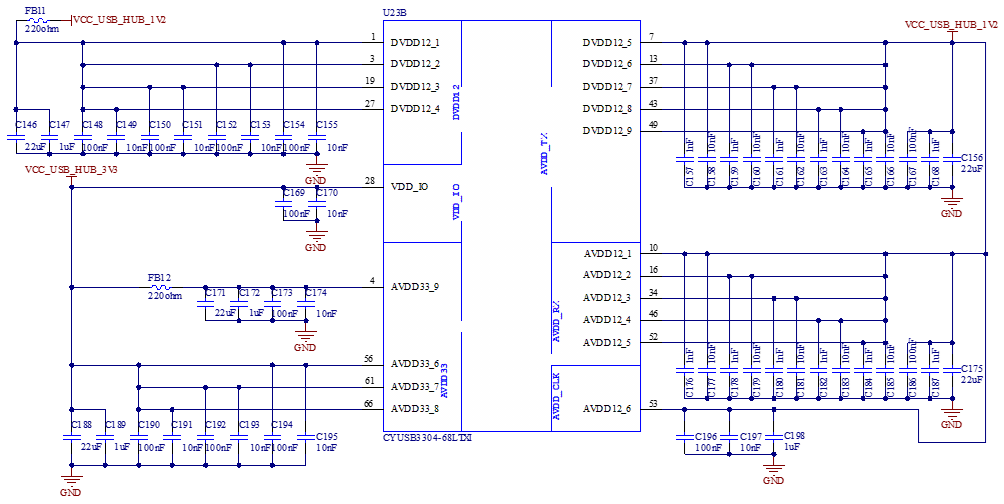
Two additional switching power supplies are used to provide 3.3V and 1.2V power to the USB Hub chip.
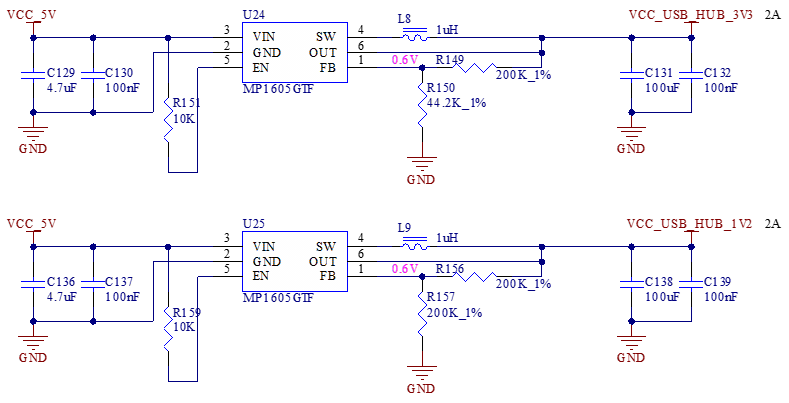
All three USB 3.0 ports on the USB hub chip are equipped with USB power-supply current-limiting switch chips, providing a stable power supply and current-limiting protection for the Type-A ports:
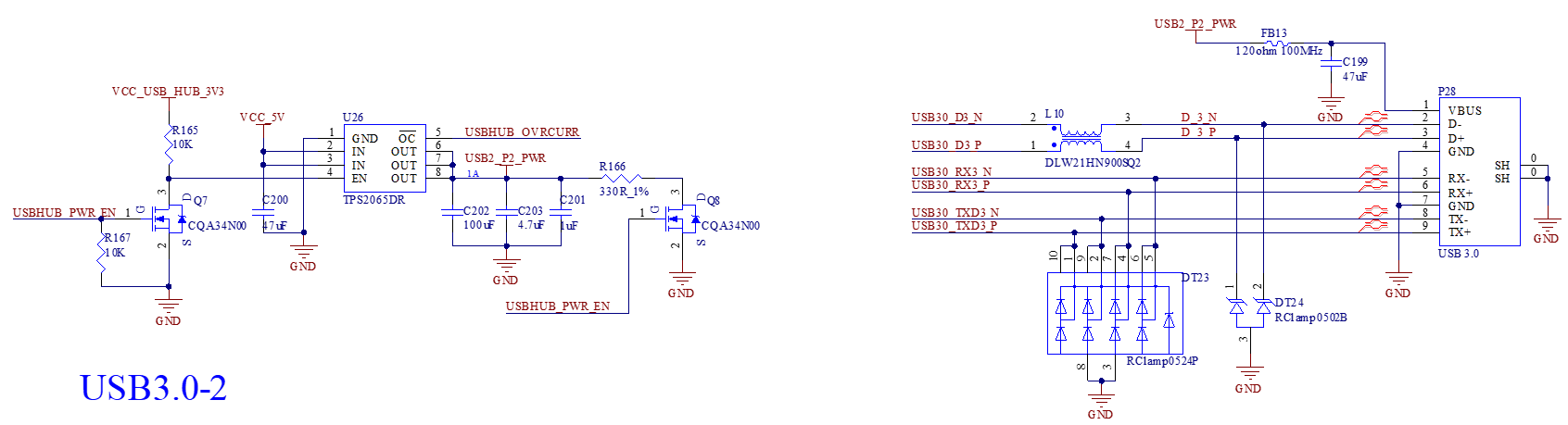
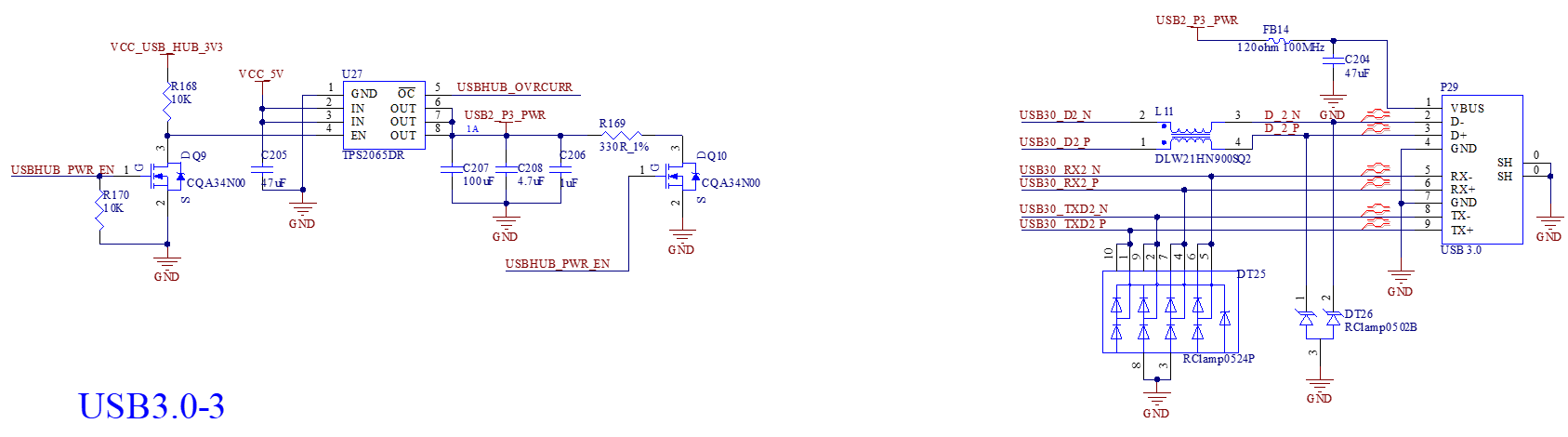
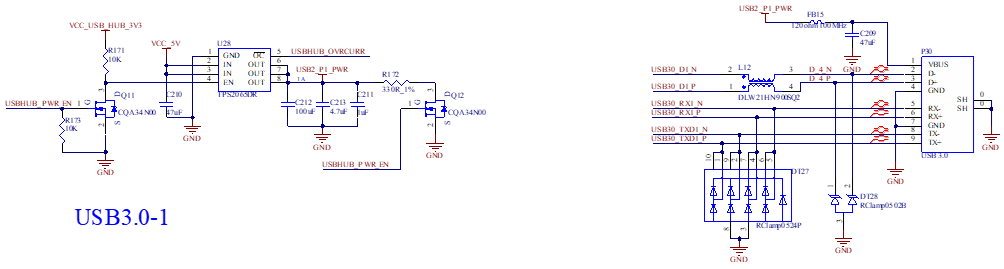
Note:
All USB data cables must be designed with a differential impedance of 90Ω;
Please select suitable ESD protection components.
The following diagram shows the circuit of the Type-C USB 3.0 interface:
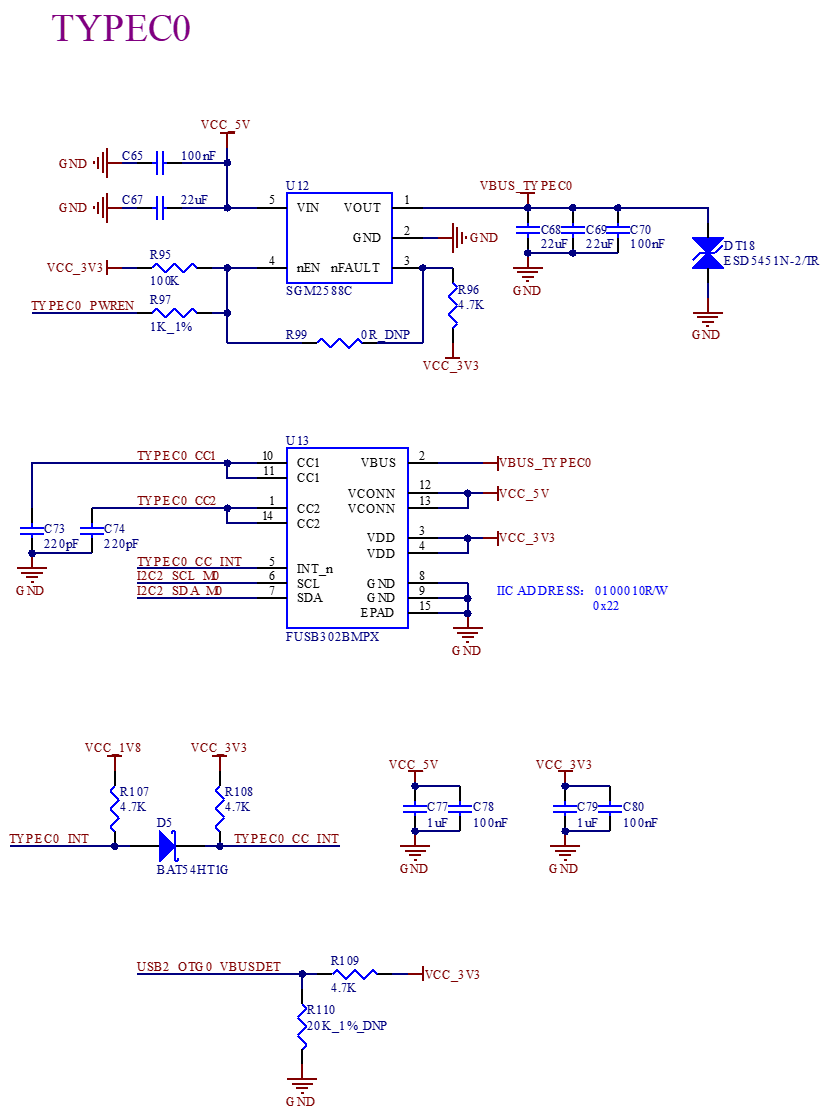
The diagram above shows the circuit for the Type-C interface CC protocol chip, which is used to support functions such as Type-C reversible plug recognition.
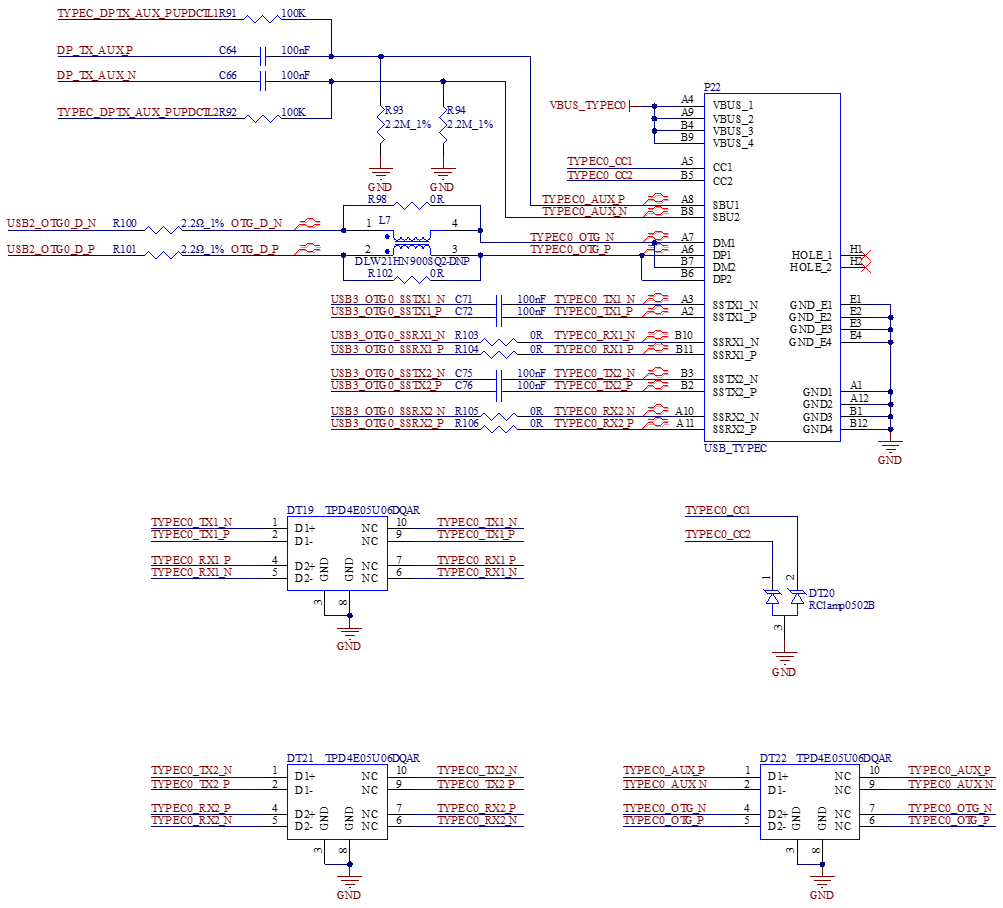
The diagram above shows the differential signal circuit and ESD protection components for a USB 3.0 Type-C connector.
Note:
USB2_OTG0_DN/USB2_OTG0_DP is the system firmware programming port. If the product does not use this interface, it must be reserved during debugging and production; otherwise, debugging and firmware burning will not be possible;
USB2_OTG0_ID features an internal pull-up resistor of approximately 12 kΩ to 1.8 V;
USB2_OTG0_VBUSDET is the OTG and Device mode detection pin; the chip contains an internal 40 kΩ pull-down resistor. A high level indicates DEVICE mode (2.7–3.3 V, typical: 3.0 V); it is recommended to place a 100 nF capacitor on this pin;
OTG mode can be configured as follows:
OTG Mode: Automatically switches between Device mode and HOST mode based on the state of the ID pin. A high ID level indicates Device mode, while a low ID level indicates HOST mode. When in Device mode, it also checks the VBUSDET pin. Only if VBUSDET is high (greater than 2.3V) will it pull DP high and begin enumeration.
Device mode: ID pin is ignored; only VBUSDET needs to be high (> 2.3 V) to enable DP pull-up and enumeration;
HOST mode: In this mode, you don’t need to worry about the ID or VBUSDET status. If the product only requires HOST mode, but the USB2_OTG0_DN/ USB2_OTG0_DP pins are reserved for system firmware programming (used in both debugging and production stages), this port must be configured in device mode for programming and ADB debugging. Therefore, the USB2_OTG0_VBUSDET signal must also be connected.
For a Type‑C interface, pull USB2_OTG0_VBUSDET high to 3.3 V through a 4.7 K resistor.
To enhance ESD and surge immunity, ESD protection devices must be reserved on signal lines. The parasitic capacitance of the ESD devices on USB 2.0 signals must not exceed 3 pF; in addition, series resistors (2.2 Ω) must be placed on the DP/DM lines of USB 2.0 signals to further strengthen ESD and surge resistance;
To suppress EMI, a common‑mode choke can be reserved on signal lines. During debugging, choose either a resistor or a choke based on actual conditions;
If the USB2_OTG0_ID signal is used, ESD protection components must be incorporated into the signal to enhance its resistance to static electricity and surges, and a 100 ohm resistor must be connected in series; these components must not be omitted;
In Host mode, it is recommended to add a current‑limiting switch on the 5 V power rail. The limit can be adjusted as needed. Control the switch with a 3.3 V GPIO. Also add filtering capacitors: ≥ 22 µF and ≥ 100 nF. If a portable HDD may be connected, increase the capacitance to ≥ 100 µF;
The TYPEC protocol requires the addition of a 100 nF AC-coupling capacitor on the SSTXP/N line. It is recommended that the AC-coupling capacitor be in a 0201 package, as this offers lower ESR and ESL, thereby reducing impedance variations on the circuit;
All signals of the Type‑C connector must have ESD protection placed as close as possible to the connector; For SSTXP/N and SSRXP/N signals, the parasitic capacitance of the ESD device must not exceed 0.3pF.
USB 2.0 differential impedance: 90 Ω ± 10 %, intra‑pair skew < 10 mil;
USB 3.0 differential impedance: 90 Ω ± 10 %, intra‑pair skew < 3 mil;
3.5.16 SATA3.1 Interface
The RK3576 chip is equipped with two SATA3.1 controllers, which share Comb PHY0/1 with the PCIe and USB3_OTG1 controllers. For specific routing, please refer to the diagram below.
Supports SATA PM (Power Management) functionality, with each port capable of supporting up to 5 devices;
Supports SATA speeds of 1.5 Gb/s, 3.0 Gb/s, and 6.0 Gb/s;
Supports eSATA.
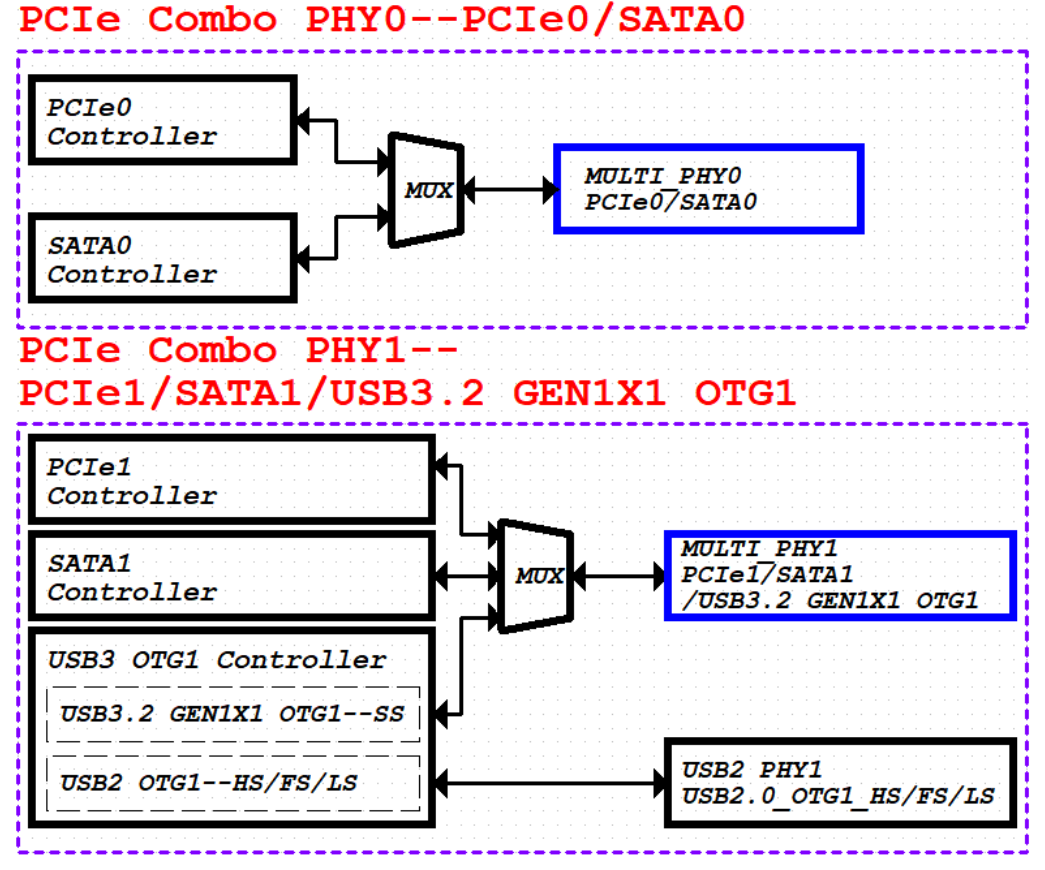
The SATA0 controller utilizes Comb PHY0 (shared with the PCIe0 controller).
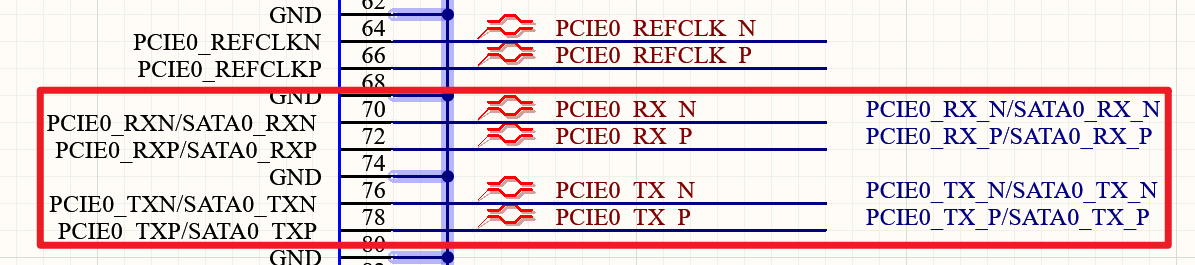
The SATA1 controller utilizes Comb PHY1 (shared with the PCIe1 controller and the USB3_OTG1 controller).
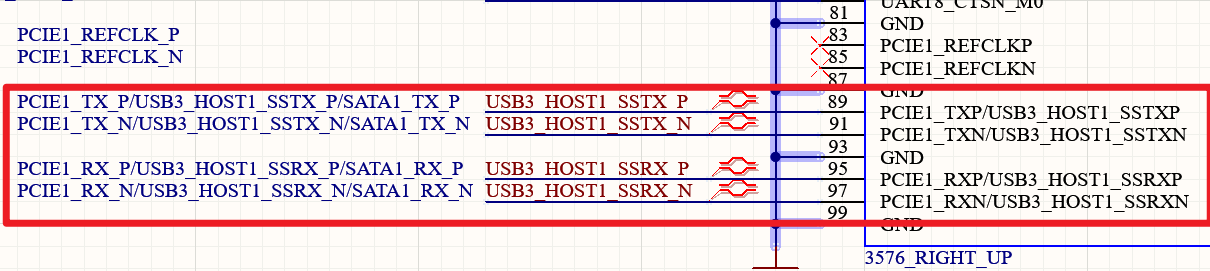
The control IOs related to the SATA0/1 controllers are as follows:
SATA0_ACTLED: Output for controlling LED blinking when there is data transmission on the SATA0 interface;
SATA1_ACTLED: Output for controlling LED blinking when there is data transmission on the SATA1 interface;
SATA_CPDET: Input for detecting the insertion and removal of hot-plug SATA devices;
SATA_MPSWIT: Input for detecting the switch status of hot-plug SATA devices.
SATA_CPPOD: Output for controlling the power switch of hot-plug SATA devices;
SATA_CPDET, SATA_MPSWIT, and SATA_CPPOD are shared interfaces for SATA0 and SATA1, and can be configured via registers to control either SATA0 or SATA1;
SATA0_ACTLED and SATA1_ACTLED are multiplexed to two locations: one in the VCCIO6 power domain and the other in the VCCIO4 power domain.
Note:
Peripheral circuits and power supplies must meet the specification requirements in Slot design;
A single SATA interface connected to a SATA Port Multiplier supports at most 5 ports; it does not support multiple multipliers exceeding 6 ports in total;
On SATA TXP/N and RXP/N differential pairs, 10 nF AC‑coupling capacitors are required. Use 0201‑size capacitors for lower ESR/ESL and reduced impedance variation;
All signals of an eSATA connector must have ESD protection placed close to the connector. The ESD parasitic capacitance must not exceed 0.4 pF.
3.5.17 PCIE2.1 Circuit
The RK3576 features two PCIe 2.1 controllers, both of which only support RC mode (RC stands for Root Complex) and do not support EP, as follows:
Controller 0(1Lane), PCIe0 Controller x1 Lane(Only RC)
Controller 1(1Lane), PCIe1 Controller x1 Lane(Only RC)
The RK3576 chip integrates two PCIe 2.1 controllers, which are combined with SATA3.1 and USB3.2_Gen1x1 interfaces to form two Combo PHYs:
PCIe2.1/SATA3.1 Combo PHY0
PCIe2.1/SATA3.1/USB3.2_Gen1x1 Combo PHY1
The mapping relationship between the controllers and PHYs is as follows:
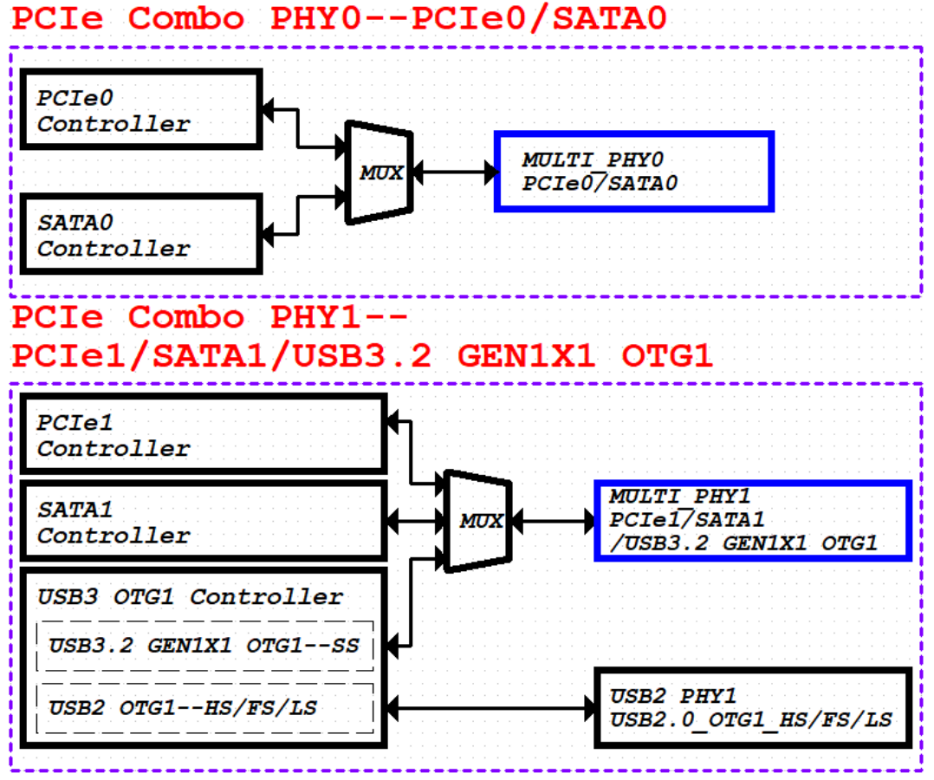
The PCIe0 controller (RC) and SATA0 controller share the PCIe2.1/SATA3.1 Combo PHY0. The corresponding package pins are shown in the figure below.
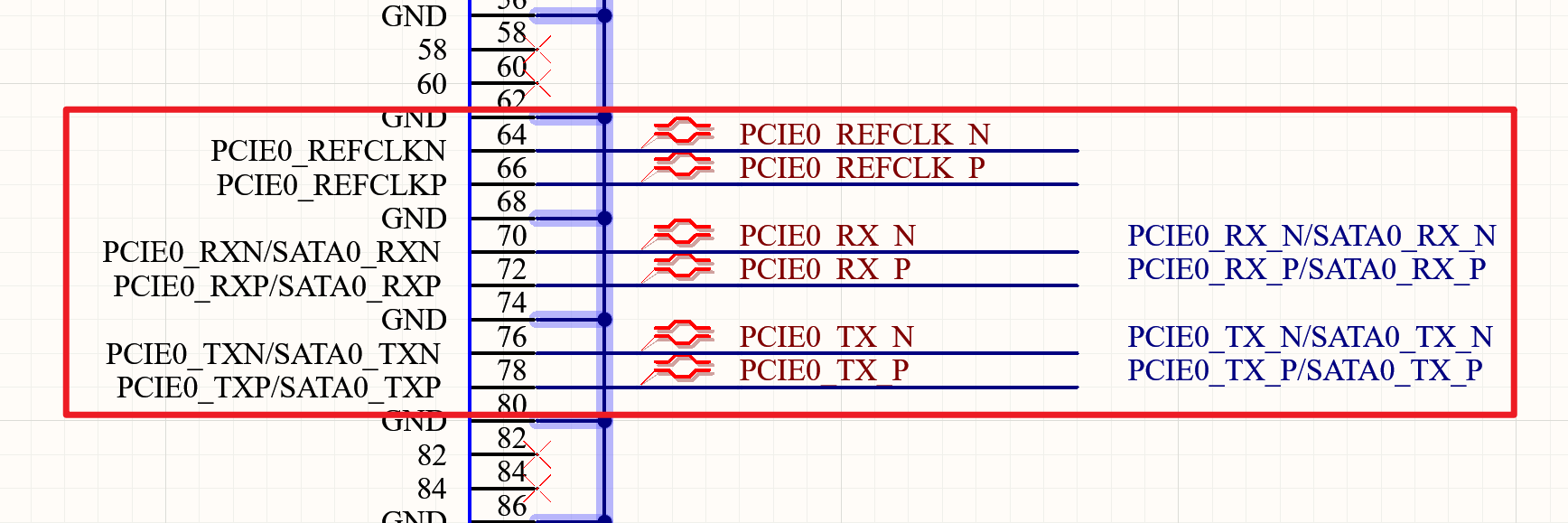
The PCIe1 controller (RC), SATA1 controller, and USB3 OTG1 controller share the PCIe2.1/SATA3.1/USB3.2_Gen1x1
Combo PHY1. The corresponding package pins are shown in the figure below.

PCIE0/1_REFCLKP/N supports both output and input modes. By default, it outputs clock signals to EP (Endpoint) devices, as illustrated in the diagram below.
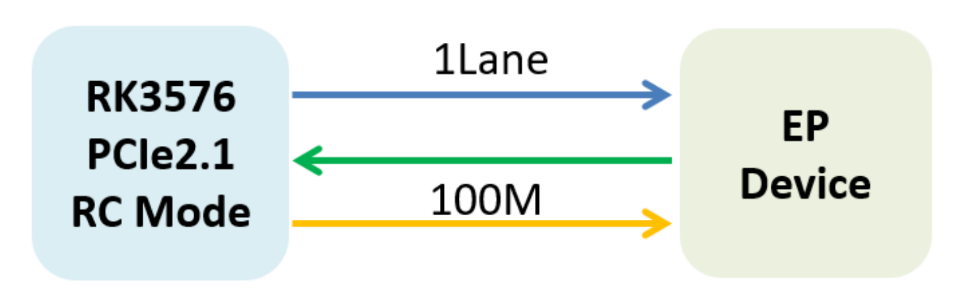
If PCIE0/1_REFCLKP/N is configured as an input, the schematic is as shown below.
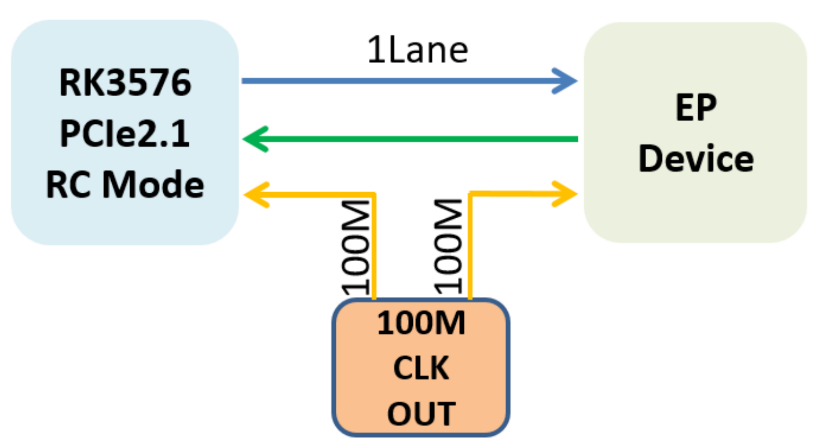
In the OK3576-C/OK3576-C21 development board, the PCIe0 lane is connected to a PCIe x1 slot and operates in PCIe 2.0 ×1 Lane mode.
It supports the PCIe Gen1 (2.4 GT/s) protocol. The other PCIe1 lane is multiplexed as a USB 3.0 interface.
The circuit design for the PCIe0 PCIe 2.0 ×1 Lane is illustrated below:
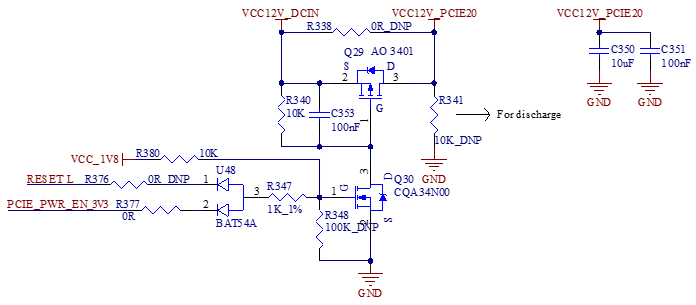
The figure above shows the 12V power supply control circuit for the PCIe interface.
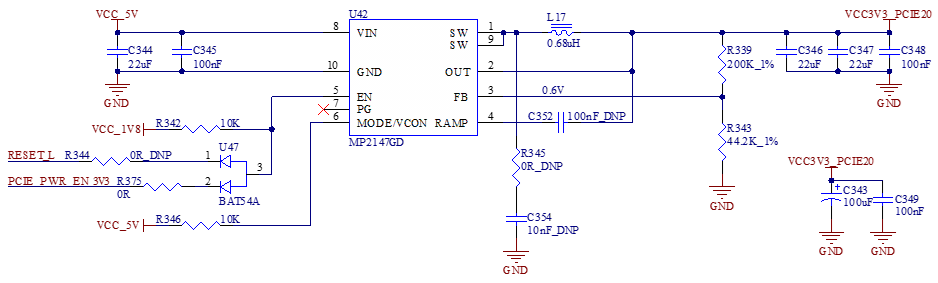
The figure above shows the 3.3V power supply and enable control circuit, where U42 is a 5V to 3.3V step-down converter.
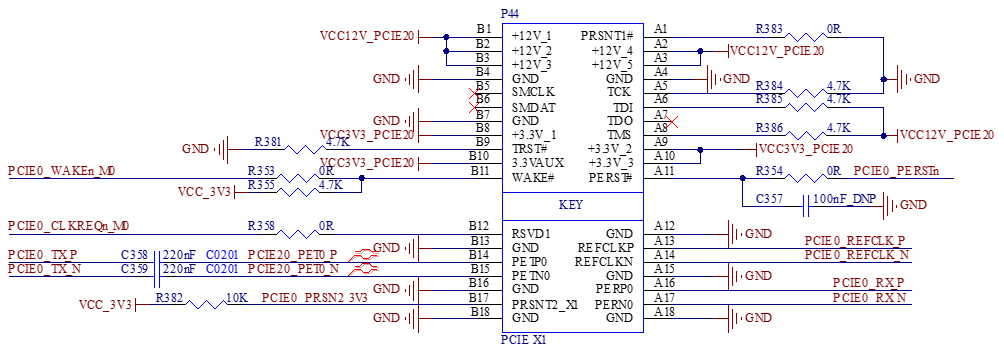
The figure above illustrates the PCIe x1 slot circuit design.
PCIe2.1 Design Note:
Peripheral circuits and power supplies must meet the specification requirements in Slot design;
A 100nF AC coupling capacitor must be connected in series on the TXP/N differential signal lines of the PCIe 2.1 interface. It is recommended to use 0201 package size capacitors for the AC coupling, as they have lower ESR and ESL, which also helps reduce impedance variations on the trace;
The PCIE0/1_CLKREQN pin must be used as a dedicated function pin and cannot be replaced by a GPIO;
PCIE0/1_PERSTN/WAKEN/PRSNT do not specify any particular I/O pins on the RK3576; you can simply use GPIO ports with matching voltage levels to serve as control pins;
In a standard PCIe slot, the signals PCIEx_CLKREQN, PCIEx_WAKEN, and PCIEx_PERSTN operate at 3.3V logic levels. Ensure proper voltage level matching is implemented on the RK3576 side accordingly;
When the PCIe function is enabled, the multiplexed SATA and USB functions cannot be used simultaneously. For details on the corresponding SATA/USB functions, refer to the respective module specifications;
If the PCIe 2.1 function module is not used:
Leave the data lines (PCIE0/1_TXP/TXN, PCIE0/1_RXP/RXN) and reference clock lines (PCIE0/1_REFCLKP/REFCLKN) unconnected (floating);
Ground the two power rails AVDD0V85 and AVDD1V8;
Ensure that the corresponding device tree (dts) configuration is disabled in the software.
The recommended interface matching design for PCIe 2.1 is as shown in the following table:
Signal |
Connection |
Description |
|---|---|---|
PCIE0/1_TXP/TXN |
Series-connected 100nF capacitor (0201 package recommended). |
PCIe data output |
PCIE0/1_RXP/RXN |
Direct connection |
PCIe data input |
PCIE0/1_REFCLKP/CLKN |
Direct connection |
PCIe reference clock |
PCIE0/1_CLKREQN |
Connect 0ohm resistor in series |
PCIe reference clock(RC mode) |
PCIE0/1_WAKEN (RK3576 does not have this signal; replaced by GPIO) |
Connect 0ohm resistor in series |
PCIe wake-up input (RC mode) |
PCIE0/1_PERSTN (RK3576 does not have this signal; replaced by GPIO) |
Connect 0ohm resistor in series |
PCIe global reset output (RC mode) |
PCIE0/1_PRSNT (RK3576 does not have this signal; replaced by GPIO) |
Connect 0ohm resistor in series |
Add In Card insertion detection input (RC mode) |
PCIE_BUTTONRSTN (not in use right now ) |
It’s no use; there’s no need to connect. |
External physical Reset of the PCIe Controller |
Data routing impedance control differential 85ohm ±10%;
Clock routing impedance control differential 100ohm±10%;*
Inter-Pair Skew maximum <3mil;
Differential pair space is better than or equal to 4 times the PCI-E line width.
3.5.18 Video Input Interface
FET3576 has two MIPI DPHY CSI RX, both support MIPI V1.2 version, the maximum data rate of each channel is 2.5Gbps.
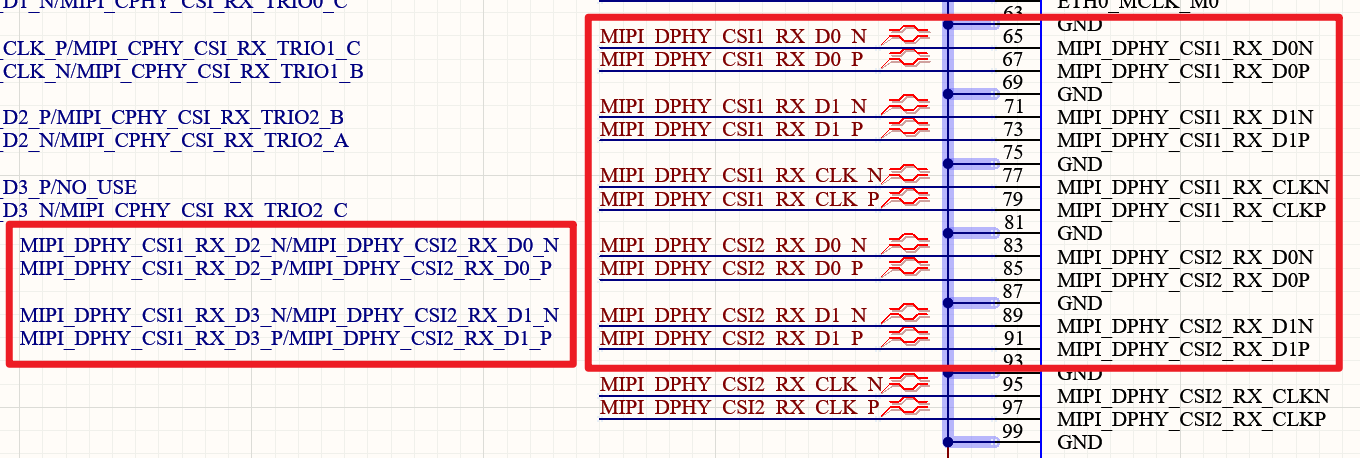
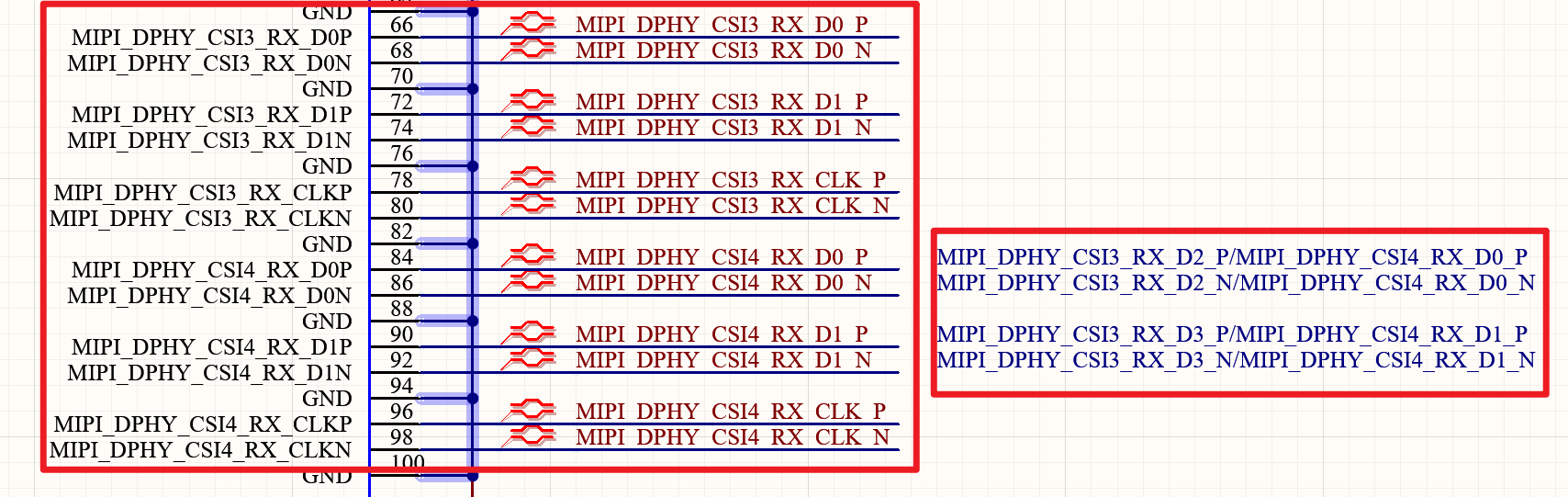
MIPI DPHY CSI1 / 2 RX interface modes:
Support 4Lane mode, MIPI_DPHY_CSI1_RX_D[3:0] data reference MIPI_DPHY_CSI1_RX_CLK.
Support 2Lane+2Lane mode:
MIPI DPHY CSI1_RX_D[1:0] data reference MIPI_DPHY_CSI1_RX_CLK
MIPI DPHY CSI2_RX_D[1:0] data reference MIPI_DPHY_CSI2_RX_CLK
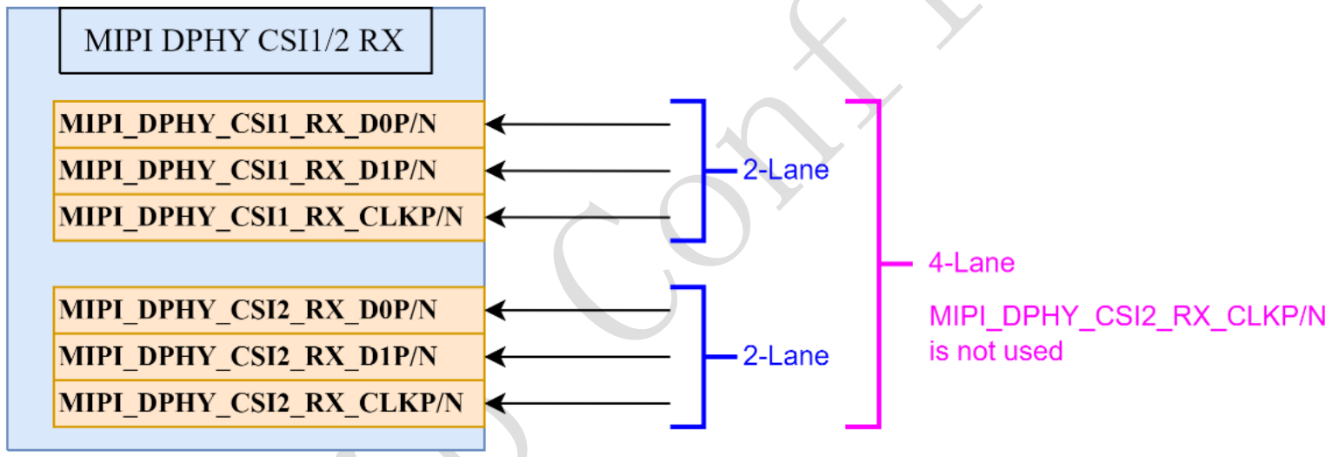
MIPI DPHY CSI3 / 4 RX interface mode:
Support 4Lane mode, MIPI_DPHY_CSI3_RX_D[3:0] data reference MIPI_DPHY_CSI3_RX_CLK
Support 2Lane+2Lane mode:
MIPI DPHY CSI3_RX_D[1:0] data reference MIPI_DPHY_CSI3_RX_CLK
MIPI DPHY CSI4_RX_D[1:0] data reference MIPI_DPHY_CSI4_RX_CLK
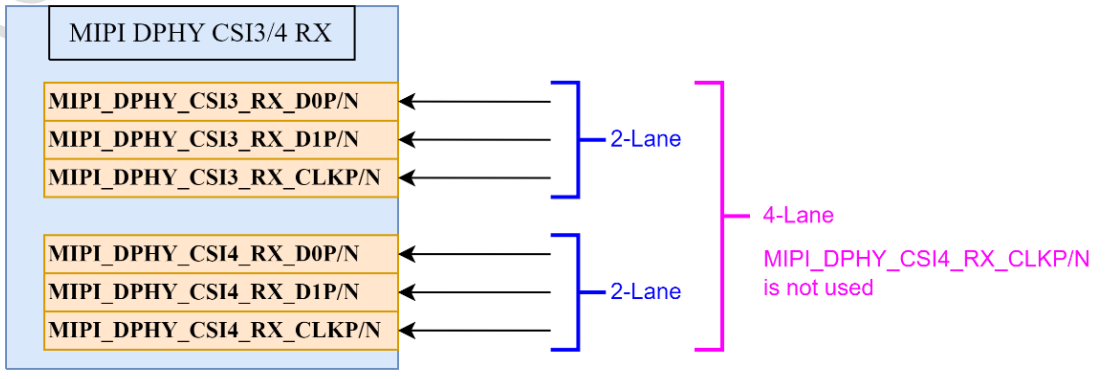
Interface Details of MIPI_DCPHY_CSI_RX
The FET3576 integrates one MIPI DCPHY CSI RX Combo PHY.
The D-PHY supports Version 2.0.
The C-PHY supports Version 1.1. In D-PHY mode, it has up to 4 lanes, with a maximum data rate of 4.5 Gbps per lane.
In C-PHY mode, it has up to 3 trios, with a maximum data rate of 5.7Gbps/Trio.
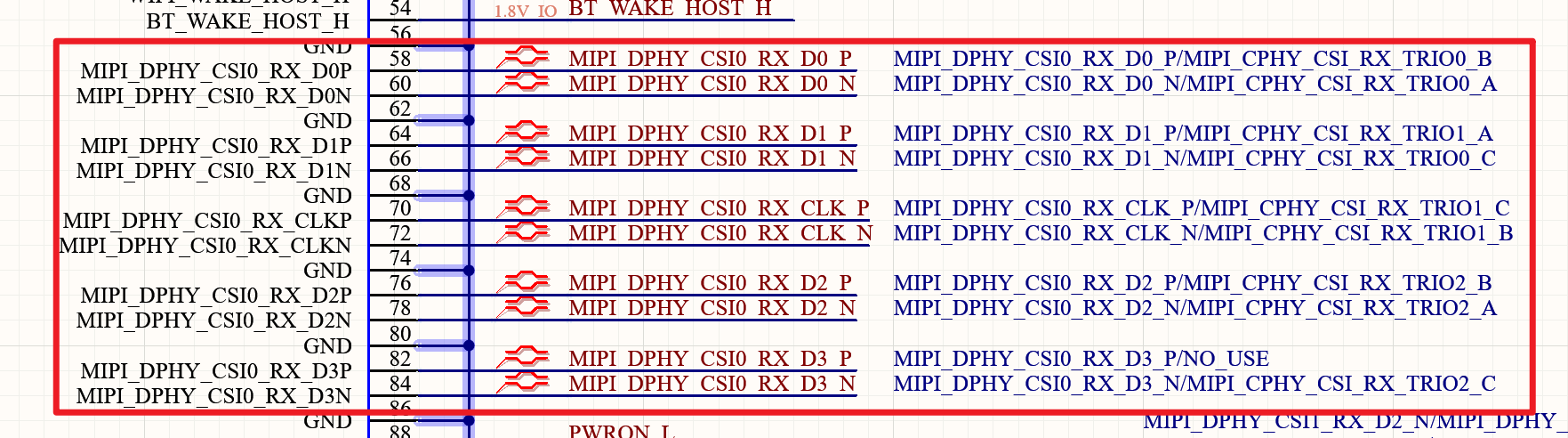
Supported D-PHY and C-PHY Configuration Modes:
The TX and RX of the MIPI DCPHY Combo PHY can only be configured in one of the following modes simultaneously:
Both as D-PHY TX and D-PHY RX mode, or
Both as C-PHY TX and C-PHY RX mode. It does not support mixed configurations such as one interface as D-PHY TX and the other as C-PHY RX, or vice versa.
MIPI DCPHY Supported Configurations in D-PHY Mode:
Supports 4-lane / 2-lane / 1-lane modes.
The data lanes MIPI_DPHY_CSI0_RX[3:0] are referenced to the clock MIPI_DPHY_CSI0_RX_CLK.
It doesn’t support splitting into a configuration of 2 lanes + 2 lanes.
MIPI DCPHY Supported Configurations in C-PHY Mode:
Supports 0 / 1 / 2 Trios. Each Trio consists of three wires: Trio_A, Trio_B, and Trio_C.
The corresponding signal pins are: MIPI_CPHY_CSI_RX_TRIO[2:0]_A, MIPI_CPHY_CSI_RX_TRIO[2:0]_B, MIPI_CPHY_CSI_RX_TRIO[2:0]_C.
The OK3576-C/OK3576-C21 is configured by default with five camera interfaces, namely: MIPI_DPHY_CSI0_RX 4-lane, MIPI_DPHY_CSI1_RX 2-lane, MIPI_DPHY_CSI2_RX 2-lane, MIPI_DPHY_CSI3_RX 2-lane and MIPI_DPHY_CSI4_RX 2-lane. The schematic diagram is as shown below:
MIPI RX Layout Design Notes:
Differential impedance: 100Ω ±10%;
Single-ended impedance: 50Ω ±10%;
Intra-pair skew (within a differential pair): < 3 mils;
Equal length between clock and data < 6 mil;
Spacing between differential pairs: Recommended > 4x the MIPI trace width; minimum > 3x;
Spacing between MIPI signals and other signals: Recommended > 4x the MIPI trace width; minimum > 3x;
When configured as CPHY, the maximum delay difference within the group (TRIO_A, TRIO_B, TRIO_C) is less than 3 mil;
Equal length between groups (TRIO0 \ TRIO1 \ TRIO2) < 50mil.
3.5.19 Video Output Interface
The RK3576 chip features a VOP (Video Output Processor), which reads video data and UI data from the frame buffer in system memory, performs corresponding processing (such as cropping, color space conversion, scaling, and overlaying), and outputs the processed data to each high-speed display interface.
It features 3 Port outputs and can output through video interfaces including DP, HDMI/eDP, MIPI DSI, LCDC(Parallel Interface).
Maximum video output capabilities:
Supports three-screen independent display configurations, for example, one screen at 4096x2160@60Hz, 2560x1600@60Hz, 1920x1080@60Hz;
Supports dual-screen independent display configurations, for example, one screen at 4096x2160@120Hz, 2560x1600@60Hz.
VOP and video interface output path diagram:
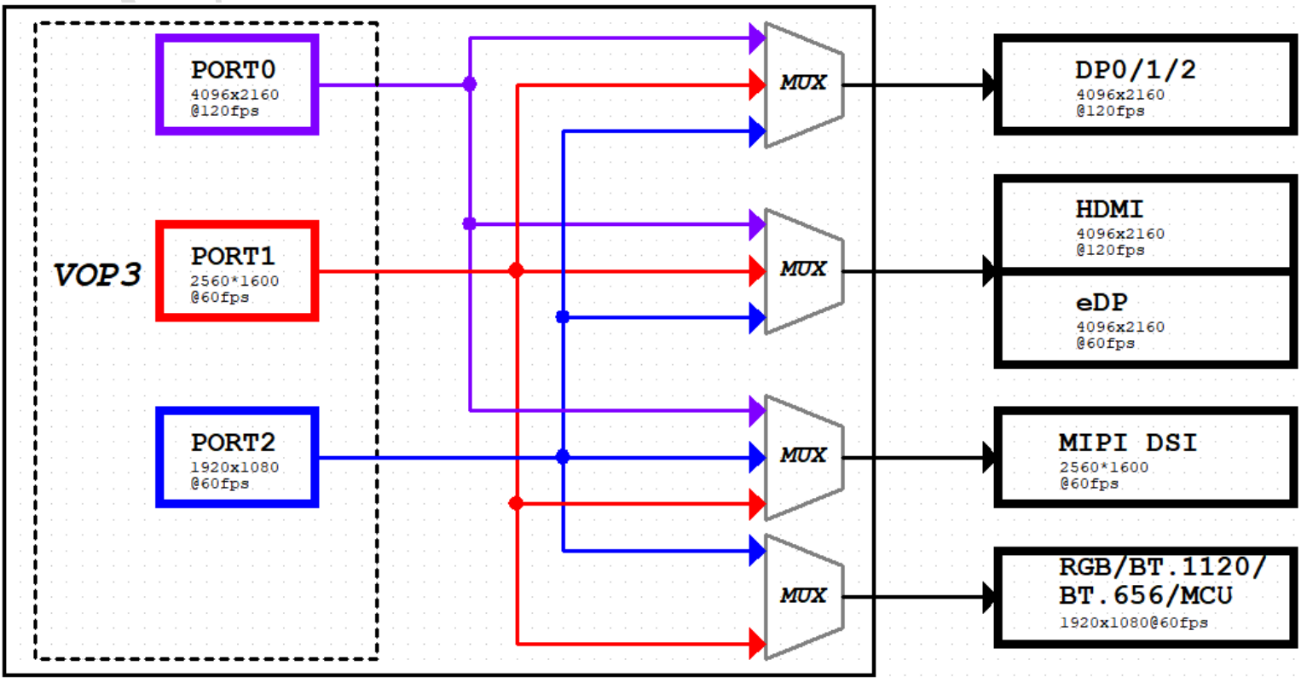
The OK3576-C/OK3576-C21 development board supports three display output interfaces: DP, MIPI_DSI and HDMI.
3.5.19.1 MIPI_DSI Interface
The FET3576 features one MIPI D-PHY/C-PHY Combo PHY TX:
D-PHY supports version 2.0. D-PHY modes include 0, 1, 2 and 3 lanes, with two wires per lane; the maximum data rate is 2.5Gbps/Lane.
MIPI_DPHY_TX supports a maximum resolution of 2560x1600@60Hz.
C-PHY supports version V1.1. The C-PHY modes are 0, 1 and 2 Trio, with each Trio comprising three lines (A, B and C); the maximum data rate is 1.7Gsps/Trio.
MIPI_CPHY_TX supports a maximum resolution of 2560x1600@60Hz.
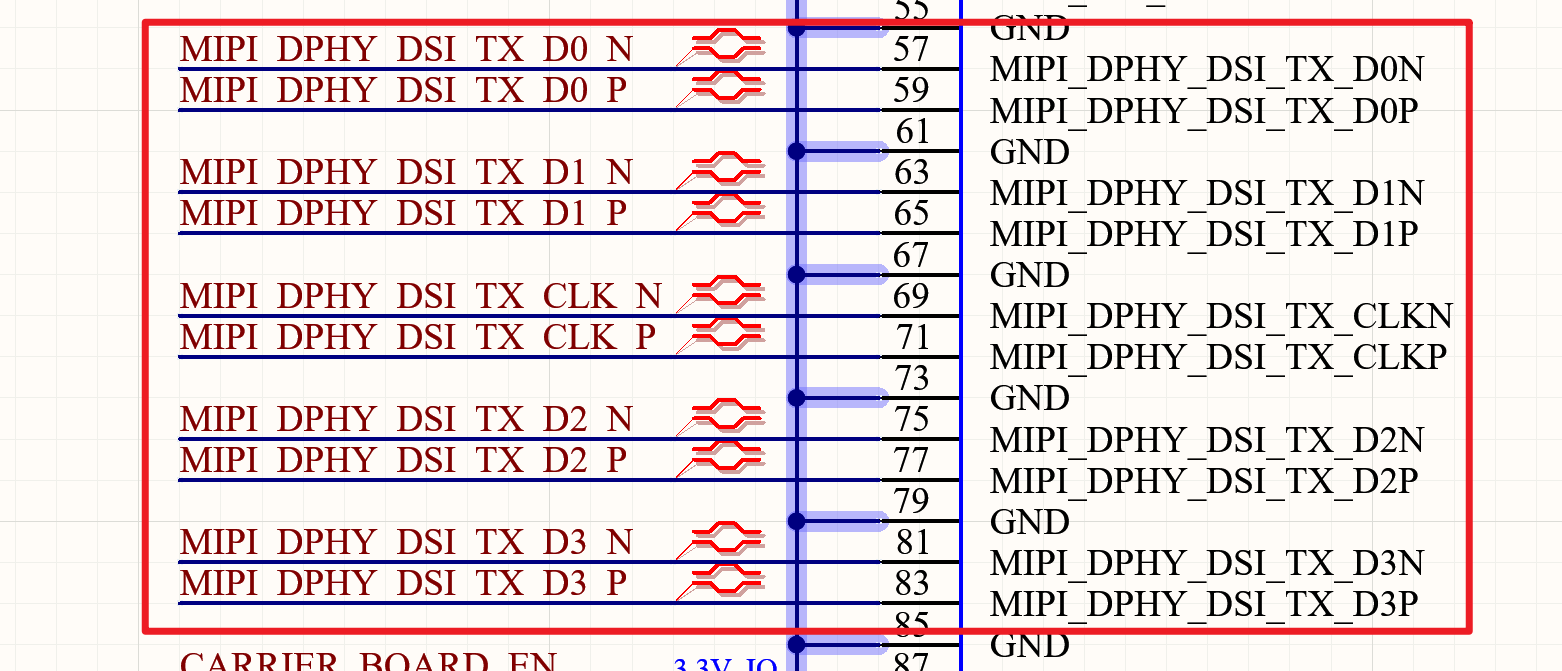
D-PHY and C-PHY Configuration Support:
The TX and RX of the MIPI D-PHY/C-PHY Combo PHY can only be configured simultaneously as D-PHY TX and D-PHY RX, or as C-PHY TX and C-PHY RX; it does not support configuring one as D-PHY TX and the other as C-PHY RX.
MIPI DCPHY Mode Support When Operating in D-PHY Mode:
Supports 4-lane mode; the MIPI_DPHY_TX_D[3:0] data is synchronised with MIPI_DPHY_TX_CLK.
MIPI DCPHY Mode Support When Operating in C-PHY Mode:
Supports 0/1/2 Trios, with 3 lines each for Trio A/B/C: MIPI_CPHY_TX_TRIO[2:0]_A,
MIPI_CPHY_TX_TRIO[2: 0]_B, MIPI_CPHY_TX_TRIO[2: 0]_C.
The MIPI_DSI interface on the OK3576-C/OK3576-C21 development board operates in a mode comprising one clock channel and four data channels. The schematic is shown below:
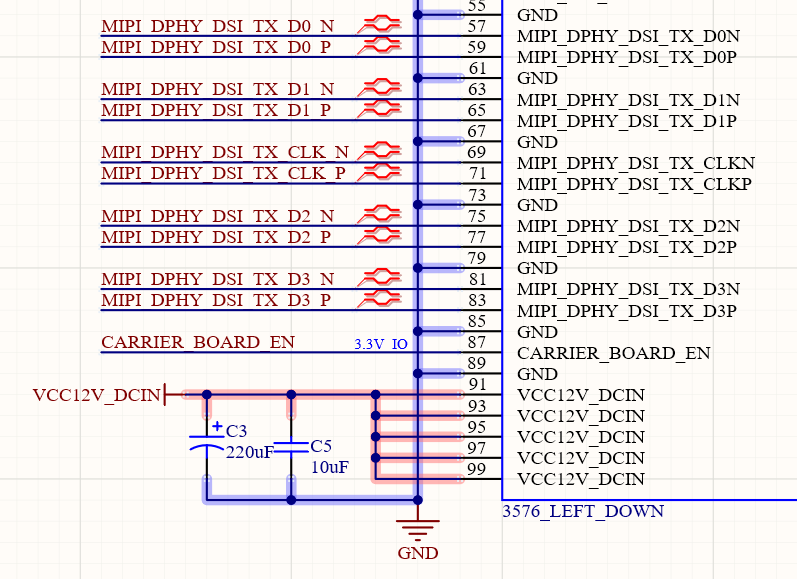
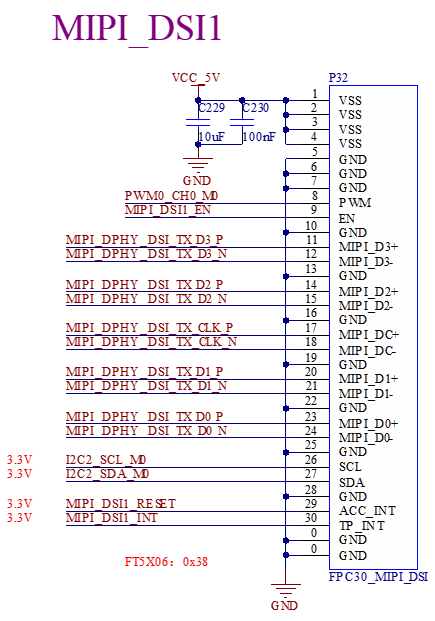
Please note in design:
Routing impedance control differential 100ohm ± 10%;
Intra-pair skew (within a differential pair): < 3 mils;
Equal length between clock and data < 6 mil;
It is recommended that the spacing between differential pairs be at least four times the MIPI line width, and no less than three times the MIPI line width;
It is recommended that the spacing between MIPI and other signals be at least four times the MIPI line width, and no less than three times the MIPI line width;
When configured as CPHY, the impedance of single-ended traces is controlled to 50ohm±10%;
The inter-group delay difference is <3mil (TRIO0\TRIO1\TRIO2);
Equal length between groups (TRIO0 \ TRIO1 \ TRIO2) < 50mil;
The number of permissible holes for each signal is recommended to be no more than 2;
It is recommended that the spacing between traces be at least four times the MIPI trace width;
It is recommended that the spacing between MPI and other signals be at least four times the MIPI line width.
3.5.19.2 HDMI_TX Interface
The RK3576 integrates an HDMI/eDP TX Combo PHY.
HDMI/eDP TX Combo PHY supports the following two modes:
HDMI TX Mode: Supports up to HDMI 2.1, including the HDMI FRL mode with backward compatibility for HDMI TMDS mode. It supports formats such as RGB/YUV444/YUV422/YUV420 (up to 10-bit);
eDP TX Mode: Supports up to eDP 1.3, with a maximum resolution of 4K@60Hz. It supports RGB/YUV444/YUV422 (up to 10-bit) formats.
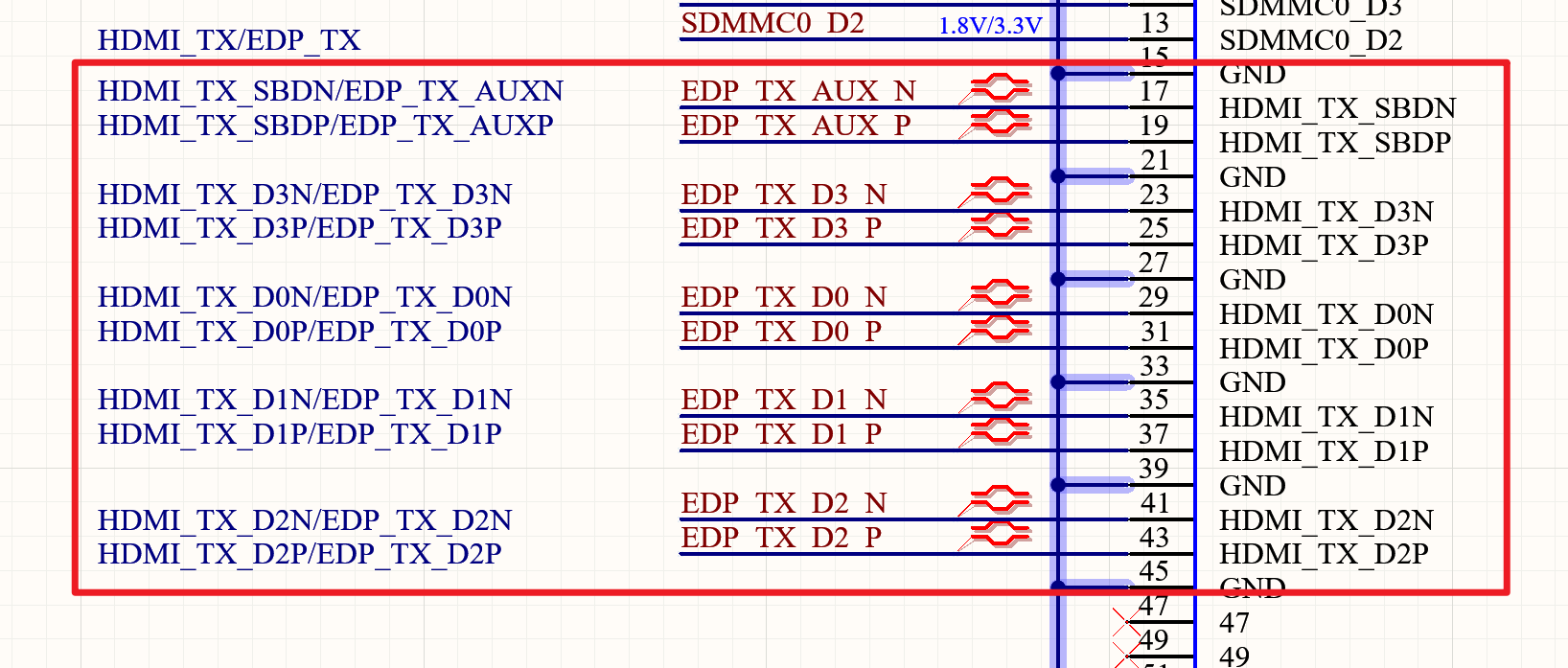
RK3576 supports HDMI 2.1 and downward for HDMI 2.0, compatible with HDMI 1.4. Because HDMI 2.1 works in FRL mode and works in TMDS mode, when switching to HDMI 2.0 and below, it will work in TMDS mode, so the AC coupled voltage mode driver is used.
As shown in the figure below, the AC coupling capacitor capacitance is 220nF, which cannot be changed at will; because the lower ESR and ESL can also reduce the impedance change on the line, it is recommended to use the 0201 packaging for the AC coupling capacitor.
When operating in HDMI 2.1 mode, HDMI_TX_ON_H is configured to low level, and transistors Q15, Q16, Q17, Q18 are turned off.
When operating in HDMI 2.0 or lower mode, HDMI_TX_ON_H is configured to high level, and transistors Q15, Q16, Q17, Q18 are turned on. The 499ohm resistors to ground form a DC bias of approximately 3V with the 50ohm pull-up resistors on the sink side.
Please note in design:
If it only needs to support HDMI 2.0 and below mode, Q15, Q16, Q17, and Q18 also can not be omitted; it needs to ensure that the machine is not power-on, the tube can not be on, as HDMI CTS Test ID 7-3 TMDS Voff test item requires that the DUT is not power-on, Voff voltage must be within AVcc +- 10mV, or this test item can not pass.
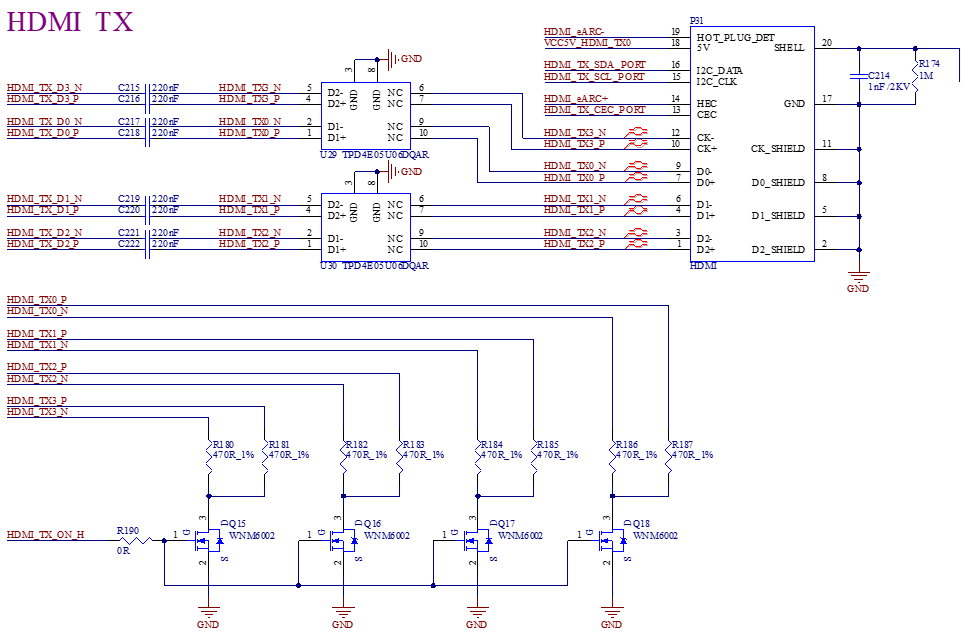
FRL mode: In a traditional TMDS architecture, a separate channel is used to transmit the clock signal; however, in the FRL architecture, the clock is embedded within the data channel and is extracted at the sink end via clock recovery.
The table below shows the relationship between FRL rates and channels:
Channel Rate |
Channel Number |
|---|---|
3Gbps |
3 |
6Gbps |
3 |
6Gbps |
4 |
8Gbps |
4 |
10Gbps |
4 |
12Gbps |
4 |
ARC/eARC is supported by routing the HDMI_TX_SBD_P/ HDMI_TX_SBD_N signals to the internal RK3576 for audio data extraction.
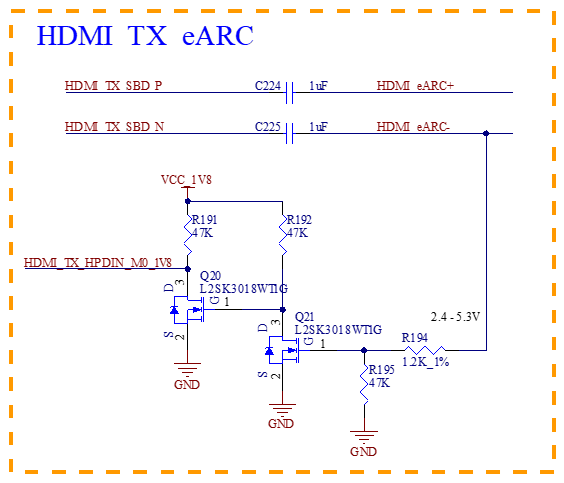
HDMI_TX_HPD is the HDMI TX controller’s Hot Plug Detect signal, multiplexed onto a standard GPIO. Its logic level corresponds to the voltage of its assigned power domain. If the power supply voltage of this domain is changed, the pull-up resistor voltage on the external circuit must be adjusted accordingly.
HDMI_TX_CEC is the HDMI controller’s Consumer Electronics Control function, multiplexed onto a standard GPIO. Its logic level corresponds to the voltage of its assigned power domain. If the power supply voltage of this domain is changed, the pull-up resistor voltage on the external circuit must be adjusted accordingly.
The CEC protocol specifies a 3.3 V logic level; however, the protocol requires that a 3.3 V voltage be applied to the CEC pin via a 27 kΩ resistor, with leakage current not exceeding 1.8 µA.
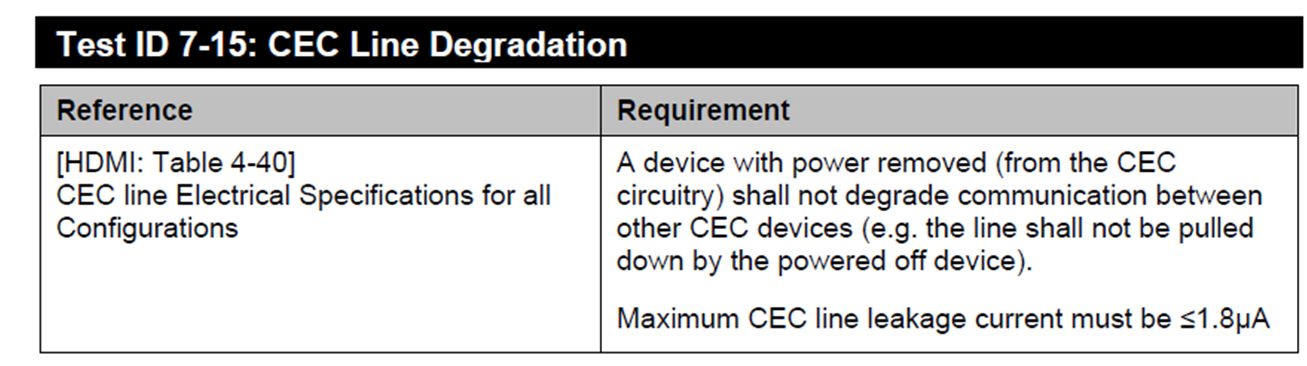
When the RK3576 IO Domain is not powered, if there is voltage on the IO, leakage current may occur. For example, after the RK3576 is powered off, if the HDMI cable is still connected to the sink device (such as a TV or monitor), the CEC signal from the sink device carries voltage, which can leak to the RK3576 IO through the HDMI cable. This can cause CEC leakage current to exceed 1.8µA. Therefore, an external isolation circuit is required. The resistance value of R189 must not be modified arbitrarily and must be set to 27 kΩ. For Q19, the default selection is the 2SK3018. If another model is to be used, its junction capacitance must be comparable. If the junction capacitance is too large, it will not only affect operation but also fail certification.
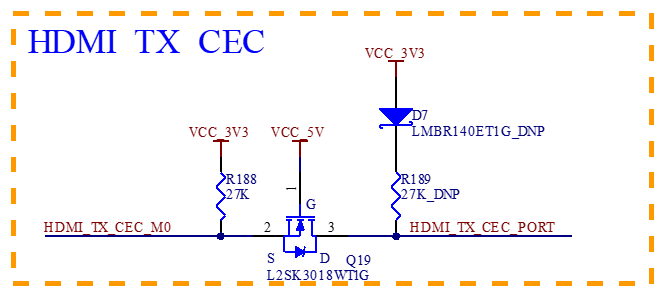
HDMI_TX_SCL and HDMI_TX_SDA are the I2C/DDC buses of the HDMI transmitter (TX) controller. Their functions are multiplexed onto standard GPIO pins. The voltage levels for these signals depend on the power domain’s supply voltage. If the supply voltage of the power domain changes, the power supply for the pull-up resistors in the peripheral circuitry must also be adjusted accordingly.
The DDC_SCL/DDC_SDA protocol specifies a 5V logic level. Since the RK3576 IO does not support 5V levels, a level-shifting circuit must be added and cannot be omitted. By default, a MOSFET-based level shifter is used, with the MOSFET model defaulting to 2SK3018. If another model is to be used, its junction capacitance must be comparable. Excessive junction capacitance will not only impact operation but also lead to certification failure.
The pull-up resistors should be set according to their default values and not altered arbitrarily.
Diode D6 must not be omitted; it is used to prevent leakage current from the Sink device to VCC_5V0.
For the level shifting of the SDA signal, a 1K resistor must be connected in series between the MOSFET gate and the power supply, and a 100pF capacitor must be placed in parallel between the MOSFET gate and source to improve timing characteristics. These components must not be removed.
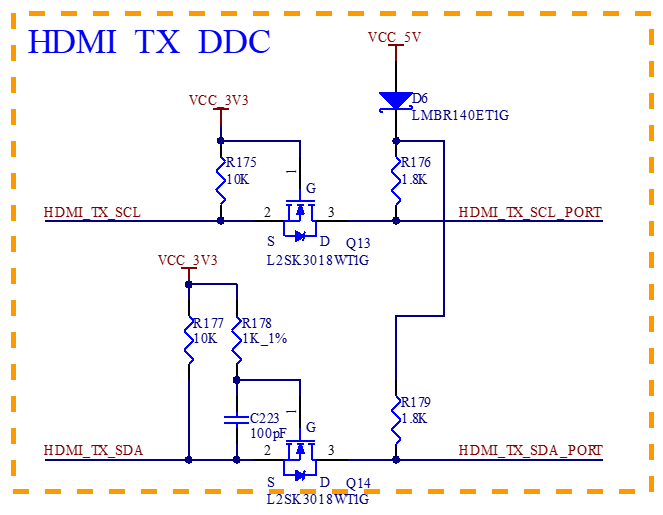
The voltage on Pin 18 of the HDMI connector must be maintained between 4.8V and 5.3V. A 1μF decoupling capacitor must be placed for this pin and cannot be omitted. During layout, this capacitor must be positioned close to the HDMI connector pin.
To enhance ESD protection, ESD protection devices must be provisioned on the signal lines. For HDMI 2.1 signals, the parasitic capacitance of the ESD device must not exceed 0.2pF. For other signals, the parasitic capacitance of the ESD device is recommended to be no greater than 0.2pF.
For other signals, it is recommended that the ESD parasitic capacitance should not exceed 1 pF.
Please note in design:
Control MOS tube Coss can not be too large, otherwise it will affect the signal quality, it is recommended to follow the reference chart model or the corresponding Coss value;
Routing impedance control differential 100ohm ± 10%;
Inter-Pair Skew maximum <3mil;
Differential inter-pair equivalence requirement <200mil;
Differential inter-pair space is recommended to be more than or equal to 7 times the HDMI line width;
HDMI and other signal space is recommended to be more than or equal to 7 times the HDMI line width;
It is recommended not to add an over-hole;
I/O capacitance to ground does not exceed 0.2pF.
3.5.19.3 DP_TX Interface
The RK3576 supports one DP1.4 TX PHY (combo with USB3 OTG0), capable of a maximum output resolution of 4K@YUV422-120Hz.
Each lane supports data rates of 1.62/2.7/5.4/8.1 Gbps.
Supports 1-lane, 2-lane or 4-lane modes;
Supports RGB/YUV444/YUV422/YUV420 formats (up to 10-bit);
Supports Multi-Stream Transport (MST);
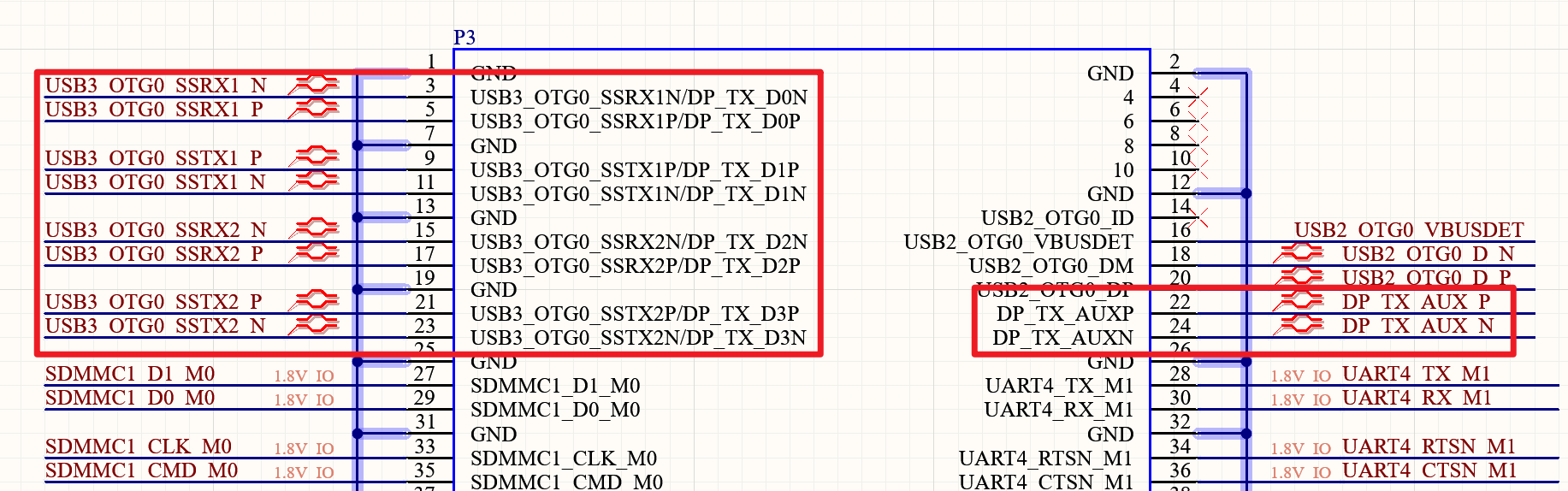
Supports both Swap On and Swap Off modes;
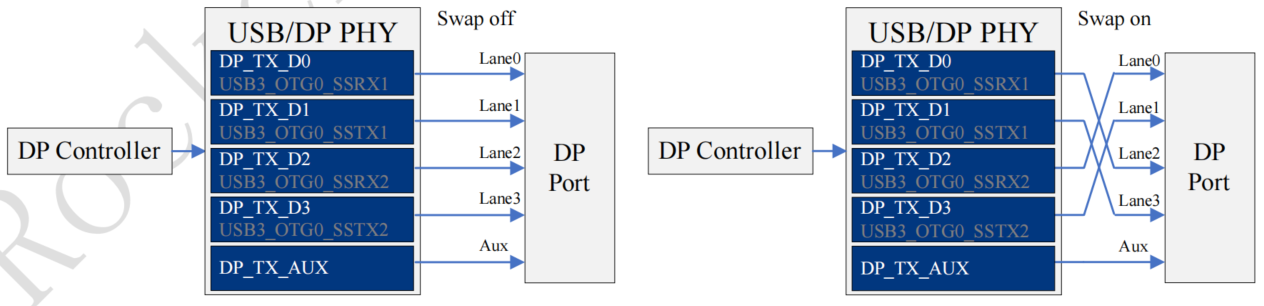
Supports MST (Multi-Stream Transport) display with 3 channels. The maximum capability for three-screen independent display under MST is: 4096x2160@60Hz, 2560x1600@60Hz, and 1920x1080@60Hz.
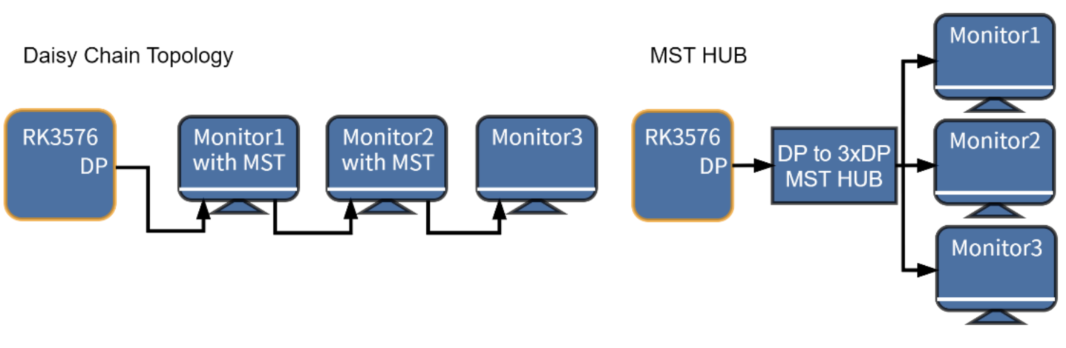
Refer to Section 3.5.15 for pin multiplexing relationships with USB.
Please note in DP sign:
The following DP lane pairs—DP0_TX_D0P/D0N, DP0_TX_D1P/D1N, DP0_TX_D2P/D2N, DP0_TX_D3P/D3N, DP1_TX_D0P/D0N, DP1_TX_D1P/D1N, DP1_TX_D2P/D2N, DP1_TX_D3P/D3N—must be series-connected with 100nF AC-coupling capacitors. Capacitors in 0201 package size are recommended for lower ESR and ESL, as well as reduced impedance variation on the line. Place them close to the RK3576-C pins during layout;
Differential pair trace impedance should be controlled at 100Ω ±10% (for DP-only interface, no multiplexing) or 95Ω ±10% (for USB3.0/DP1.4 multiplexed interface);
Differential pair internal delay difference < 3 mil;
Differential inter-pair equivalence requirement <500mil;
Differential inter-pair space is recommended to be more than or equal to 6 times the DP line width;
DP and other signal space is recommended to be more than or equal to 6 times the DP line width;
The number of permissible holes for each signal is recommended to be no more than 2;
I/O capacitance to ground does not exceed 0.2pF.
3.5.20 WIFI/BT Module Circuit
OK3576-C/ The OK3576-C21 board comes with an on-board AzureWave AW-CM358SM WIFI & BT module, supporting Wi-Fi 2.4G/5G and Bluetooth 5.0. The Wi-Fi/BT antenna is connected via an SMA interface, and the module interfaces with the main controller through SDIO, PDM, and UART.
Note: In low-power application scenarios, if you need to maintain the Wi-Fi module’s network connection during the process of putting the RK3576 into sleep mode and then waking it up (without requiring the Wi-Fi module to reconnect), it is necessary to power the Wi-Fi module’s 3.3V and 1.8V supplies from a dedicated 12V input power source. You can refer to this specific design in the OK3576-C.
The schematic is as follows:
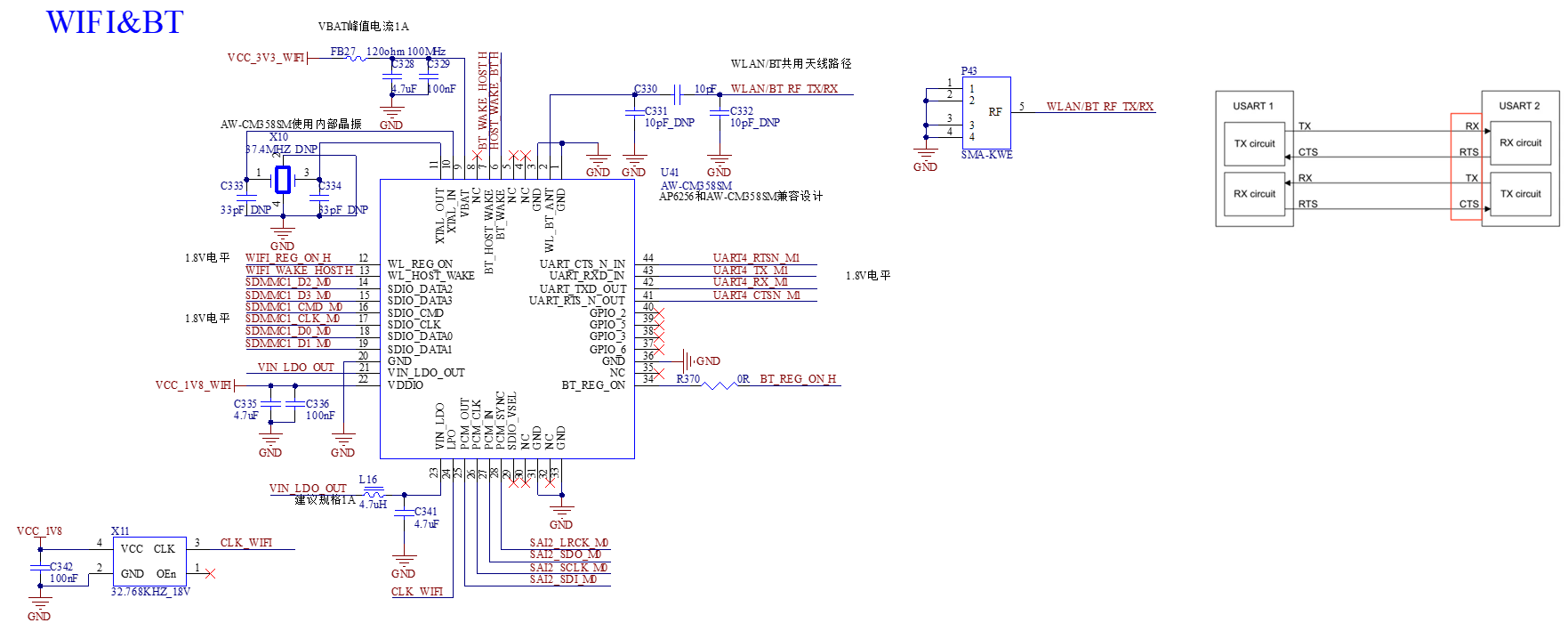
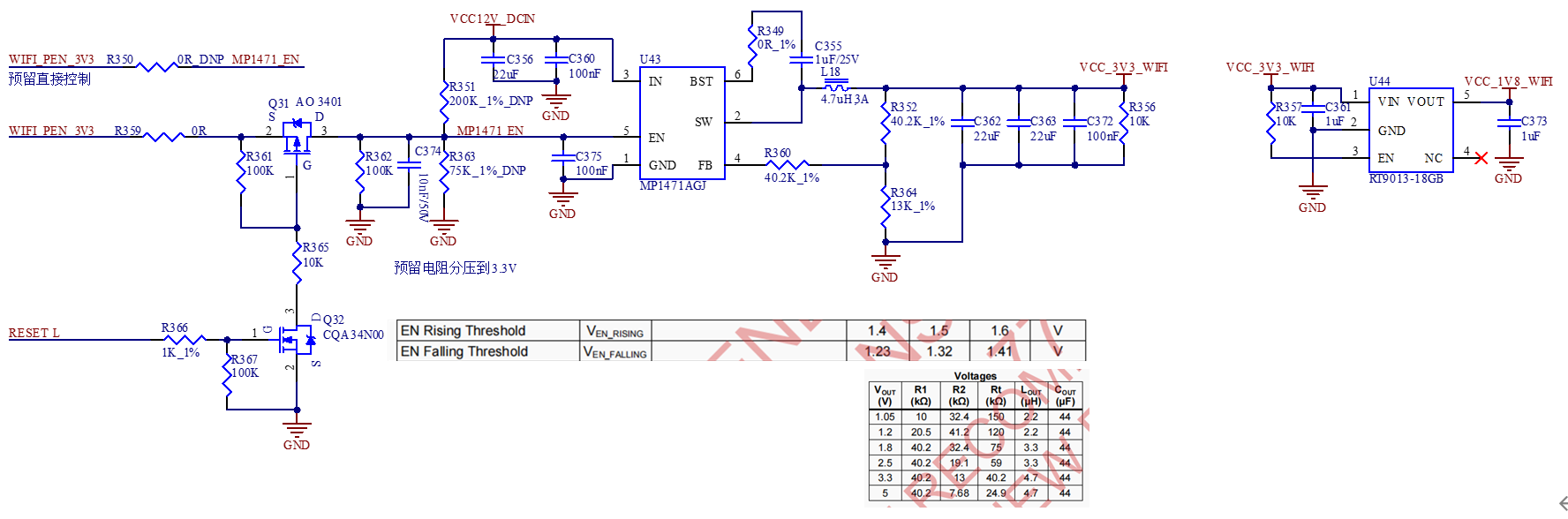
Note:
The power supply to the WIFI card must be controlled; refer to the carrier board circuit for implementation;
SDIO impedance requirements: Single‑ended impedance: 50ohm;
Signal length matching tolerance: ±50 mil.
User Hardware Design Guide_V1.4
I2C Requirements:
Multiple slave devices can be connected to a single I2C bus; ensure there are no address conflicts.
Pull-up resistors are required on the I2C bus, but avoid using multiple resistors for pull-up (i.e., use a single pair of pull-up resistors for the entire bus).
Ensure level matching between the I2C signals from the SoM and those from the slave devices.
USB Design:
To meet USB eye diagram requirements, the PCB trace length for USB3.0 TX/RX signals should not exceed 6 inches.
Unused signal pins on the SoM can be left floating, but all GND pins must be connected.
Power-On Sequence
It is strongly recommended that when designing the carrier board, please refer to the development board design. Use the CARRIER_BOARD_EN signal output from the SoM as the enable signal for powering on the carrier board, and strictly control the power-on sequence. Failure to do so may result in the following issues:
Excessive inrush current during power-up.
Device failure to boot.
In the worst case, irreversible damage to the processor.
Note: For detailed hardware design information, please refer to the “FET3576-C Hardware Design Guide” document.
5. Connector Dimensions
The SoM connector dimensions are as follows:
A=21.52mm, B=19.6mm, C=3.2mm, Contacts=100
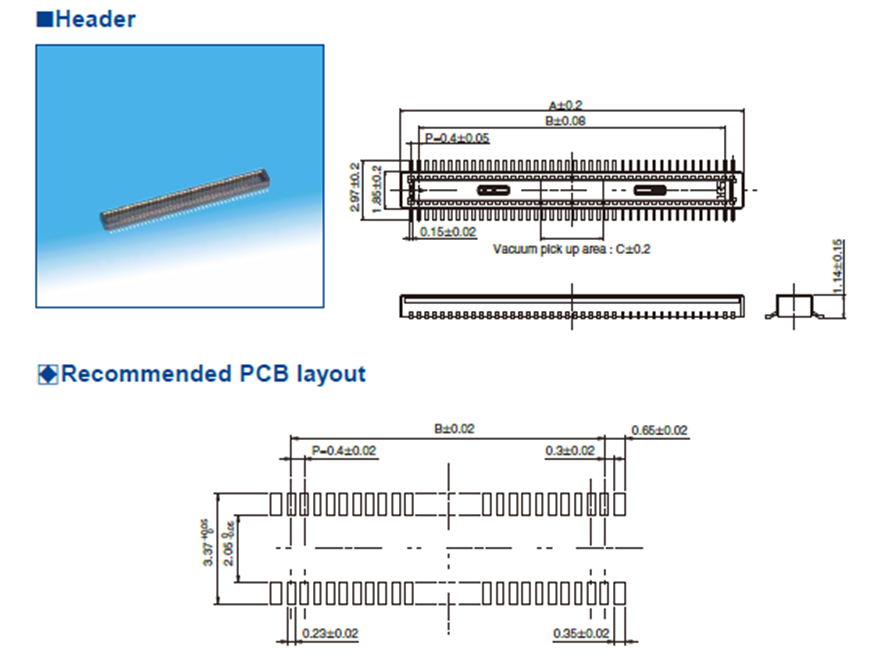
The dimensions and specifications for the carrier board connectors are as follows:
A=22.6mm, B=19.6mm, C=3.2mm, D=1.45mm, Contacts=100
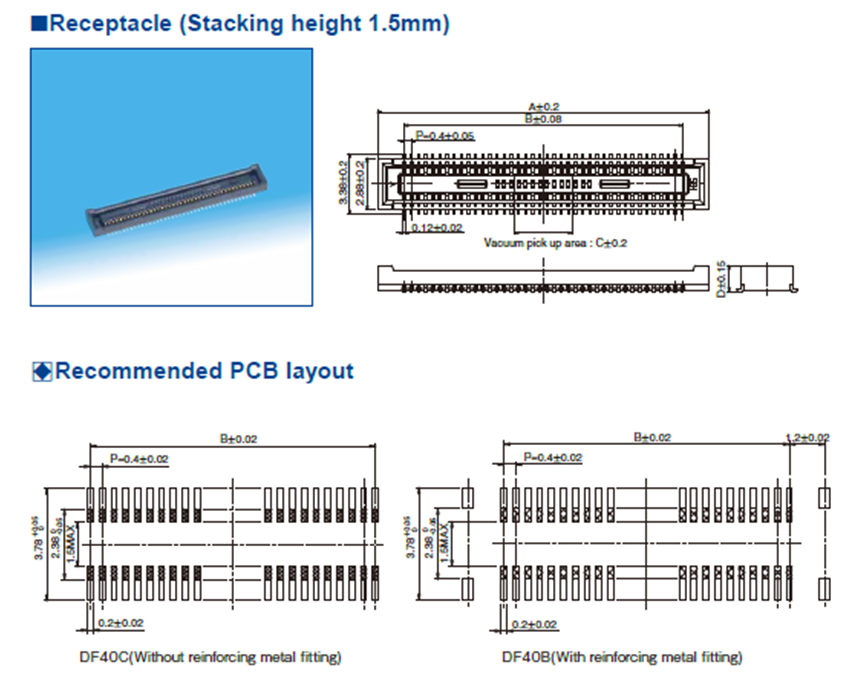
6. OK3576-C&OK3576-C21 Development Board Power Consumption Table
Table 1 OK3576-C Linux Power Consumption
No. |
Test Item |
SoM Power (W) |
Development Board Power (including SoM) (W) |
|---|---|---|---|
1 |
No-load startup peak power |
3.66 |
5.88 |
2 |
No-load standby power |
0.82 |
2.33 |
3 |
CPU+GPU+Memory+eMMC pressure test |
5.87 |
7.39 |
4 |
7-inch LCD screen + 4G + U disk + video decoding |
2.02 |
10.02 |
5 |
7-inch LCD screen + 4G + U disk + video encoding |
3.06 |
10.48 |
6 |
Pwron Key (Long press) |
0.28 |
0.32 |
7 |
Pwron Key (Short press) |
TBD |
TBD |
Table 2. OK3576-C Android System Power Consumption
No. |
Test Item |
SoM Power (W) |
Development Board Power (including SoM) (W) |
|---|---|---|---|
1 |
No-load startup peak power |
4.86 |
7.09 |
2 |
No-load standby power |
0.95 |
2.43 |
3 |
Peak power during the AnTuTu 3D test |
6.04 |
10.29 |
4 |
Pwron Key (Long press) |
0.28 |
0.32 |
5 |
Pwron Key (Short press) |
0.65 |
2.19 |
Table 3 OK3576-C21 Linux Power Consumption
No. |
Test Item |
SoM Power (W) |
Development Board Power (including SoM) (W) |
|---|---|---|---|
1 |
No-load startup peak power |
3.86 |
6.50 |
2 |
No-load standby power |
0.66 |
3.06 |
3 |
USB read/write power consumption |
0.88 |
4.25 |
4 |
TF card flashing power consumption |
0.76 |
3.31 |
5 |
4G module PING power consumption |
0.66 |
3.71 |
6 |
WiFi module PING power consumption |
0.66 |
2.94 |
7 |
7‑inch MIPI screen video playback power consumption. |
1.53 |
6.07 |
8 |
HDMI screen power consumption |
2.00 |
4.46 |
9 |
DP screen power consumption |
1.90 |
4.36 |
10 |
GPU+Memory+eMMC pressure test |
4.53 |
7.20 |
11 |
Pwron Key (Short press) |
0.02 |
TBD |
Note:
OK3576-C Test conditions: The SoM configuration is 4GB memory+32GB eMMC, the 4G module is Quectel EM05-CE, and the screen is an Forlinx optional product. SoM power supply: 12V; and the carrier board is 12V;
OK3576-C21 Test conditions: The SoM configuration is 4GB memory+32GB eMMC, the 4G module is Quectel EM05-CE, and the screen is an Forlinx optional product. SoM power supply: 12V; and the carrier board is 12V;
Peak Power: The peak current during the startup process multiplied by the supply voltage;
Standby Power: The current value while the device remains on the startup interface after booting, multiplied by the supply voltage;
Power consumption is for reference only.
7. Minimum System Diagram
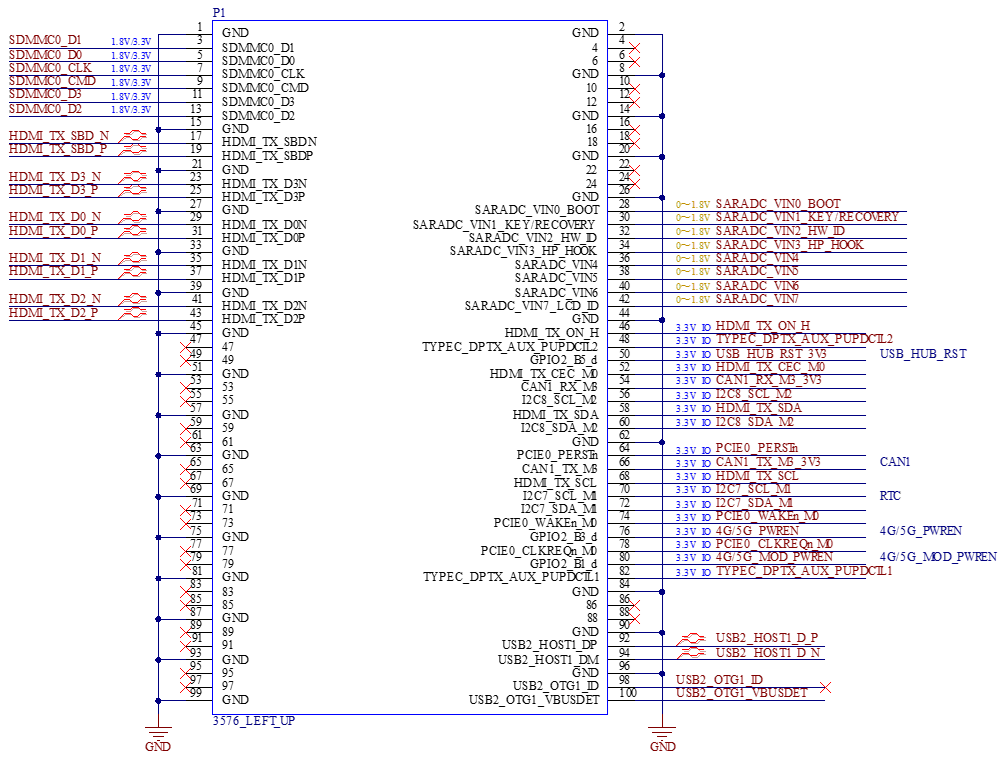
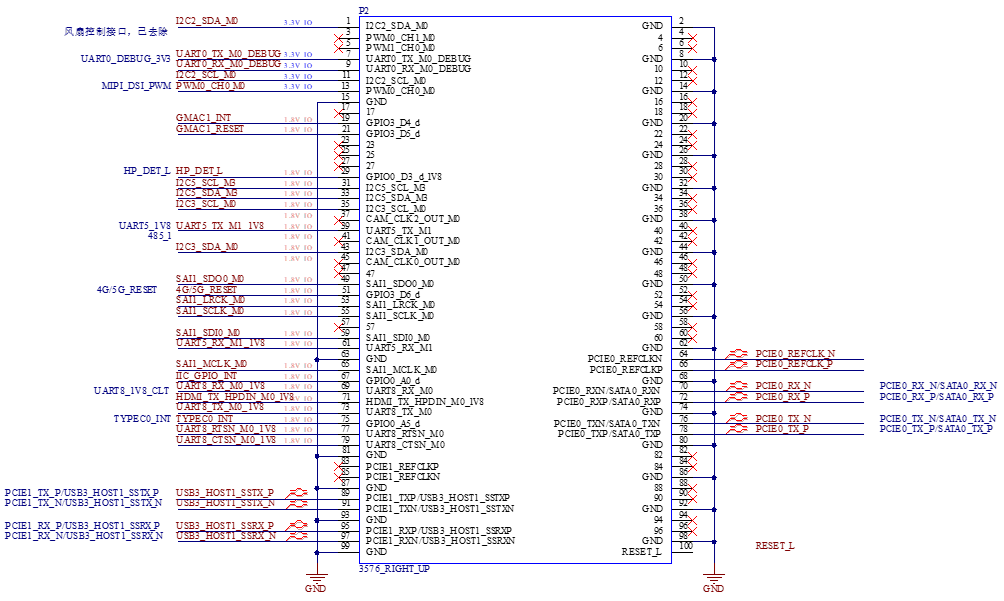
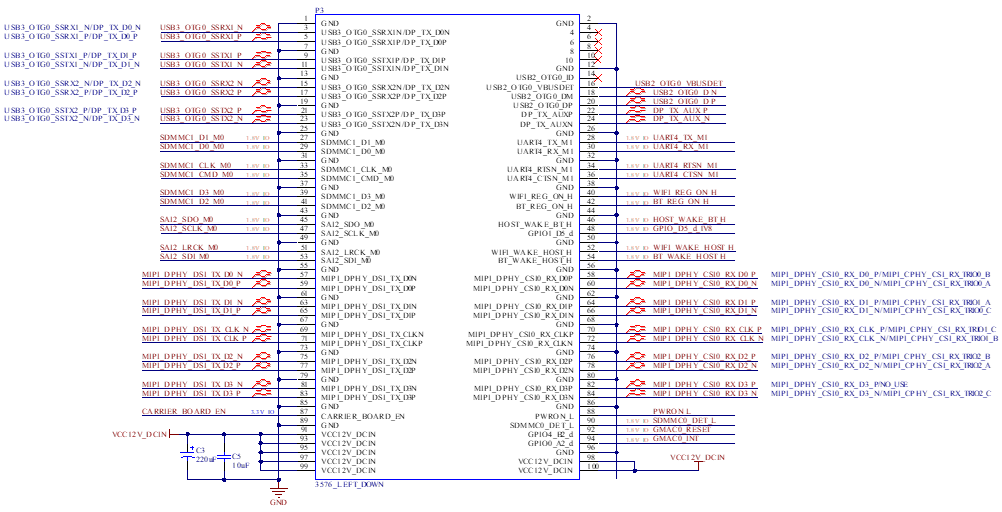
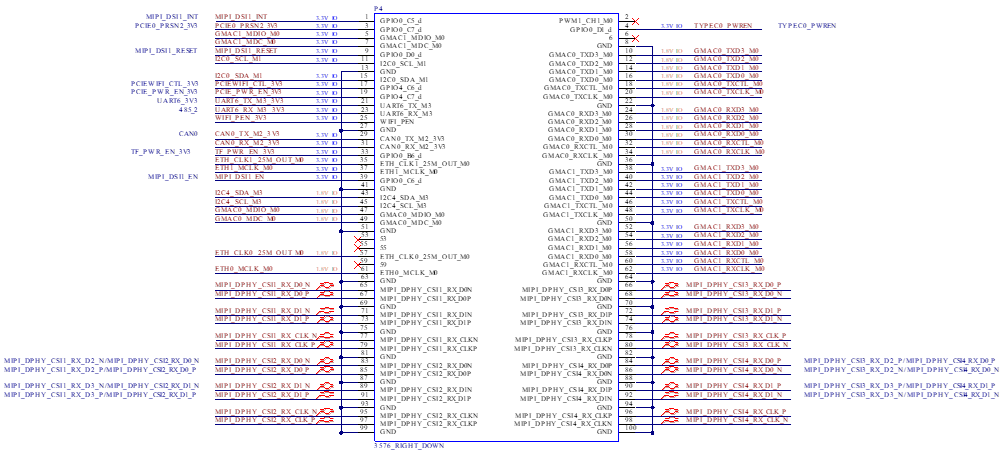

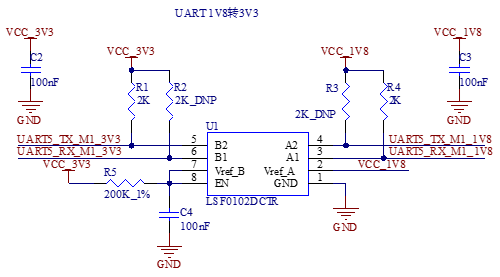
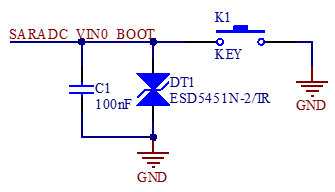
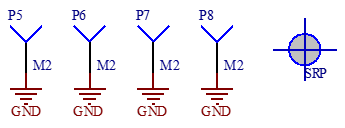
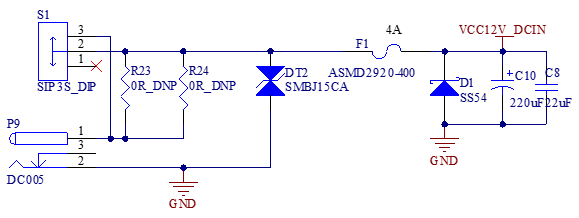
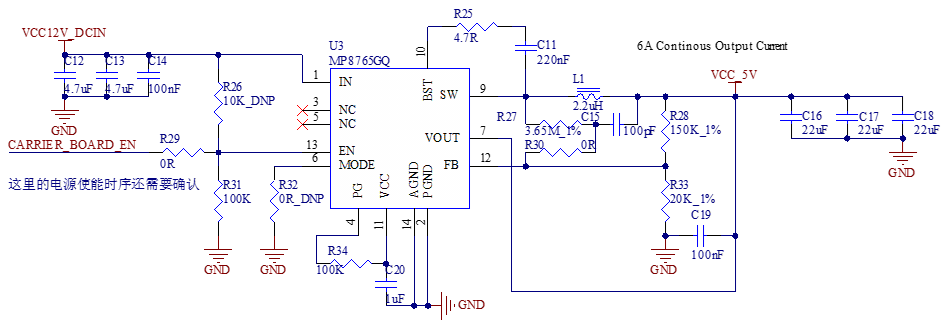
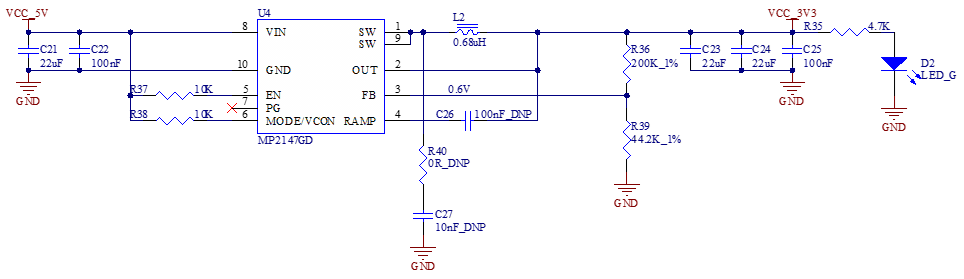
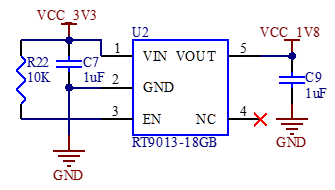
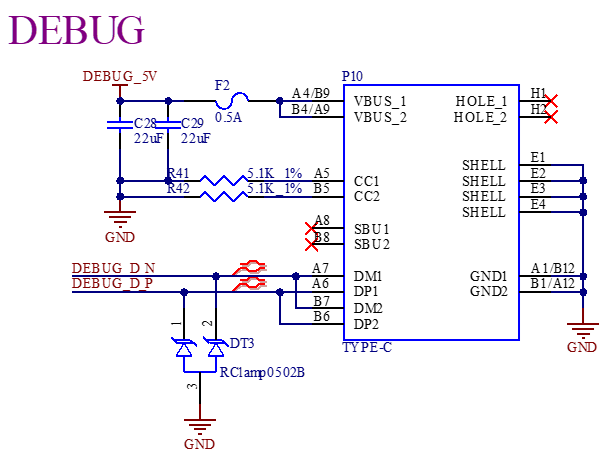
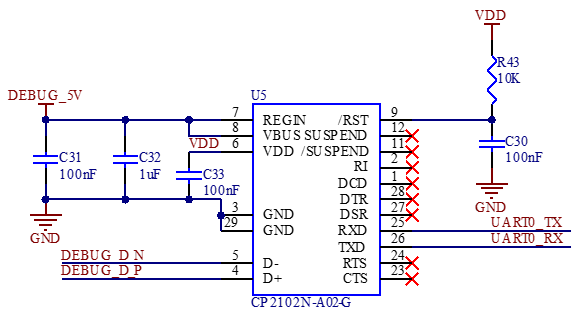
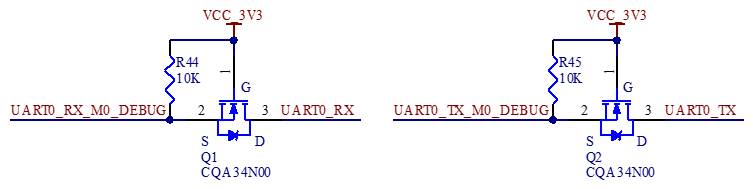
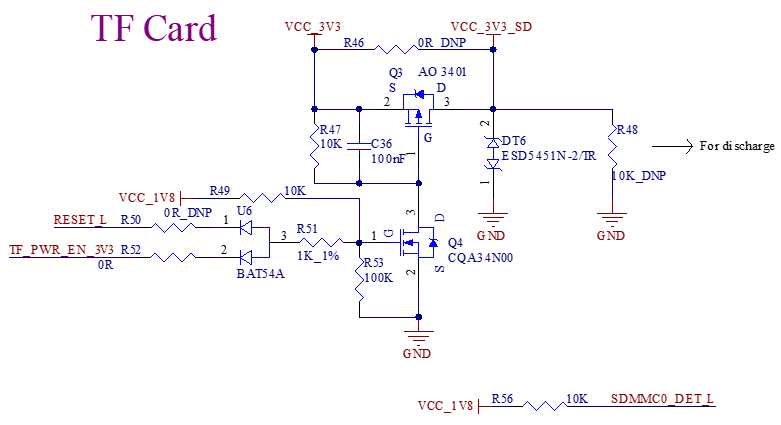
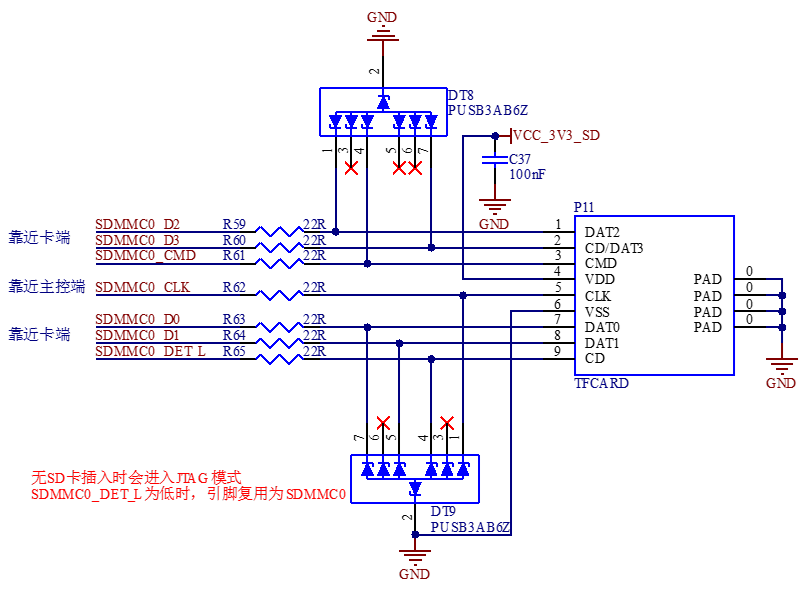
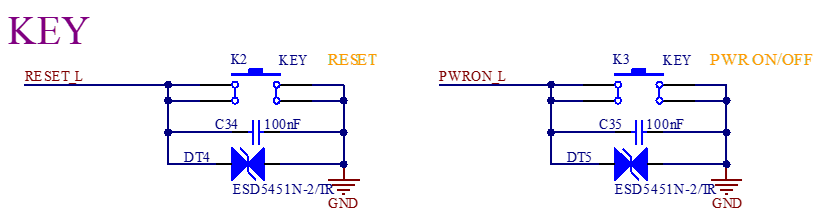
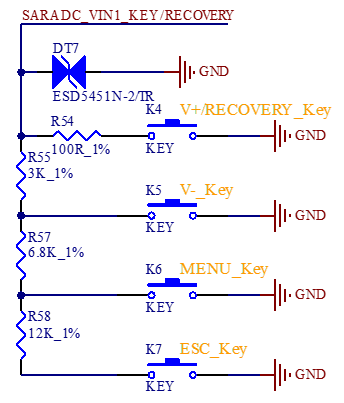
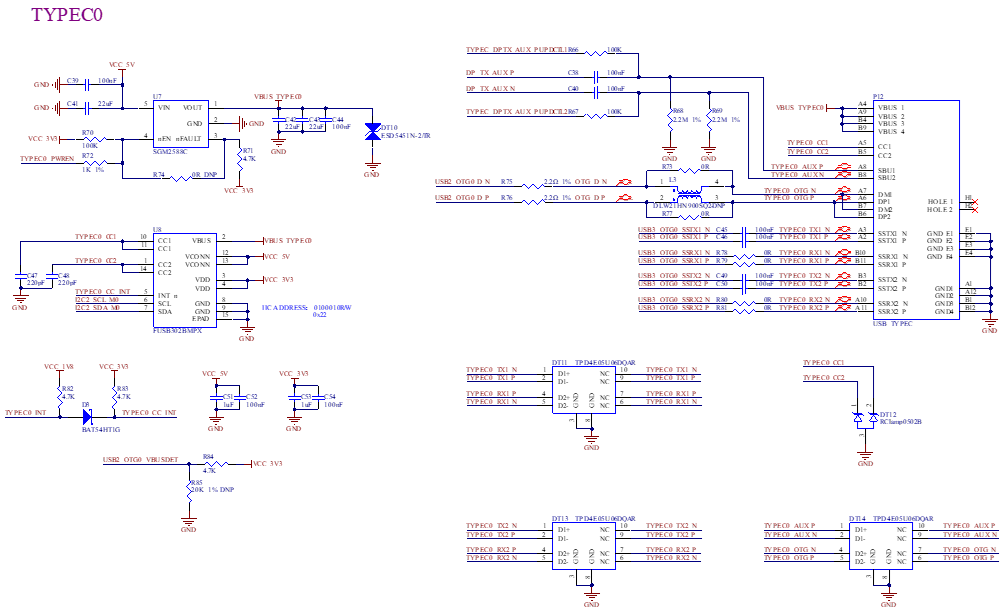
The diagram above is for illustrative purposes only; please refer to the schematic in the source file for the actual connections. To ensure the proper operation of the SoM, the minimum system includes the SoM power supply circuit, system programming/burning circuit, and debug serial port circuit.