OK3568 4.19.206 Add an Auto-start Script
Document classification: □ Top secret □ Secret □ Internal information ■ Open
Copyright
The copyright of this manual belongs to Baoding Folinx Embedded Technology Co., Ltd. Without the written permission of our company, no organizations or individuals have the right to copy, distribute, or reproduce any part of this manual in any form, and violators will be held legally responsible.
Forlinx adheres to copyrights of all graphics and texts used in all publications in original or license-free forms.
The drivers and utilities used for the components are subject to the copyrights of the respective manufacturers. The license conditions of the respective manufacturer are to be adhered to. Related license expenses for the operating system and applications should be calculated/declared separately by the related party or its representatives.
Revision History
Date |
Version |
Revision History |
|---|---|---|
04/08/2022 |
V1.0 |
Initial Version |
Add an Auto-start Script
Note: This routine uses an auto-start script to initiate Wi-Fi hotspot connection upon boot.
Method: Create/etc/init.d/S99mywifi.sh
Note: The prefix S99 is mandatory.
Add the followings:
#!/bin/sh
/usr/bin/fltest_wifi.sh -i mlan0 -s “forlinx” -p 12345678 &
WiFi hotspot name: forlinx; password: 12345678
Grant executable permissions to the S99mywifi.sh script:
chmod +x S99mywifi.sh
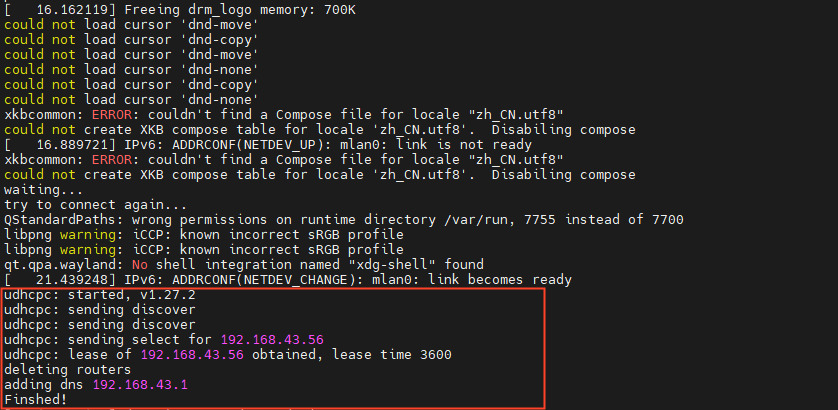
Execution Effect:
If the script displays the information shown in the red box, it indicates a successful connection.