OK3568 4.19.206 Buildroot Fixed HDMI Resolution
Document classification: □ Top secret □ Secret □ Internal information ■ Open
Copyright
The copyright of this manual belongs to Baoding Folinx Embedded Technology Co., Ltd. Without the written permission of our company, no organizations or individuals have the right to copy, distribute, or reproduce any part of this manual in any form, and violators will be held legally responsible.
Forlinx adheres to copyrights of all graphics and texts used in all publications in original or license-free forms.
The drivers and utilities used for the components are subject to the copyrights of the respective manufacturers. The license conditions of the respective manufacturer are to be adhered to. Related license expenses for the operating system and applications should be calculated/declared separately by the related party or its representatives.
Fixed Resolution Output of Weston Desktop
Enter the ls/sys/class/DRM command to view the display device

View supported resolution.
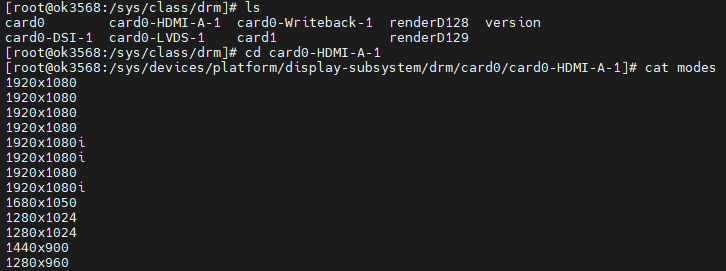
Modify /etc/xdg/weston/weston.ini.
[output]
name=HDMI-A-1 //corresponds to the above list, with card0- removed
mode=1280x960 ///valid resolution supported by the screen
scale=1 //zoom factor, which must be an integer multiple
English Translation:
1. Forced HDMI Resolution Output without Reading EDID**
1.1 Modification Approach**
In U-Boot, enable the HDMI screen as the display output.
Modify the file
OK3568-linux-source/kernel/drivers/gpu/drm/bridge/synopsys/dw-hdmi.c:Add
edid = NULL;Modify the parameters in the
dw_hdmi_default_modesarray.
If the required resolution parameters are not available in the
dw_hdmi_default_modesarray, you can refer to theOK3568-linux-source/kernel/drivers/gpu/drm/drm_edid.cfile to find the required parameters and add them to the array in the same format.
1.2 Modification Method
Source file location: kernel/drivers/gpu/drm/bridge/synopsys/dw-hdmi.c
static int dw_hdmi_connector_get_modes(struct drm_connector *connector)
{
    struct dw_hdmi *hdmi = container_of(connector, struct dw_hdmi,
                                        connector);
    --------Some code has been omitted-------
        edid = drm_get_edid(connector, hdmi->ddc);
//Don't read the current edid
    	edid = NULL;
    if (edid) {
        dev_dbg(hdmi->dev, "got edid: width[%d] x height[%d]\n",
                edid->width_cm, edid->height_cm);
        --------Some code has been omitted-------
            kfree(edid);
    } else {
        hdmi->support_hdmi = true;
        ...

//Keep only the desired resolution in dw_hdmi_default_modes
static const struct drm_display_mode dw_hdmi_default_modes[] = {
    /* 108 - 1920x1080@60Hz */
    { DRM_MODE("1920x1080", DRM_MODE_TYPE_DRIVER, 148500, 1920, 2008,
   2052, 2200, 0, 1080, 1084, 1089, 1125, 0,
   DRM_MODE_FLAG_NHSYNC | DRM_MODE_FLAG_NVSYNC),
     .vrefresh = 60, .picture_aspect_ratio = HDMI_PICTURE_ASPECT_64_27, },
                +/*
	4 - 1280x720@60Hz 16:9
	{ DRM_MODE("1280x720", DRM_MODE_TYPE_DRIVER, 74250, 1280, 1390,
		   1430, 1650, 0, 720, 725, 730, 750, 0,
		   DRM_MODE_FLAG_PHSYNC | DRM_MODE_FLAG_PVSYNC),
	  .vrefresh = 60, .picture_aspect_ratio = HDMI_PICTURE_ASPECT_16_9, },
	 16 - 1920x1080@60Hz 16:9

	--------Some code has been omitted-------

	 2 - 720x480@60Hz 4:3
	{ DRM_MODE("720x480", DRM_MODE_TYPE_DRIVER, 27000, 720, 736,
		   798, 858, 0, 480, 489, 495, 525, 0,
		   DRM_MODE_FLAG_NHSYNC | DRM_MODE_FLAG_NVSYNC),
	  .vrefresh = 60, .picture_aspect_ratio = HDMI_PICTURE_ASPECT_4_3, },
+*/
                };
Use ./build.sh kernel to compile the kernel separately and generate the /kernel/boot.img file. Then flash only the boot.img file.
Note: Some users have reported that after fixing the HDMI resolution using this method, the screen colors may appear different, and this issue may be screen-specific (i.e., certain screens may not fully comply with the setting). However, most users should be able to use this method normally.