OK3568 4.19.206 Buildroot Adding User Programs
Document classification: □ Top secret □ Secret □ Internal information ■ Open
Copyright
The copyright of this manual belongs to Baoding Folinx Embedded Technology Co., Ltd. Without the written permission of our company, no organizations or individuals have the right to copy, distribute, or reproduce any part of this manual in any form, and violators will be held legally responsible.
Forlinx adheres to copyrights of all graphics and texts used in all publications in original or license-free forms.
The drivers and utilities used for the components are subject to the copyrights of the respective manufacturers. The license conditions of the respective manufacturer are to be adhered to. Related license expenses for the operating system and applications should be calculated/declared separately by the related party or its representatives.
Revision History
Date |
Version |
Revision History |
|---|---|---|
04/08/2022 |
V1.0 |
Initial Version |
Adding User Programs
This article primarily applies to the Forlinx OKT3568-C platform running Linux 4.19.206. Other platforms may also be used as a reference, but differences between platforms exist, and please make modifications accordingly to suit your own applications.
The compiled file system images are located in OK3568-linux-source/buildroot/output/OK3568/images.
You can use the command mount rootfs.ext2 target/ to mount the filesystem for modifications. After making the changes, use umount to unmount it, and then directly flash the rootfs.ext2 to the SoM using the single-step flashing method.
Flash the root.ext2 file to the board step by step.
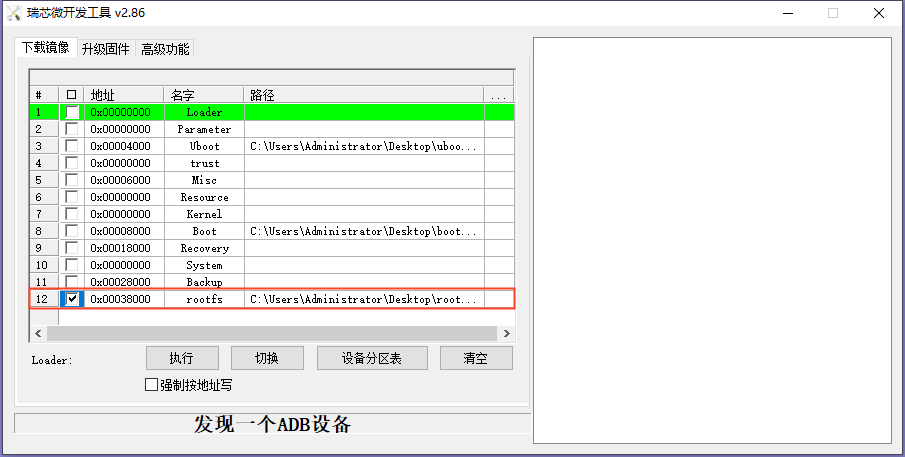
If only the filesystem has been modified and an update.img is needed, you can execute ./build.sh updateimg in the OK3568-linux-source directory to generate an update.img based on the current rootfs.ext2. Then, use the update.img for flashing.
Note: This method is a convenient shortcut. If more standardized management of Buildroot is required, please familiarize yourself with the Buildroot filesystem creation process in detail and utilize Buildroot’s management mechanisms for handling.